

NinjaButton
CONCEPT PROTO Inc. Sports iPhoneiPadiPod touch
NinjaButton is a free Sports app for iPhone and iPad by CONCEPT PROTO Inc. Requires iOS 15.5. Updated September 11, 2026.
- Price
- Free
- on the App Store
- Size
- 38 MB
- Age 4+
- Updated
- Sep 11
- 2026 · v1.0.1
Screenshots
Save to Pinterest

About NinjaButton
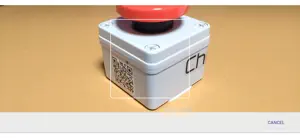
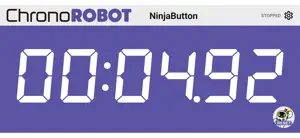
NinjaButton is a wireless button for timing sports activities with your smartphone. Place NinjaButtons at the start, finish, or other points on your course, and simply press a button to control the stopwatch on your smartphone. You can register up to three NinjaButtons with the app. ■ Registering a NinjaButton 1. Open the app and tap the gear icon in the upper-right corner to open Settings. 2. Tap “QR CODE” and scan the QR code on your NinjaButton. 3. Confirm that the Button ID appears, then tap “APPLY.” 4. When “READY” appears on the main screen, you’re ready to start timing. You can also register a NinjaButton by entering its Button ID manually. ■ Timing 1. Make sure “READY” is displayed on the main screen. 2. Press a registered NinjaButton to start the timer. 3. Press a NinjaButton again to stop the timer and display the result. 4. Tap “RESET” to clear the result and get ready for the next measurement. If multiple NinjaButtons are registered, you can control the stopwatch from any of them. ■ Main Features ・Wireless timing with NinjaButton ・Register up to three NinjaButtons ・Easy Button ID registration by QR code ・Manual Button ID entry ・Time display to 1/100 of a second ※A NinjaButton device, sold separately, is required for wireless timing with this app.
App privacy
The developer, CONCEPT PROTO Inc., reported these privacy practices to Apple.
Data Not Collected
The developer does not collect any data from this app.
Alternatives to NinjaButton
Looking for apps like NinjaButton? Here are 6 similar apps on the App Store. The highest rated is NinjaMetrics (5.0/5), and all 6 are free to download.
-
 NinjaMetrics
5.0
-
 MaxTapTime - Stopwatch
-
 Handy Stopwatch
4.6
-
 OCR Buddy
4.9
-
 UIPM Central
3.7
-
 陸上スタートアプリ
| App | Rating | Price | Last updated | Compare |
|---|---|---|---|---|
| NinjaButton | – | Free | September 11, 2026 | |
| NinjaMetrics | 5.0 / 5 (3) | Free | Nov 5, 2026 | Compare |
| MaxTapTime - Stopwatch | – | Free | Sep 8, 2024 | Compare |
| Handy Stopwatch | 4.6 / 5 (5) | Free | Aug 12, 2026 | Compare |
| OCR Buddy | 4.9 / 5 (36) | Free | Apr 17, 2026 | Compare |
| UIPM Central | 3.7 / 5 (3) | Free | Jul 8, 2025 | Compare |
| 陸上スタートアプリ | – | Free | Apr 30, 2024 | Compare |
Compare NinjaButton with the top alternatives: ratings, updates, ASO score and keyword gaps →