

ODODOCK - Weather Wallpapers
PixelBrick Weather iPhoneiPadiPod touch
ODODOCK - Weather Wallpapers is a free Weather app for iPhone and iPad by PixelBrick. Requires iOS 18.0. Updated October 5, 2026.
- Price
- Free
- on the App Store
- Size
- 238 MB
- Age 4+
- Updated
- Oct 5
- 2026 · v7.3
Screenshots


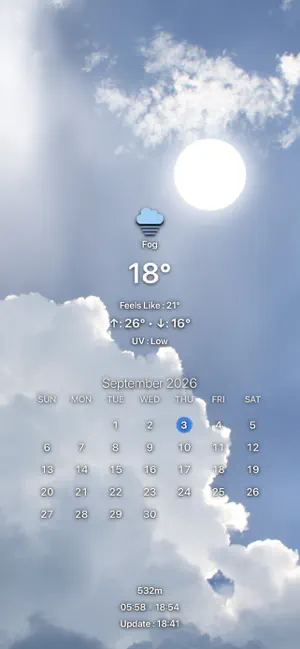
About ODODOCK - Weather Wallpapers
Put weather, calendars, and everyday information on your Lock Screen and Home Screen. Wallpapers created in ODODOCK are applied and updated through Apple Shortcuts. Turn your photos into personal wallpapers with more than 40 display items. Choose what matters to you and arrange it directly in the preview. Weather at a glance See current and feels-like temperatures, daily highs and lows, and a four-day forecast with eight styles. Add rain, temperature, and UV graphs, peak UV and wind forecasts, yesterday’s temperature comparison, humidity, air quality, and more. Calendars, events, and reminders View daily, weekly, and monthly events from selected calendars. Choose card, timeline, and calendar layouts. All-day and multi-day events can appear as bands across dates. Customize colors, spacing, today’s highlight, and the first day of the week. Filter reminders by list, due date, and completion status, with multiple display styles. Four independent layouts Create separate day and night setups for your Lock Screen and Home Screen. Swipe between screens and copy settings between day and night. Edit directly in the preview Tap an item to edit it or touch and hold to move it. Adjust size, alignment, fonts, colors, shadows, and icon styles. Reframe your photo and add depth effects or background blur. Weather effects, sun, and moon Dynamic Weather adds effects for rain, snow, fog, and other conditions, along with sunrise and sunset colors. Display the sun and moon in time-based positions or use your own images. With moon phases enabled, the moon shows 16 stages and adjusts its tilt to your location and time. Sunrise and sunset also offer several text and icon layouts. Useful details for your day Add notes, countdowns, a second time zone, month and year progress, battery level and changes, Wi-Fi information, altitude, a mini map, Google search trends, or a QR code linked to a URL. Theme presets and backups Save named presets with day and night settings and background photos for both screens. Apply a saved preset or delete several at once. With PRO, export your themes as backups or import them on another device. Connect with Apple Shortcuts Generate separate Lock Screen and Home Screen images from your saved settings. Use preset shortcuts and configure automations for times, locations, Wi-Fi connections, or Focus modes. Wallpaper changes are performed by the shortcuts you configure. Basic features are free. Some advanced features require ODODOCK PRO, available as a monthly subscription or a one-time lifetime purchase. Weather data is provided by Apple Weather, air quality data by CAMS, and search trends by Google Trends. Updated weather requires an internet connection and location permission. Offline, saved data is used where available. Events and reminders require access permission. Availability may vary by region and data provider. Feedback: [email protected] Privacy Policy: https://pixelbricktek.github.io/Ododock/privacy Terms of Use (EULA): https://www.apple.com/legal/internet-services/itunes/dev/stdeula/
What’s new
Version 7.3 · Updated October 5, 2026
1. Increased the maximum number of custom display items from 12 to 48. 2. You can now use more system icons within a single custom display item. 3. Fixed an issue where outdated data could continue to appear after changing a custom item’s options. 4. Fixed an issue that could prevent large saved results for custom items from being restored correctly after restarting the app.
App privacy
The developer, PixelBrick, reported these privacy practices to Apple.
Data Not Collected
The developer does not collect any data from this app.
Alternatives to ODODOCK - Weather Wallpapers
Looking for apps like ODODOCK - Weather Wallpapers? Here are 6 similar apps on the App Store. The highest rated is 너의날씨: 섬세하고 정교한 일기예보, 미세먼지, 레이더 (5.0/5), and all 6 are free to download.
-
 CrayonWeather
-
 Weather Game IRL
-
 WeatherMark - Weather Compare
-
 Todo Weather
-
 너의날씨: 섬세하고 정교한 일기예보, 미세먼지, 레이더
5.0
-
 Red Clock - Weather & Alarm
4.5
| App | Rating | Price | Last updated | Compare |
|---|---|---|---|---|
| ODODOCK - Weather Wallpapers | – | Free | October 5, 2026 | |
| CrayonWeather | – | Free | May 3, 2026 | Compare |
| Weather Game IRL | – | Free | Sep 1, 2026 | Compare |
| WeatherMark - Weather Compare | – | Free | Oct 3, 2026 | Compare |
| Todo Weather | – | Free | May 21, 2026 | Compare |
| 너의날씨: 섬세하고 정교한 일기예보, 미세먼지, 레이더 | 5.0 / 5 (1) | Free | Sep 18, 2026 | Compare |
| Red Clock - Weather & Alarm | 4.5 / 5 (451) | Free | Oct 2, 2026 | Compare |