

Rinda Field
Grinda AI Inc. Business iPhoneiPadiPod touch
Rinda Field is a free Business app for iPhone and iPad by Grinda AI Inc. Requires iOS 15.5. Updated October 29, 2026.
- Price
- Free
- on the App Store
- Size
- 83 MB
- Age 4+
- Updated
- Oct 29
- 2026 · v1.2.204
Screenshots



About Rinda Field
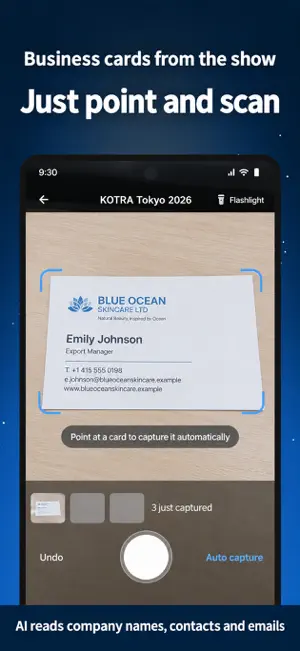
Rinda Field is the app for export and B2B sales teams working trade show booths and on-site buyer meetings. Snap a business card and it becomes a buyer record. Record a meeting and it becomes a summary with next steps. No more scribbling notes at the booth and retyping them back at the office. ■ KEY FEATURES • Business card scanning — Shoot cards back to back and AI reads the company, contact name, email and phone, then adds each one as a buyer. Cards are grouped by trade show, so follow-up starts the moment you are back. • Works offline — Even when the exhibition Wi-Fi drops, photos are saved on your phone first and upload automatically once you are connected again. • On-site meeting notes — Record the conversation at your booth and AI writes up the summary, what was agreed and what to do next. Pick the other person's language to see live captions. • Ask before you record — Show a consent message in the other person's language (English, Japanese, Chinese, Indonesian, Thai and more). Just turn your phone around. • Live interpretation — Real-time captions in 60 languages with a split-screen view for face-to-face conversations. • Action plan — Tasks pulled from your meetings are sorted by priority, with email and text drafts ready for follow-up. • Team sharing — Share summaries and buyer details with teammates in the same workspace for handovers and coaching. ■ GREAT FOR • Export managers who collect dozens to hundreds of cards a day at trade shows • Sales teams with no time to write up booth conversations afterwards • Anyone who wants the cards they receive to turn straight into a buyer list ■ GETTING STARTED 1. Open the app and enter the email you use for Rinda. 2. Enter the 6-digit code sent to your inbox to connect this device to your workspace. 3. Start scanning cards or recording meetings right away. ※ No Rinda account yet? Tap [Sign up] on the connect screen to create one. If your company gave you a connection QR or code, use [Connect another way]. ■ PRIVACY • Data is encrypted with TLS in transit and AES-256 at rest. • Recording only happens after you press the record button. Recordings and card images are sent to our servers for AI processing to create summaries and buyer records. • Contacts access is optional and only used to match names and numbers with buyer details. • You can request account and data deletion in Settings > Delete account. ■ PERMISSIONS • Camera — to scan business cards and the QR code used to connect your device. • Microphone — to record on-site meetings for AI summaries. Only active after you press record. • Photos — to pick a business card photo from your library (optional). • Contacts — to match names and numbers with buyer details (optional). Never lose track of a company you met at a trade show again.
What’s new
Version 1.2.204 · Updated October 29, 2026
Bug fixes and reliability improvements. Scanning cards, recording meetings and live interpretation keep getting faster and more dependable.
App privacy
The developer, Grinda AI Inc., reported these privacy practices to Apple.
Data Linked to You
The following data, which may be collected and linked to your identity, may be used for the following purposes:
- Contact Info: Email Address, Name, Phone Number, Other User Contact Info
- User Content: Photos or Videos, Audio Data
- Identifiers: User ID
Used for: App Functionality
Alternatives to Rinda Field
Looking for apps like Rinda Field? Here are 6 similar apps on the App Store.


| App | Rating | Price | Last updated | Compare |
|---|---|---|---|---|
| Rinda Field | – | Free | October 29, 2026 | |
| X4 | – | Free | Oct 8, 2026 | Compare |
| Pinit: PiP Anything | – | Free | Oct 2, 2026 | Compare |
| 인턴메이트 | – | Free | Dec 24, 2024 | Compare |
| PlanFlow: Calendar & Planner | – | Free | Oct 27, 2026 | Compare |
| Volza | – | Free | Jun 26, 2026 | Compare |
| CODIT - AI Policy Monitoring | – | Free | Sep 16, 2026 | Compare |
Compare Rinda Field with the top alternatives: ratings, updates, ASO score and keyword gaps →