

Duo Clean: Swipe Delete Photos
Shenzhen HaoWeiLai Network Technology Co., Ltd. Photo & Video iPhoneiPadiPod touch
Duo Clean: Swipe Delete Photos is a free Photo & Video app for iPhone and iPad by Shenzhen HaoWeiLai Network Technology Co., Ltd. Rated 5.0/5 from 1 ratings.
- Rating
- 5.0
- 1 ratings
- Price
- Free
- on the App Store
- Size
- 99 MB
- Age 4+
- Updated
- Oct 15
- 2026 · v2.2
Screenshots
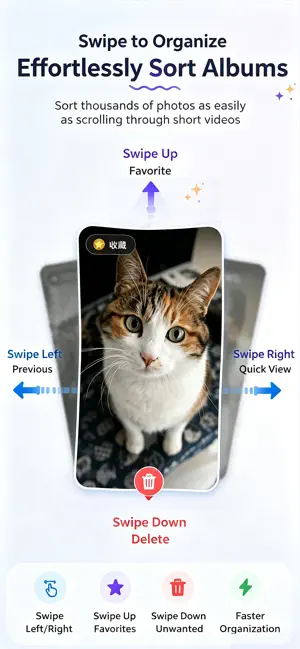


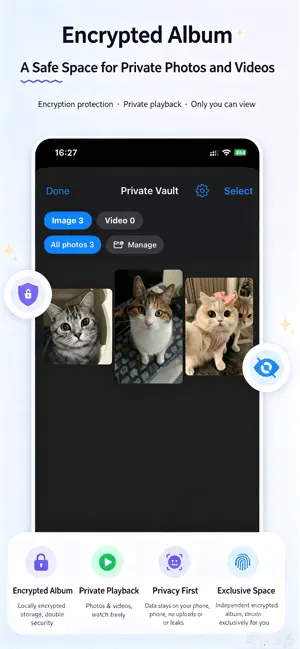
About Duo Clean: Swipe Delete Photos
# Duo Clean — Swipe, Clean & Take Them Anywhere Too many photos taking up space on your iPhone? Tired of scrolling through endless screenshots, blurry shots, and duplicates? Duo Clean makes cleaning up your photo library as easy as a swipe. And that’s not all—you can even take the people in your photos on a trip to somewhere new! ### Swipe to Clean Up Swipe left or right to browse your photos, down to mark photos for deletion, or up to add them to Favorites. It’s a simple, satisfying way to clear out the clutter. AI features can help you quickly find the photos you want to clean up. ### Take Them Somewhere New Wish you could take someone special to that dream destination? Now you can get creative with your photos. Cut a person out of a photo and place them in a new scene—or bring them into the view of your camera. Adjust their position and create fun, unique photos worth sharing. **Different place, same people. Make the photo you wish you had taken together.** ### More Ways to Make the Most of Your Photos - **Free Up Space:** Compress large videos, manage blurry videos, and convert Live Photos to still images. - **Find Photos Fast:** Search by keywords or images—no manual tagging needed. - **Stay Organized:** Browse by date, category, or album, and create your own collections. - **ID Photos at Home:** Get guidance on photo dimensions, backgrounds, and lighting. - **Private Photo Vault:** Protect personal photos with a passcode or Face ID. - **Your Memories, Revisited:** Track your cleanup activity and look back with On This Day. ### Your Photos Stay Yours Your photos are processed on your device and never uploaded to our servers. No account required, no ads, and no third-party analytics. **You’re always in control.** Review every photo before confirming deletion. iOS moves deleted photos to the Recently Deleted album, where you can recover them while they remain available. **Duo Clean — Clear the clutter. Keep the memories. Take them somewhere new.**
What’s new
Version 2.2 · Updated October 15, 2026
fix bugs
App privacy
The developer, Shenzhen HaoWeiLai Network Technology Co., Ltd., reported these privacy practices to Apple.
Data Not Collected
The developer does not collect any data from this app.
Alternatives to Duo Clean: Swipe Delete Photos
Looking for apps like Duo Clean: Swipe Delete Photos? Here are 6 similar apps on the App Store. The highest rated is Flipic: Photo Organizer (5.0/5), and all 6 are free to download.
-
 水印相机-时间地点和工作水印,工程记录
-
 LibraryTracks
-
 Swipe Photos Cleanup
-
 Treelock 隐私相册:隐藏私密相册管家
1.0
Treelock 隐私相册:隐藏私密相册管家
1.0
-
 Flipic: Photo Organizer
5.0
Flipic: Photo Organizer
5.0
-
 QingPic
| App | Rating | Price | Last updated | Compare |
|---|---|---|---|---|
| Duo Clean: Swipe Delete Photos | 5.0 / 5 (1 rating) | Free | October 15, 2026 | |
| 水印相机-时间地点和工作水印,工程记录 | – | Free | Aug 17, 2026 | Compare |
| LibraryTracks | – | Free | Apr 23, 2025 | Compare |
| Swipe Photos Cleanup | – | Free | Oct 28, 2026 | Compare |
| Treelock 隐私相册:隐藏私密相册管家 | 1.0 / 5 (2) | Free | Sep 12, 2025 | Compare |
| Flipic: Photo Organizer | 5.0 / 5 (2) | Free | Oct 29, 2026 | Compare |
| QingPic | – | Free | Oct 24, 2026 | Compare |