

MD to PDF: Converter
Antonio Gonzalez de la aleja german Utilities iPhoneiPadiPod touch
MD to PDF: Converter is a free Utilities app for iPhone and iPad by Antonio Gonzalez de la aleja german. Requires iOS 26.5. Updated September 28, 2026.
- Price
- Free
- on the App Store
- Size
- 11 MB
- Age 4+
- Updated
- Sep 28
- 2026 · v1.1
Screenshots


About MD to PDF: Converter
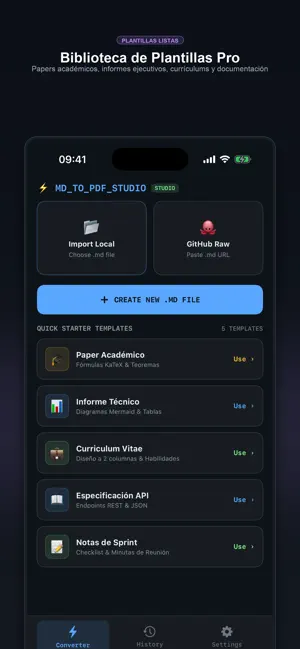
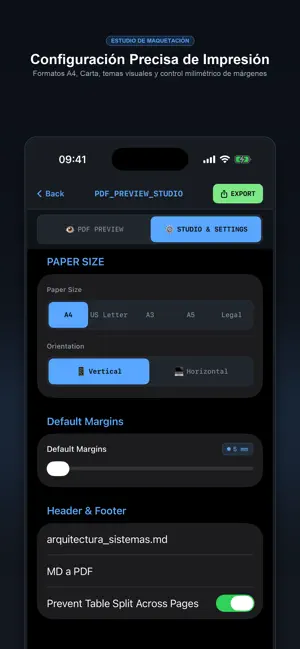
Markdown to PDF is a professional document typesetting tool designed for software developers, academic researchers, technical writers, and students who require clean, publication-ready PDF documents from Markdown source files. Unlike basic plain-text converters, this application combines a code-centric editor with full local support for KaTeX scientific formulas and Mermaid.js vector diagrams, running completely offline on your device. CORE FEATURES 1. Professional Markdown Editor - Monospace line numbering for easy document navigation. - Productivity toolbar with one-tap insertion for headers (H1 to H3), bold, italics, inline code, and code fences. - Guided wizard dialogs for inserting complex Markdown tables, mathematical expressions, and diagram structures. 2. KaTeX Scientific Mathematics - Full support for inline ($...$) and block ($$...$$) mathematical notations. - Crisp vector typography for fractions, integrals, summations, matrices, Greek letters, and LaTeX operators. - Built-in symbol selector for rapid equation drafting without syntax memorization. 3. Mermaid.js Flowcharts and Diagrams - Native compilation of architecture diagrams, decision trees, sequence charts, and state graphs. - High-resolution SVG vector output that remains crisp at any print scale or zoom level. 4. Built-in Editorial Templates - 8 publication layouts ready to use: * Academic LaTeX Paper * Executive Business Report * GitHub GFM Documentation * TechDocs Developer Guide * Resume & Curriculum Vitae * Book & Thesis Chapter * Swiss Minimalist * Cyber Studio Dark 5. Precise Print & Layout Studio - Industry-standard paper formats: A4, US Letter, A3, and Legal. - Millimeter margin customization ranging from 5 mm to 40 mm. - Portrait and landscape orientations. - Configurable headers, footers, and page numbers. - Table cut prevention to preserve data integrity across page boundaries. 6. Live Preview & Vector PDF Output - Real-time WYSIWYG preview matching the printed document. - Vector-grade PDF generation with selectable text and functional hyperlinks. - Direct export to the iOS Files app or instant distribution via the native Share Sheet. 7. Local Privacy & Offline Architecture - 100% on-device processing: your documents never leave your hardware. - No network connection required for rendering or export. - No account creation, login, or tracking telemetry. 8. Document Hub & Management - Import existing .md files directly from the Files app. - Import public technical documentation via GitHub Raw URLs. - Conversion history archive with metadata, page counts, and quick search. Terms of Use (EULA): https://www.apple.com/legal/internet-services/itunes/dev/stdeula/ Privacy Policy: https://www.freeprivacypolicy.com/live/6709a492-0082-4d37-b246-397c3cdc06a5
What’s new
Version 1.1 · Updated September 28, 2026
-Bug fixes
App privacy
The developer, Antonio Gonzalez de la aleja german, reported these privacy practices to Apple.
Data Not Collected
The developer does not collect any data from this app.
Alternatives to MD to PDF: Converter
Looking for apps like MD to PDF: Converter? Here are 6 similar apps on the App Store. The highest rated is The Wrong Calculator (5.0/5), and all 6 are free to download.
-
 The Wrong Calculator
5.0
-
 Kenon
-
 Hindi_Calendar
-
 Markdown to PDF Fast Converter
-
 Gujarati Calendar
-
 English Calendar 2027
4.9
| App | Rating | Price | Last updated | Compare |
|---|---|---|---|---|
| MD to PDF: Converter | – | Free | September 28, 2026 | |
| The Wrong Calculator | 5.0 / 5 (2) | Free | Oct 1, 2025 | Compare |
| Kenon | – | Free | Apr 28, 2025 | Compare |
| Hindi_Calendar | – | Free | Dec 12, 2025 | Compare |
| Markdown to PDF Fast Converter | – | Free | Sep 29, 2026 | Compare |
| Gujarati Calendar | – | Free | Dec 23, 2025 | Compare |
| English Calendar 2027 | 4.9 / 5 (11) | Free | Oct 19, 2026 | Compare |