

Flickover
Caffeinated Code d.o.o. Productivity iPhoneiPadiPod touch
Flickover is a free Productivity app for iPhone and iPad by Caffeinated Code d.o.o. Requires iOS 26.1. Updated September 23, 2026.
- Price
- Free
- on the App Store
- Size
- 50 MB
- Age 4+
- Updated
- Sep 23
- 2026 · v1.1.11
Screenshots


About Flickover
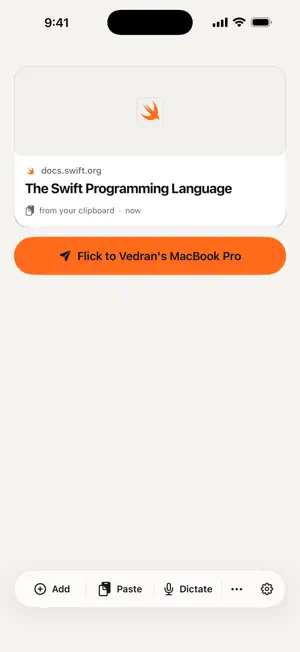
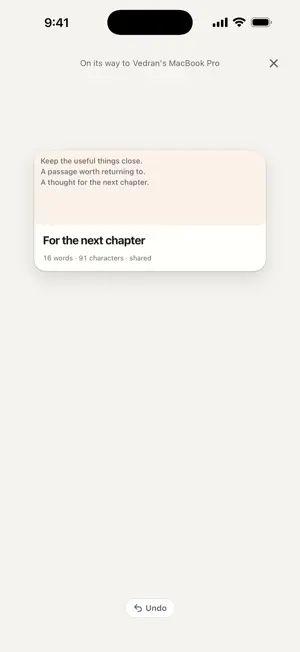
Move what you need between iPhone, iPad and Mac without a chat with yourself. Share a link from Safari, pick a photo, scan a document, capture your clipboard or write a note. Choose a device and flick. On your Mac, a card waits beneath the notch; on iPhone and iPad, it lands in your deck. Open it, copy it, save it or mark it Done. Your Stash keeps things within reach. Flickover uses a direct connection when your devices can reach each other and iCloud when they cannot. Your devices use your iCloud account for continuity; pairing lets you connect another device. Delivery time depends on the connection, content and whether the other device is available. Ask your iPhone from your Mac for a photo, a scan, the clipboard or a file. Choose Later for tonight, tomorrow morning or a time you pick. Set per-kind actions for what happens when something lands. Flickover Premium covers iPhone, iPad and Mac with one subscription. Eligible customers can start a 14-day full-feature free trial. Monthly and annual plans are available; your local price and trial eligibility appear before you confirm. Subscriptions renew automatically unless cancelled. Manage or cancel an App Store subscription in your Apple Account subscription settings. An active trial or subscription is required for new transfers in every direction, new requests to another device, timed Later and automation. If it ends, your existing flicks remain accessible and transfers already accepted can finish. You can still open, copy, save and manage your content. Captures kept as drafts do not transfer automatically when you subscribe. Flickover uses RevenueCat for purchase management and subscription analytics. Previews can contact the linked service, and some speech features may use Apple services. See the privacy policy for the details of iCloud, previews, purchases and support. Flickover does not use advertising tracking. Requires iOS/iPadOS 26.1 or later. Flickover for Mac is available at flickover.app and requires an Apple silicon Mac with macOS 26.1 or later. Use the same iCloud account for subscription access across your devices. Privacy Policy: https://flickover.app/privacy Terms of Use (Apple standard EULA): https://www.apple.com/legal/internet-services/itunes/dev/stdeula/
What’s new
Version 1.1.11 · Updated September 23, 2026
Fixed an issue that could close Flickover after you left the app while a flight was finishing.
App privacy
The developer, Caffeinated Code d.o.o., reported these privacy practices to Apple.
Data Linked to You
The following data, which may be collected and linked to your identity, may be used for the following purposes:
- Purchases: Purchase History
- Identifiers: User ID
Used for: Analytics, App Functionality
Alternatives to Flickover
Looking for apps like Flickover? Here are 6 similar apps on the App Store. The highest rated is Towers Valley ERP (5.0/5), and all 6 are free to download.
-
 ELECORE
-
 Towers Valley ERP
5.0
Towers Valley ERP
5.0
-
 FlowNote, To-Do List & Planner
4.1
FlowNote, To-Do List & Planner
4.1
-
 PromptKit: AI Helper
4.7
PromptKit: AI Helper
4.7
-
 Kinopio
4.7
Kinopio
4.7
-
 Sohar University SU
2.0
Sohar University SU
2.0
| App | Rating | Price | Last updated | Compare |
|---|---|---|---|---|
| Flickover | – | Free | September 23, 2026 | |
| ELECORE | – | Free | Jul 4, 2026 | Compare |
| Towers Valley ERP | 5.0 / 5 (1) | Free | Jan 7, 2025 | Compare |
| FlowNote, To-Do List & Planner | 4.1 / 5 (9) | Free | Jun 6, 2024 | Compare |
| PromptKit: AI Helper | 4.7 / 5 (24) | Free | Jun 25, 2026 | Compare |
| Kinopio | 4.7 / 5 (14) | Free | Feb 25, 2026 | Compare |
| Sohar University SU | 2.0 / 5 (4) | Free | Sep 3, 2026 | Compare |
Compare Flickover with the top alternatives: ratings, updates, ASO score and keyword gaps →