

Decibly: Noise Log & dB Meter
Denys Khomenko Utilities iPhoneiPadiPod touch
Decibly: Noise Log & dB Meter is a paid Utilities app for iPhone and iPad by Denys Khomenko. Requires iOS 17.0. Updated October 1, 2026.
- Price
- 0.29 USD
- on the App Store
- Size
- 5 MB
- Age 4+
- Updated
- Oct 1
- 2026 · v1.2.1
Screenshots



About Decibly: Noise Log & dB Meter
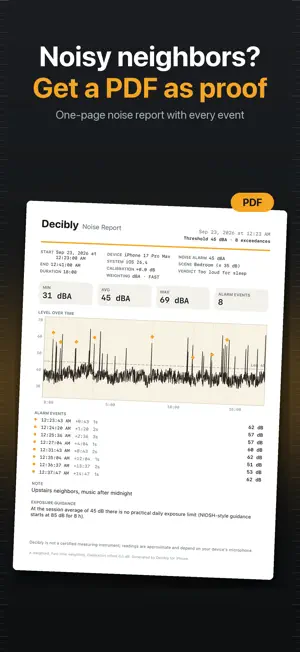
Decibly turns your iPhone into a sound level meter that looks and feels like a real instrument: a large analog gauge with an amber needle, the live reading in crisp numerals, and color zones for quiet, moderate and loud. MEASURE • Live A-weighted decibel reading (dBA), updated 20 times a second • Min, average (Leq) and max for the running session • Scrolling chart of the last 60 seconds • Reference points: 30 whisper · 60 conversation · 80 traffic · 100 danger KEEP THE PROOF • Start/Stop sessions with time, duration, min / avg / max and an optional note ("neighbors drilling", "night shift, hall 3") • History with mini stats and a full chart for every session • Export any session as a one-page PDF report or a CSV file UNDERSTAND • Exposure indicator with NIOSH-style guidance computed from the session average (e.g. about 8 h at 85 dB, about 15 min at 100 dB) — informational only • Calibration slider (−15 … +15 dB) to match a reference meter LIVE, EVERYWHERE • Live Activity: the current level, zone color and elapsed time in the Dynamic Island and on the Lock Screen while a session runs • Lock Screen "Measure" widget that starts a session with one tap; Home Screen widget with your last peak NOISE ALARM & SCENES • Set a threshold (default 70 dBA) — every excursion gets a haptic pulse and is logged with time and peak • Scenes: Baby room ≤ 40, Bedroom ≤ 35, Office ≤ 55, Street, Concert — one tap sets the alarm and gives a verdict such as "OK for sleep" or "Too loud" • "Sounds like…" under the readout: whisper, quiet library, rain, conversation, vacuum cleaner, city traffic, lawn mower, motorcycle, concert, siren EVIDENCE REPORT • One-page Noise Report PDF with device model, iOS version, calibration, start/end, min / avg / max, the strip chart with alarm markers, every event and your note • Shareable summary card image with the peak, date and note PRIVATE BY DESIGN • Audio is never recorded, stored or transmitted — the microphone signal becomes a number and is discarded instantly • No accounts, no analytics, no ads, no location, no network • Everything stays on your iPhone PAY ONCE • Every feature is included. No subscriptions, no in-app purchases, no "Pro" version. Also: two alternate app icons, 8 languages, light and dark theme. Decibly is not a certified measuring instrument; readings are approximate and depend on your device's microphone. The exposure indicator is general guidance, not medical advice.
What’s new
Version 1.2.1 · Updated October 1, 2026
Minor fixes. “Rate Decibly” in Settings now opens the App Store review page.
App privacy
The developer, Denys Khomenko, reported these privacy practices to Apple.
Data Not Collected
The developer does not collect any data from this app.
Alternatives to Decibly: Noise Log & dB Meter
Looking for apps like Decibly: Noise Log & dB Meter? Here are 6 similar apps on the App Store.
-
 Random Number 2: Full Screen
-
 Sound Meter: Noise & dB AI
-
 Equinoxx - Sun & Moon
-
 DecibelLab: Sound Level Meter
-
 Decibel Meter | Sound Level
-
 Lettre24 - Courrier en ligne
| App | Rating | Price | Last updated | Compare |
|---|---|---|---|---|
| Decibly: Noise Log & dB Meter | – | 0.29 USD | October 1, 2026 | |
| Random Number 2: Full Screen | – | 0.99 USD | Dec 7, 2023 | Compare |
| Sound Meter: Noise & dB AI | – | Free | Aug 25, 2026 | Compare |
| Equinoxx - Sun & Moon | – | Free | Sep 2, 2026 | Compare |
| DecibelLab: Sound Level Meter | – | Free | Apr 2, 2026 | Compare |
| Decibel Meter | Sound Level | – | Free | Sep 15, 2026 | Compare |
| Lettre24 - Courrier en ligne | – | Free | Aug 12, 2024 | Compare |