

MusicKeep: MP3 & FLAC Player
Stefan Dasic Music iPhoneiPadiPod touchApple Watch
MusicKeep: MP3 & FLAC Player is a free Music app for iPhone and iPad by Stefan Dasic. Rated 5.0/5 from 1 ratings. Requires iOS 17.0.
- Rating
- 5.0
- 1 ratings
- Price
- Free
- on the App Store
- Size
- 25 MB
- Age 4+
- Updated
- Nov 1
- 2026 · v1.4.0
Screenshots
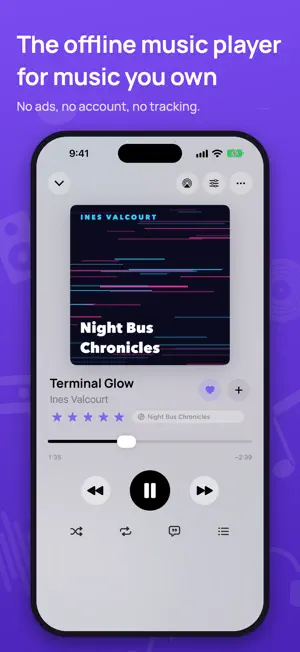


About MusicKeep: MP3 & FLAC Player
Keep the music you own close. MusicKeep is an offline music player for iPhone and iPad: import your MP3, FLAC, and other audio files, build your library, and listen without ads or an account. From favorite albums to a folder of forgotten songs, give your collection a home that's ready for flights, commutes, and places with no signal. BRING YOUR OWN MUSIC • Import songs or whole folders from the Files app. • Play MP3, FLAC, M4A, AAC, ALAC, WAV, AIFF, and CAF files. • Keep local copies so your imported music stays available offline. • Import and export M3U playlists using tracks in your library. MAKE YOUR LIBRARY YOURS • Browse songs, albums, artists, genres, and folders. • Create playlists, mark favorites, and rate your songs. • Edit track details and artwork to tidy up your collection. • Find music by title, artist, album, genre, or filename. • Return to recent favorites with listening history. ENJOY EVERY LISTEN • Keep music playing in the background and control it from the Lock Screen. • Shape your sound with built-in equalizer presets. • Follow along with your own LRC lyrics or pasted lyrics. • Set a sleep timer and pick up long recordings where you left off. • Reach your music with Home Screen widgets and Siri Shortcuts. GO FURTHER WITH MUSICKEEP PLUS • Wi-Fi Drop: send music folders from your Mac or PC browser over the same local network. • Transfer music between nearby iPhones and iPads, or import from Dropbox. • Build smart playlists that update using your rules. • Fine-tune a 10-band equalizer and save custom presets. • Adjust playback speed with pitch lock, or blend songs with crossfade. • Edit multiple tracks at once and explore storage insights. Importing from Files, regular playlists, and core playback are free. Plus is optional, with monthly, yearly, or one-time lifetime purchase options. Start the device's 14-day Plus trial in the app with no payment or sign-up. This in-app trial ends automatically and does not start a paid subscription. MusicKeep has no ads or developer analytics. Your music library and listening history are stored on your device. Optional online features connect to the services you choose to use. MusicKeep plays files you supply; it does not include a music catalog or download songs from streaming subscriptions. Import only audio and artwork you own or have permission to use. Protected files are not supported. If you purchase a monthly or yearly plan, payment is charged to your Apple Account. Subscriptions renew automatically unless canceled at least 24 hours before the current period ends. Manage or cancel in Apple Account settings. The lifetime option is a one-time purchase. Privacy Policy: https://musickeepapp.com/privacy.html Terms of Use: https://musickeepapp.com/terms.html
What’s new
Version 1.4.0 · Updated November 1, 2026
The biggest MusicKeep update yet: Listening Stats, recaps of your year, an Apple Watch app, and Autoplay, all for the music you own. Your stats are calculated on your iPhone and never leave it. YOUR LISTENING STATS See how much you listened each week, month, and year, with your top songs, artists, and albums, a listening clock, a weekly heatmap, and streaks. Tap Your Week in Music on Home, add the Minutes This Week widget to your Home Screen or Lock Screen, or add the Get Listening Time action to a shortcut to hear your minutes. RECAPS OF YOUR LISTENING Tap through a look back at any week, month, or year: minutes listened, top artist, top songs, your listening personality, and your biggest day. Share any card as an image, or save the top 25 songs as a playlist. Your Year So Far is on Home now, and the full year recap arrives in December. MUSICKEEP ON APPLE WATCH Control MusicKeep on your iPhone from your wrist: resume, shuffle your library, play your favorites or a playlist, jump ahead in Up Next, mark songs as favorites, and turn the Digital Crown for volume. The music plays from your iPhone. Part of MusicKeep Plus and included in the 14-day trial. Find a setup guide in Settings > Support. AUTOPLAY When the queue runs out, MusicKeep keeps playing similar songs from your offline library, never repeating what you just heard. Touch and hold the infinity button in the queue to pick Similar, Deep Cuts, Favorites Mix, or Rediscover, or tap it to turn Autoplay off. ALSO NEW • Home's stats and recap cards glow in colors from your album artwork. Prefer them still? Turn off Moving Colors in Settings > Appearance. • Search finds songs again. In 1.3.9, a song search could show only albums, artists, and folders. Enjoying MusicKeep? Share what you think in Settings > Send Feedback.
App privacy
The developer, Stefan Dasic, reported these privacy practices to Apple.
Data Not Collected
The developer does not collect any data from this app.
Alternatives to MusicKeep: MP3 & FLAC Player
Looking for apps like MusicKeep: MP3 & FLAC Player? Here are 6 similar apps on the App Store. The highest rated is Trove-Local Music Player (5.0/5), and all 6 are free to download.
-
 Tunora : Music Player & Mp3
4.9
-
 MP3 Player: Offline Music
-
 Stow Player
4.0
-
 Trove-Local Music Player
5.0
-
 LocalSound Music Player
5.0
-
 Wave - Offline Music Player
| App | Rating | Price | Last updated | Compare |
|---|---|---|---|---|
| MusicKeep: MP3 & FLAC Player | 5.0 / 5 (1 rating) | Free | November 1, 2026 | |
| Tunora : Music Player & Mp3 | 4.9 / 5 (12) | Free | Oct 29, 2026 | Compare |
| MP3 Player: Offline Music | – | Free | Oct 30, 2026 | Compare |
| Stow Player | 4.0 / 5 (5) | Free | Oct 24, 2026 | Compare |
| Trove-Local Music Player | 5.0 / 5 (4) | Free | Oct 30, 2026 | Compare |
| LocalSound Music Player | 5.0 / 5 (1) | Free | Oct 14, 2026 | Compare |
| Wave - Offline Music Player | – | Free | Sep 21, 2026 | Compare |