

TRANSFERIT - Send Large Files
THOMAS JUNIOR MODESTE Productivity iPhoneiPadiPod touchMac
TRANSFERIT - Send Large Files is a free Productivity app for iPhone and iPad by THOMAS JUNIOR MODESTE. Rated 5.0/5 from 1 ratings. Requires iOS 16.4.
- Rating
- 5.0
- 1 ratings
- Price
- Free
- on the App Store
- Size
- 43 MB
- Age 4+
- Updated
- Oct 15
- 2026 · v1.0.6
Screenshots



About TRANSFERIT - Send Large Files
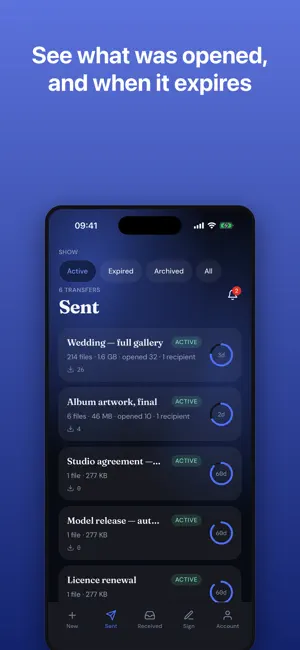
Send large files to anyone, with a link that expires when you say. TransferIt is a file transfer and file sharing app for sending big files that email will not take. Pick your files, add an email address or just take the link, and send. Whoever you send to opens the link in a browser and chooses what to take — no app, no account, nothing to sign up for. FULL ORIGINAL QUALITY Files are stored and served as the exact bytes you uploaded. Photos, videos and documents are never re-encoded, resized or compressed. A photo arrives as the photo you took. SEND ANYTHING Photos, videos, audio, documents, folders and zip archives. Large video files, RAW photos, design files — if you can pick it, you can send it. LINKS THAT EXPIRE You choose how long a transfer lasts. When the time is up the link stops working and the files are deleted. End one early whenever you want, and get a warning before anything expires. PASSWORD PROTECTION AND DOWNLOAD LIMITS Lock a transfer with a password so only the right person gets in. Cap how many times it can be downloaded, and see who opened what. PREVIEW BEFORE DOWNLOADING Whoever receives a transfer can look at a file before saving it, then download one, a few, or all at once. EVERYONE ADDS TO ONE ROLL Start a roll, share one link, and everybody puts their own pictures in — the wedding, the trip, the match. Nobody needs the app or an account to add to it, and every picture stays the size it was taken. ASK FOR FILES INSTEAD OF CHASING THEM Make a request link and send it to anyone. They drop their files in from a browser, with no app and no account, and everything they send lands under Received. You choose how long the link stays open and how long what arrives is kept. ONE ADDRESS THAT NEVER CHANGES A fixed link points at whichever transfer you say. Give it out once — on a website, in an email signature, on a card — and point it at something new whenever you like. Everyone who has it always gets the latest version. SEND DOCUMENTS FOR SIGNATURE Upload a PDF, say who signs it, and mark where: signature, initials, date, name, address, phone, tick boxes and more. Up to five people per document, each with their own private link, in any order or one after another. Mark a box as required and nobody can skip it. Save your own signature and business logo once and they go on automatically. When the last person signs, everyone gets the finished document with a certificate of who signed and when. SEND LATER Choose now, tomorrow morning, or an exact time, and the transfer goes out on its own. ASK THEM TO APPROVE Send work over for approval and get a straight yes, a request for changes, or a thumbs up or down on each file. They can also point: tap the picture where they mean and the note stays at that spot, or pause the video and the note carries the moment. SAVE TO YOUR OWN CLOUD Connect Google Drive or Dropbox and anything that arrives is copied into a folder of yours automatically. CHARGE FOR A TRANSFER Put a price on a transfer and whoever opens the link pays by card before the files unlock. The money goes to your own Stripe account. KEEP EVERY CLIENT TOGETHER Everything you have sent a person and everything they have sent you, on one page. SENT AND RECEIVED Two plain lists of what you have shared and what has come to you, with the time left on every one. Notifications tell you when a transfer is opened or a document is signed. PLANS Free to start, and sending documents for signature is on every plan. Paid plans raise the size of a transfer, how much storage you keep and how long links last: Plus adds fixed links, scheduled sends and cloud saves; Pro adds file requests, approvals and paid downloads; Studio adds a page per client, watermarked previews and your own branding. Subscriptions are billed by Apple and can be cancelled any time. Support: https://transferitapp.com/support Privacy: https://transferitapp.com/privacy Terms of Use: https://transferitapp.com/terms
What’s new
Version 1.0.6 · Updated October 15, 2026
The walk-through now shows once and stays gone, on every device you sign in on.
App privacy
The developer, THOMAS JUNIOR MODESTE, reported these privacy practices to Apple.
Data Linked to You
The following data, which may be collected and linked to your identity, may be used for the following purposes:
- Purchases: Purchase History
- Location: Coarse Location
- Contact Info: Physical Address, Email Address, Name, Phone Number
- User Content: Photos or Videos, Other User Content
- Identifiers: User ID
- Usage Data: Product Interaction
Used for: App Functionality
Alternatives to TRANSFERIT - Send Large Files
Looking for apps like TRANSFERIT - Send Large Files? Here are 6 similar apps on the App Store. The highest rated is Motora - Car Market (5.0/5), and all 6 are free to download.
-
 FileFly | Share & Upload Files
-
 Oz
Oz
-
 Motora - Car Market
5.0
Motora - Car Market
5.0
-
 SteelNote: Markdown Notes
-
 QuickNote - Text Library
2.5
QuickNote - Text Library
2.5
-
 ChatBrain - AI Chat, ChatBot
4.9
ChatBrain - AI Chat, ChatBot
4.9
| App | Rating | Price | Last updated | Compare |
|---|---|---|---|---|
| TRANSFERIT - Send Large Files | 5.0 / 5 (1 rating) | Free | October 15, 2026 | |
| FileFly | Share & Upload Files | – | Free | Sep 15, 2026 | Compare |
| Oz | – | Free | Oct 5, 2026 | Compare |
| Motora - Car Market | 5.0 / 5 (1) | Free | Nov 29, 2025 | Compare |
| SteelNote: Markdown Notes | – | Free | Oct 15, 2026 | Compare |
| QuickNote - Text Library | 2.5 / 5 (2) | Free | Aug 25, 2026 | Compare |
| ChatBrain - AI Chat, ChatBot | 4.9 / 5 (11) | Free | Mar 26, 2025 | Compare |