

Remember the Filter
Striven Industries LLC Utilities iPhoneiPadiPod touch
Remember the Filter is a free Utilities app for iPhone and iPad by Striven Industries LLC. Rated 5.0/5 from 2 ratings. Requires iOS 17.0.
- Rating
- 5.0
- 2 ratings
- Price
- Free
- on the App Store
- Size
- 3 MB
- Age 4+
- Updated
- Oct 13
- 2026 · v1.1
Screenshots



About Remember the Filter
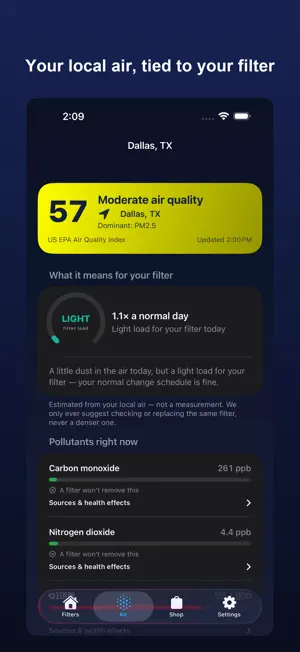
Never forget a filter change again — at home or across a portfolio of buildings — and finally understand what your filters are up against. Remember the Filter tracks every furnace, AC, and refrigerator filter, reminds you before each one is due, and shows you your local air quality so you know when a filter is working hardest. Whether it's one furnace or a fleet of rooftop units, your exact replacement is one tap away. ADD A FILTER IN SECONDS • Pick your size on simple wheels (W × H × D) and choose your MERV with a visual selector — no typing part numbers. • Name filters however you like ("Upstairs return," "RTU-4") when you track several. • Refrigerator filters too — by brand and model. REMINDERS THAT ACTUALLY FIT • Set any schedule — days, weeks, or months. • A transparent "smart schedule" suggests when to check each filter, based on your filter type, your home (pets, smoking, how many people), the season, and how the filter has actually looked at past changes. Every factor is shown in plain language — an honest estimate, never a hidden guess. • Tell us how the old filter looked when you swap it, and the schedule learns. LOCAL AIR QUALITY, TIED TO YOUR FILTER • See your live AQI, the pollutant breakdown, pollen levels, and a multi-day forecast. • We're honest about what a filter can and can't do: it captures airborne particulates like PM2.5, PM10, smoke, and pollen — not gases like ozone, NO₂, or CO. We tell you which is which, every time. • On smoky or high-pollen days, the app estimates the extra load on your filter and can move your reminder in — so you check it before it's overdue. • We never tell you to "size up" your MERV. A denser filter can strain an older system; we only ever suggest checking or replacing the same filter. FOR YOUR HOME • Every filter on one screen, most-due first, organized by room. • A lifespan gauge and countdown to the next change; log a note or photo each time. FOR YOUR BUSINESS • Track filters across properties, units, and systems — with a portfolio dashboard, a "due this week" rounds list, and search to jump to any filter fast. • Quick-add filters as you walk a building, no drilling required. • A portfolio pull list rolls up every size with quantities and where they go — reorder in bulk or share it to load the truck. • Scan a unit's nameplate to read the make, model, and serial on device; print QR labels; keep photo proof-of-service, change history, and CSV audit export. REORDER YOUR EXACT SIZE • One tap opens your size at the Remember the Filter store — standard and hard-to-find custom sizes (built to the ⅛ inch). • A rolled-up shopping list totals every size you track. PRIVATE BY DESIGN • No account, no login, no ads, no subscription. • Your data lives on your device, with export/restore so a new or lost phone never loses a thing. Air quality uses a ZIP you enter — never your device's location. Free forever. Set it up once, and never think about a filter change again.
What’s new
Version 1.1 · Updated October 13, 2026
Built for iPhone Duo. • Side by side: open your Duo to see your filter list and the selected filter's details at the same time — the divider even lines up with the fold. • Tabletop Change mode: stand your Duo half-folded and the top half shows exactly what to install — size, MERV rating and airflow direction — big enough to read from the floor. The bottom half gives you big Mark Changed, Reorder and Snooze buttons for dusty hands. • Reorder beside your list: the store opens next to your filters instead of covering them, with the exact size and MERV shown above it. • Closed or open, everything fits: on the outer screen, controls move to the side rail automatically. • For businesses: order straight from your pull list — each size opens in the store beside the list, quantity pre-filled, so you can work through the whole order without losing your place. New for every iPhone — filters on hand: • Bought a case? Track how many filters you have left. Each time you mark a filter changed, the count goes down — 12, 11, 10… • Get a heads-up when you're running low, with one tap to reorder your exact size. • Add a case when your order arrives. • For businesses: your pull list now shows what's on hand and how many cases to order. Fixes and improvements: • Fixed a crash when tapping a filter reminder notification. • Tapping a reminder now opens that filter directly, even when the app wasn't already running. • Improved layouts at larger text sizes. • Confirmation pop-ups now point to the button you tapped.
App privacy
The developer, Striven Industries LLC, reported these privacy practices to Apple.
Data Not Linked to You
The following data, which may be collected but is not linked to your identity, may be used for the following purposes:
- Location: Coarse Location
Used for: App Functionality
Alternatives to Remember the Filter
Looking for apps like Remember the Filter? Here are 6 similar apps on the App Store. The highest rated is Mona Radio (5.0/5), and all 6 are free to download.


| App | Rating | Price | Last updated | Compare |
|---|---|---|---|---|
| Remember the Filter | 5.0 / 5 (2 ratings) | Free | October 13, 2026 | |
| Mona Radio | 5.0 / 5 (1) | Free | Oct 26, 2026 | Compare |
| Dura Remote App | – | Free | Aug 8, 2025 | Compare |
| BigBattery Husky 2 | 5.0 / 5 (2) | Free | Aug 12, 2026 | Compare |
| TCTEC | 4.0 / 5 (4) | Free | Sep 22, 2026 | Compare |
| My Baldwinsville | – | Free | Jul 14, 2026 | Compare |
| Pynamite WiFi | 3.0 / 5 (2) | Free | Sep 16, 2026 | Compare |