

Stick Remote: Control TV
Alexandra May Utilities iPhoneiPadiPod touch
Stick Remote: Control TV is a free Utilities app for iPhone and iPad by Alexandra May. Requires iOS 17.0. Updated October 20, 2026.
- Price
- Free
- on the App Store
- Size
- 12 MB
- Age 4+
- Updated
- Oct 20
- 2026 · v1.7
Screenshots


About Stick Remote: Control TV
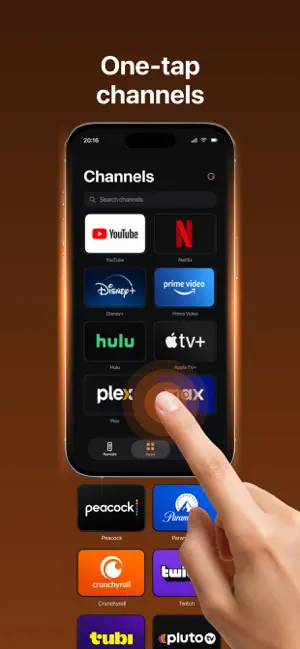
Turn your iPhone into a convenient remote control for a compatible TV streaming device. When the physical remote is lost, out of reach, or inconvenient for typing, your phone provides quick access to the controls you need. Connect over the same Wi-Fi network and control your TV from the couch. KEY FEATURES • Directional navigation and OK button • Back, Home, and Menu controls • Play, pause, rewind, and fast-forward • Volume and mute controls • Touchpad for convenient navigation • Keyboard input from your iPhone • Quick access to apps available on the connected device • Automatic device discovery and reconnection • Manual connection using a local network address • Built-in connection troubleshooting HOW TO CONNECT: - Connect your iPhone and TV device to the same Wi-Fi network. - Make sure the TV device is turned on and awake. - Select the detected device or enter its local address manually. - Approve the connection on the TV if requested. - Start using your phone as a remote control. Compatibility depends on the device model and local network configuration. The app only sends user-initiated remote-control commands. It does not provide, host, stream, download, or redistribute television channels, movies, applications, or other third-party media content. This is an independently developed remote-control utility. It is not affiliated with, endorsed by, sponsored by, or associated with any television manufacturer or platform provider. Privacy Policy: https://doc-hosting.flycricket.io/tv-remote-touchpad-keys-privacy-policy/9554bbf8-09aa-4236-8f5d-84d48e8d02c8/privacy Terms of Use: https://doc-hosting.flycricket.io/tv-remote-touchpad-keys-terms-of-use/0c0ab8d6-994d-4168-bb23-da2121de3499/terms
What’s new
Version 1.7 · Updated October 20, 2026
Improved remote control performance and connection stability. Fixed minor bugs for a smoother experience.
App privacy
The developer, Alexandra May, reported these privacy practices to Apple.
Data Used to Track You
The following data may be used to track you across apps and websites owned by other companies:
- Usage Data: Product Interaction
Data Linked to You
The following data, which may be collected and linked to your identity, may be used for the following purposes:
- Identifiers: Device ID
Used for: App Functionality
Data Not Linked to You
The following data, which may be collected but is not linked to your identity, may be used for the following purposes:
- Usage Data: Product Interaction
Used for: App Functionality
Alternatives to Stick Remote: Control TV
Looking for apps like Stick Remote: Control TV? Here are 6 similar apps on the App Store. The highest rated is TV Remote Controller・Tuno (5.0/5), and all 6 are free to download.
-
 Rok: Universal TV LED Control
4.6
Rok: Universal TV LED Control
4.6
-
 Camera Finder - Device Scanner
4.0
Camera Finder - Device Scanner
4.0
-
 Decibel Meter - Sound Level.
4.8
Decibel Meter - Sound Level.
4.8
-
 Nearby Device Scanner - Finder
4.6
Nearby Device Scanner - Finder
4.6
-
 Hidden Device Monitor - TTPS
4.8
Hidden Device Monitor - TTPS
4.8
-
 TV Remote Controller・Tuno
5.0
TV Remote Controller・Tuno
5.0
| App | Rating | Price | Last updated | Compare |
|---|---|---|---|---|
| Stick Remote: Control TV | – | Free | October 20, 2026 | |
| Rok: Universal TV LED Control | 4.6 / 5 (5) | Free | Mar 10, 2026 | Compare |
| Camera Finder - Device Scanner | 4.0 / 5 (2) | Free | Sep 22, 2026 | Compare |
| Decibel Meter - Sound Level. | 4.8 / 5 (5) | Free | Feb 17, 2026 | Compare |
| Nearby Device Scanner - Finder | 4.6 / 5 (10) | Free | Aug 11, 2026 | Compare |
| Hidden Device Monitor - TTPS | 4.8 / 5 (16) | Free | Jul 22, 2025 | Compare |
| TV Remote Controller・Tuno | 5.0 / 5 (1) | Free | Oct 11, 2026 | Compare |