

Tomatino: Pomodoro Timer
Missaq Ataschi Productivity iPhoneiPadiPod touchMac
Tomatino: Pomodoro Timer is a paid Productivity app for iPhone and iPad by Missaq Ataschi. Rated 5.0/5 from 1 ratings. Requires iOS 26.0.
- Rating
- 5.0
- 1 ratings
- Price
- 7.99 USD
- on the App Store
- Size
- 9 MB
- Age 4+
- Updated
- Oct 29
- 2026 · v2.6.1
Screenshots

About Tomatino: Pomodoro Timer
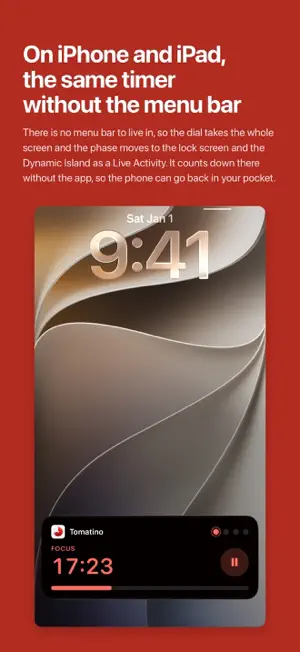
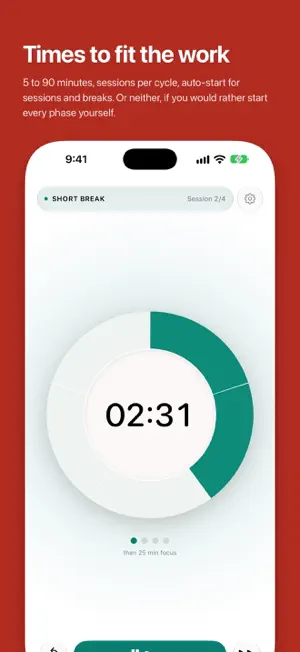
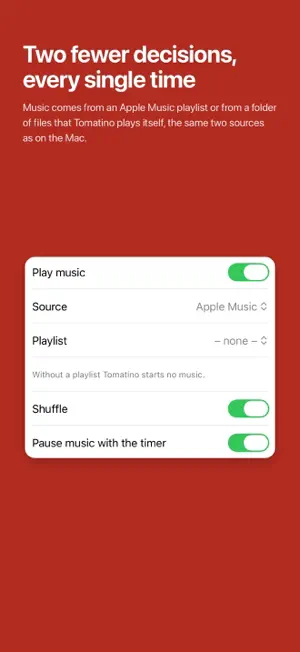
Pomodoro timer for Mac, iPhone and iPad. A session starts your music and, on the Mac, a Focus mode; the break puts both back. One purchase covers all three. iPhone and iPad There is no menu bar to live in, so the dial takes the whole screen and the phase moves to the lock screen and the Dynamic Island as a Live Activity. It counts down there without the app, so the phone can go back in your pocket. The notification at the end arrives on time whether Tomatino is still running or not. Music comes from an Apple Music playlist or from a folder of files that Tomatino plays itself, the same two sources as on the Mac. Focus stays untouched, because iOS gives an app no way to switch it, and Spotify is the Mac's as well. Both are waiting in the version that comes with the same purchase: one price covers Mac, iPhone and iPad. One glance The elapsed time fills a scale, so one glance tells you how far in you are. Focus is red, breaks are teal, and the color alone tells you which phase is running. What else the timer does Times to fit the work 5 to 90 minutes, sessions per cycle, auto-start for sessions and breaks. Or neither, if you would rather start every phase yourself. Sound and notification At the end of every phase, on the Mac both switchable on their own. On iPhone and iPad the notification carries the sound, so it reaches you with the phone in a pocket. No server of its own Tomatino opens no connection to one, so there is nothing it could send anywhere, and it measures nothing about how you work. Spotlight, Shortcuts and Siri “Start Tomatino” and “Pause Tomatino” work from all three. In Shortcuts the start can take a work length, which then becomes your setting. Your settings on every device They travel between your own devices through iCloud and stay inside your Apple account. English, German, French, Italian, Spanish, Portuguese (Brazil), Japanese, Korean, Simplified Chinese, Traditional Chinese and Dutch, following your system language. Requirements: macOS 26 on Apple silicon, iOS 26, iPadOS 26.
What’s new
Version 2.6.1 · Updated October 29, 2026
• Settings now close with the X instead of Done. • The support address and the music folder name no longer break with stray hyphens when they wrap.
App privacy
The developer, Missaq Ataschi, reported these privacy practices to Apple.
Data Not Collected
The developer does not collect any data from this app.
Alternatives to Tomatino: Pomodoro Timer
Looking for apps like Tomatino: Pomodoro Timer? Here are 6 similar apps on the App Store. The highest rated is Pomodoro Timer - M (5.0/5), and 5 of the 6 are free to download.
-
 Shlinkly
-
 Timlin: Time Blocking&Tracking
-
 Pomodoro Timer - M
5.0
-
 FSNotes
4.6
-
 FocusPasta | Study App Blocker
4.1
-
 Simple Memo - Obsidian Voice
5.0
| App | Rating | Price | Last updated | Compare |
|---|---|---|---|---|
| Tomatino: Pomodoro Timer | 5.0 / 5 (1 rating) | 7.99 USD | October 29, 2026 | |
| Shlinkly | – | Free | Oct 11, 2026 | Compare |
| Timlin: Time Blocking&Tracking | – | Free | Aug 18, 2026 | Compare |
| Pomodoro Timer - M | 5.0 / 5 (2) | Free | Oct 12, 2026 | Compare |
| FSNotes | 4.6 / 5 (87) | 4.99 USD | Oct 27, 2026 | Compare |
| FocusPasta | Study App Blocker | 4.1 / 5 (10) | Free | Oct 30, 2026 | Compare |
| Simple Memo - Obsidian Voice | 5.0 / 5 (1) | Free | Oct 14, 2026 | Compare |