

DunCrux: Smart Task Manager
Michael Jones Productivity iPhoneiPadiPod touchMac
DunCrux: Smart Task Manager is a free Productivity app for iPhone and iPad by Michael Jones. Rated 5.0/5 from 2 ratings. Requires iOS 15.0.
- Rating
- 5.0
- 2 ratings
- Price
- Free
- on the App Store
- Size
- 61 MB
- Age 4+
- Updated
- Oct 14
- 2026 · v1.0.111
Screenshots
About DunCrux: Smart Task Manager
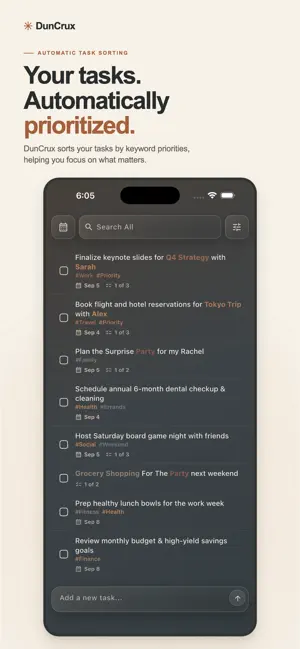
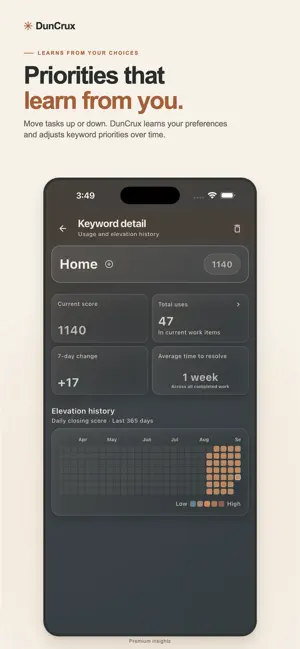
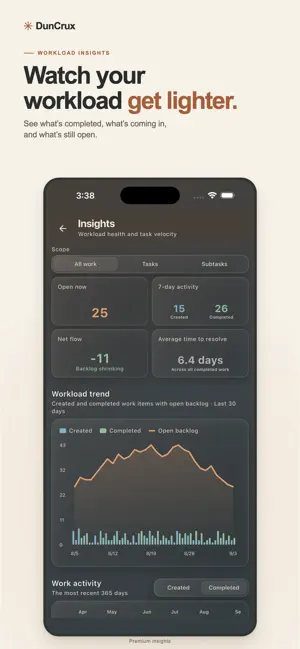
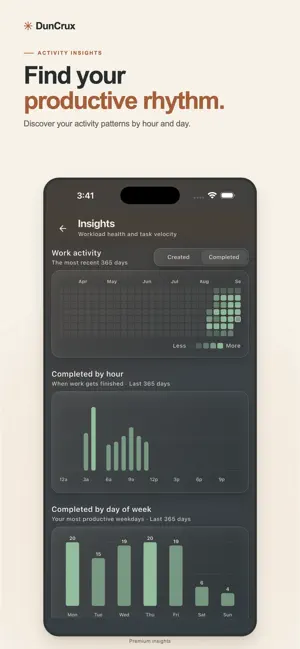
DunCrux is a task manager that helps you focus on what matters most. Instead of making you maintain a rigid priority list, DunCrux organizes tasks using keywords. Each keyword has an “elevation” that represents its importance. Tasks with higher-priority keywords rise toward the top automatically. -- Priorities That Adapt -- Move a task up or down to show DunCrux what matters to you. Its keyword priorities adjust over time, allowing your task list to evolve alongside your goals. -- Capture And Organize -- • Create tasks quickly • Add due dates and snooze tasks until later • Break large tasks into nested subtasks • Use @keywords in task text or add #tags • Search and filter your work • Create saved task views • Review upcoming and completed tasks -- Understand Your Workload -- Explore insights into completed tasks, open work, keyword priorities, and activity patterns. See how your workload changes and discover when you are most productive. -- Local First By Design -- DunCrux’s core task-management features work without an account. Your workspace remains available locally on your device, even when you are offline. Cloud sync is optional. Sign in when you want to keep your DunCrux workspace synchronized across supported devices. You can also export your data whenever you choose. Some advanced features require DunCrux Pro. With the free version you have unlimited tasks but are limited to 10 Keywords for tracking priorities. Additionally paying for or subscribing to DunCrux Pro unlocks saved views. Subscribing to DunCrux Pro+Synch will unlock cloud syncing across multiple devices. Spend less time deciding what to do next—and more time making meaningful progress. Terms of Service: https://www.apple.com/legal/internet-services/itunes/dev/stdeula/
What’s new
Version 1.0.111 · Updated October 14, 2026
- Bug fixes and minor tweaks
App privacy
The developer, Michael Jones, reported these privacy practices to Apple.
Data Linked to You
The following data, which may be collected and linked to your identity, may be used for the following purposes:
- Location: Coarse Location
- Identifiers: Device ID
- Usage Data: Product Interaction, Other Usage Data
- Purchases: Purchase History
- Contact Info: Email Address, Name
- User Content: Other User Content
- Diagnostics: Crash Data, Performance Data
Used for: Analytics, App Functionality
Data Not Linked to You
The following data, which may be collected but is not linked to your identity, may be used for the following purposes:
- Diagnostics: Other Diagnostic Data
Used for: App Functionality
Alternatives to DunCrux: Smart Task Manager
Looking for apps like DunCrux: Smart Task Manager? Here are 6 similar apps on the App Store. The highest rated is RightNow Focus: ADHD Planner (5.0/5), and all 6 are free to download.
-
 Habit Tracker: HabitGlass
-
 Voice Memo: AI Assistant
-
 WeekPlans
-
 RightNow Focus: ADHD Planner
5.0
RightNow Focus: ADHD Planner
5.0
-
 Productiiv - Plan, Build, Grow
5.0
Productiiv - Plan, Build, Grow
5.0
-
 Complete & Conquer
5.0
Complete & Conquer
5.0
| App | Rating | Price | Last updated | Compare |
|---|---|---|---|---|
| DunCrux: Smart Task Manager | 5.0 / 5 (2 ratings) | Free | October 14, 2026 | |
| Habit Tracker: HabitGlass | – | Free | Oct 14, 2026 | Compare |
| Voice Memo: AI Assistant | – | Free | Jul 13, 2026 | Compare |
| WeekPlans | – | Free | Nov 22, 2025 | Compare |
| RightNow Focus: ADHD Planner | 5.0 / 5 (3) | Free | Sep 23, 2026 | Compare |
| Productiiv - Plan, Build, Grow | 5.0 / 5 (3) | Free | Jan 23, 2026 | Compare |
| Complete & Conquer | 5.0 / 5 (3) | Free | Aug 24, 2026 | Compare |