

FocusBloom Pro: App Blocker
春城 贾 Productivity iPhoneiPadiPod touch
FocusBloom Pro: App Blocker is a paid Productivity app for iPhone and iPad by 春城 贾. Rated 5.0/5 from 1 ratings. Requires iOS 17.0. Updated September 4, 2026.
- Rating
- 5.0
- 1 ratings
- Price
- 5.99 USD
- on the App Store
- Size
- 13 MB
- Age 4+
- Updated
- Sep 4
- 2026 · v1.0
Screenshots



About FocusBloom Pro: App Blocker
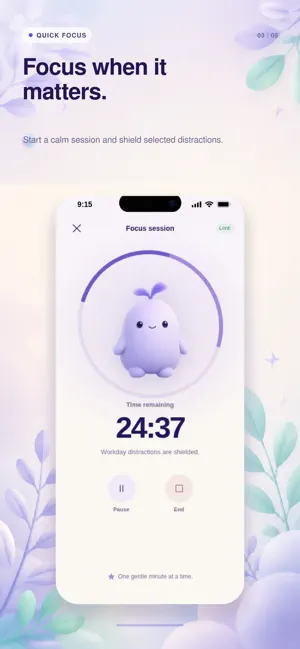
Spend less time scrolling and more time on what matters. FocusBloom is a gentle app blocker and focus companion for iPhone. Choose the apps that distract you, set a daily goal or schedule, and build healthier screen habits—without guilt, streak pressure, or shame. GROW YOUR FOCUS ENERGY See your selected-app usage as a simple Focus Energy score. A calm companion reflects your progress and gives you an encouraging way to stay aware throughout the day. CREATE RULES THAT FIT YOUR LIFE Set daily limits or recurring schedules for work, study, evenings, and bedtime. FocusBloom shields only the apps you choose, so the rest of your phone stays available. START A FOCUS SESSION Need a clean block of time right now? Start a manual focus session and keep selected distractions out of reach while you work, read, create, or rest. UNDERSTAND YOUR PATTERNS Review clear on-device insights to see when distractions happen, how your habits change, and which days need a gentler reset. PRIVATE BY DESIGN Your Screen Time details and selected apps stay on your iPhone. No account is required to use the core experience. You stay in control of Screen Time permission and can change it anytime. FREE TO START • One active rule • Manual focus sessions • Today’s Focus Energy • Basic seven-day insights FocusBloom PRO Upgrade for unlimited rules and deeper seven-day insights. Monthly and yearly options are available. No weekly subscription. FocusBloom uses Apple’s Screen Time technology to apply limits to the apps you select. Availability and behavior may vary based on your device settings and iOS version. Take back a little attention every day—and let better habits grow. 1. This service is a subscription based paid service, which means you will prepay for future subscription usage. You can currently choose to use this service on a quarterly basis. At the end of each subscription period, your subscription will automatically renew by default, unless you cancel the automatic renewal yourself or we cancel the service. 2. Unsubscribe: To cancel the renewal, please cancel at least 24 hours in advance. You can unsubscribe by opening System Settings, clicking on Apple ID, clicking on Subscription, selecting Premium, and then unsubscribing. 3. Restore purchase: If you receive a prompt saying "You have already subscribed to this project" during the payment process and confirm that you have completed the purchase before, you can click "Restore Purchase" in the upper right corner to restore the purchase. Membership Service Agreement and Automatic Renewal Agreement: https://gcn1s2rmayw3.feishu.cn/wiki/YgqKwPdJmiH0ulkF92kco1CznCg?from=from_copylink Privacy Policy: https://gcn1s2rmayw3.feishu.cn/wiki/SGBIwmUWCiPWoWktE5sclLRgnol?from=from_copylink
App privacy
The developer, 春城 贾, reported these privacy practices to Apple.
Data Not Collected
The developer does not collect any data from this app.
Alternatives to FocusBloom Pro: App Blocker
Looking for apps like FocusBloom Pro: App Blocker? Here are 6 similar apps on the App Store. The highest rated is Nexus: Remember Who You Are (5.0/5), and all 6 are free to download.
-
 RSS Reader Peruse
-
 Wasted - Aware Screen Time
-
 Nexus: Remember Who You Are
5.0
Nexus: Remember Who You Are
5.0
-
 SGL: App Blocker & Screen Time
1.0
SGL: App Blocker & Screen Time
1.0
-
 Screen Time Control App
5.0
Screen Time Control App
5.0
-
 10,000 hours – skill tracker
4.7
10,000 hours – skill tracker
4.7
| App | Rating | Price | Last updated | Compare |
|---|---|---|---|---|
| FocusBloom Pro: App Blocker | 5.0 / 5 (1 rating) | 5.99 USD | September 4, 2026 | |
| RSS Reader Peruse | – | Free | Jul 8, 2026 | Compare |
| Wasted - Aware Screen Time | – | Free | Sep 16, 2026 | Compare |
| Nexus: Remember Who You Are | 5.0 / 5 (9) | Free | Oct 21, 2026 | Compare |
| SGL: App Blocker & Screen Time | 1.0 / 5 (1) | Free | Dec 18, 2025 | Compare |
| Screen Time Control App | 5.0 / 5 (2) | Free | Feb 5, 2026 | Compare |
| 10,000 hours – skill tracker | 4.7 / 5 (59) | Free | Aug 31, 2026 | Compare |