

Warpeer
延平 陈 Developer Tools iPhoneiPadiPod touch
Warpeer is a free Developer Tools app for iPhone and iPad by 延平 陈. Requires iOS 18.0. Updated October 30, 2026.
- Price
- Free
- on the App Store
- Size
- 42 MB
- Age 4+
- Updated
- Oct 30
- 2026 · v1.3.0
Screenshots


About Warpeer
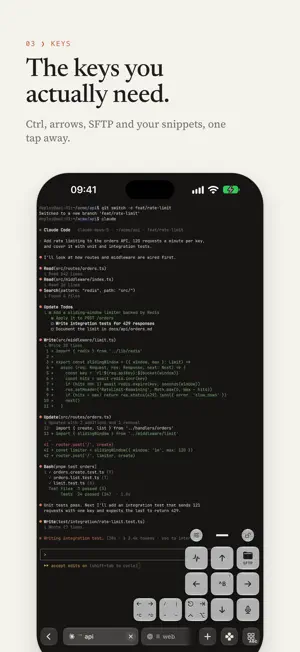
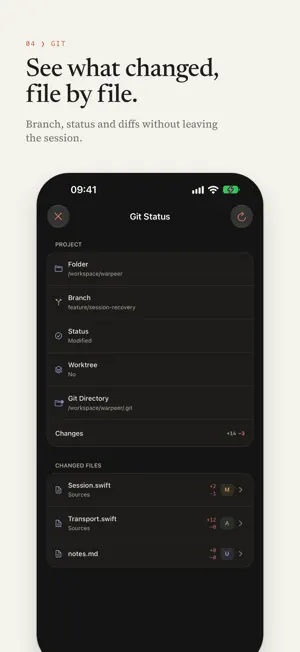
Warpeer is a remote terminal built for iPhone. Connect to your own servers over SSH to keep an eye on AI coding agents, resume tmux sessions, review Git changes and manage remote files — without squeezing a desktop interface onto a small screen. Watch your agents work • Live state for Claude Code, Codex, OpenCode, Gemini and more: working, waiting for input, completed • Model, context usage and token counts at a glance, so a stalled task stands out • Notifications when a remote agent has something new A real terminal, in your pocket • GPU rendering by Ghostty for crisp text and smooth scrolling • Hundreds of terminal themes, bundled monospaced fonts and adjustable text size • Hardware keyboard support, Option as Meta, Caps Lock remapping and CJK input Sessions that survive • Resume remote tmux and Herdr sessions in one tap; open several at once and swipe between them • Reconnects when you return to the app and recovers quickly after network changes • Tabs for connecting to several hosts at the same time The keys you actually need • A customizable shortcut row: Esc, Tab, Ctrl, arrows, Control-C and more, one tap away • Movable floating keys bound to snippets, files, Git status, host performance and other functions • Command history and snippets: search and insert without running automatically • Dictation and image paste straight into the terminal Files, right next to the shell • Browse, search, preview, upload and download over SFTP on the same connection • Previews for code, Markdown, HTML and images, with Git diffs • Open websites running on the remote host, such as localhost:3000 See what changed, file by file • Branch, worktree status and per-file diffs without leaving the session Every server, one tap away • Saved hosts, with credentials encrypted in the iOS Keychain • SSH host fingerprints verified and remembered, with a clear warning if one changes • Discovers SSH devices on your local network and accepts quick-connect commands • Password and private-key authentication, compatible with Tailscale SSH • Device transfer moves hosts, keys and snippets securely to a new iPhone Privacy first • No account required, and terminal contents are never uploaded • Terminal history and connection logs stay on your device • Optional app lock with a PIN or Face ID, and content blurring in the app switcher The interface is available in English and Simplified Chinese, follows your system language by default and can be switched in the app. Warpeer is free during early access: no trial, no account, every feature included.
What’s new
Version 1.3.0 · Updated October 30, 2026
Warpeer 1.3 adds eyes to the terminal. • Remote desktop: open the desktop of a Mac you reach over SSH, right inside Warpeer. Tap, drag, scroll, zoom and type, with a key bar for Command shortcuts. The Mac only needs Screen Sharing turned on, and its screen travels only inside your SSH connection. • Built for cellular: only the parts of the screen that change are sent, scaled to your iPhone, and quality adapts to the link. Open a desktop from Hosts, a session card, an agent notification or the new Remote desktop key. • Stream videos and photos: remote videos and audio start in about a second and photos show a first picture right away, instead of waiting for the whole download. • The floating ball: minimise previews and desktops to one ball and jump back to the terminal. A collapsed desktop or video pauses and uses no data. • Faster downloads: SFTP fetches several parts at once, up to 25 to 50 times faster on distant servers. • Fixed a crash when tapping an agent notification while Warpeer was in the background.
App privacy
The developer, 延平 陈, reported these privacy practices to Apple.
Data Not Collected
The developer does not collect any data from this app.
Alternatives to Warpeer
Looking for apps like Warpeer? Here are 6 similar apps on the App Store. The highest rated is GateShell - SSH Client & SFTP (5.0/5), and all 6 are free to download.
-
 KumaPush
-
 GateShell - SSH Client & SFTP
5.0
GateShell - SSH Client & SFTP
5.0
-
 SnapSSH.ai
-
 Gitox
Gitox
-
 DiffSSH: Remote Git Client
5.0
DiffSSH: Remote Git Client
5.0
-
 SymbolCraft: Developer Tool
| App | Rating | Price | Last updated | Compare |
|---|---|---|---|---|
| Warpeer | – | Free | October 30, 2026 | |
| KumaPush | – | Free | Sep 23, 2026 | Compare |
| GateShell - SSH Client & SFTP | 5.0 / 5 (1) | Free | Sep 15, 2026 | Compare |
| SnapSSH.ai | – | Free | Sep 15, 2026 | Compare |
| Gitox | – | Free | May 2, 2026 | Compare |
| DiffSSH: Remote Git Client | 5.0 / 5 (1) | Free | Jul 29, 2026 | Compare |
| SymbolCraft: Developer Tool | – | Free | Aug 17, 2026 | Compare |
Compare Warpeer with the top alternatives: ratings, updates, ASO score and keyword gaps →