

Quick Video Player
Savan Bhimani Photo & Video iPhoneiPadiPod touch
Quick Video Player is a free Photo & Video app for iPhone and iPad by Savan Bhimani. Requires iOS 18.6. Updated October 11, 2026.
- Price
- Free
- on the App Store
- Size
- 51 MB
- Age 4+
- Updated
- Oct 11
- 2026 · v1.2
Screenshots

About Quick Video Player
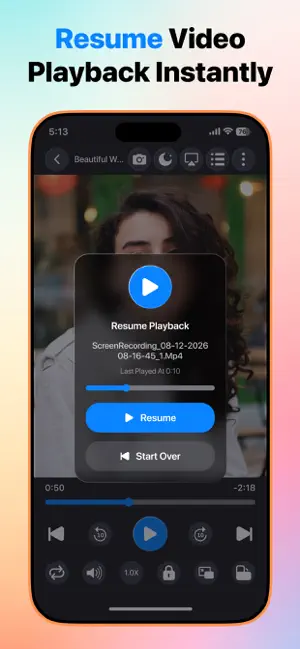
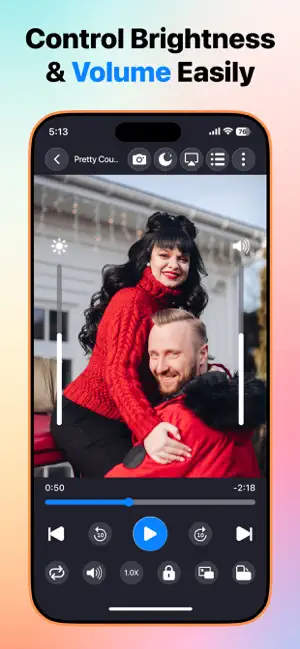
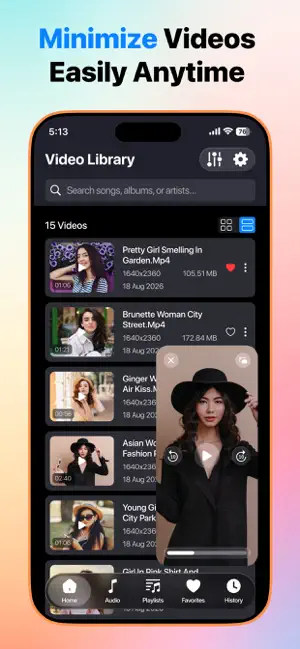
Enjoy a fast, smooth, and reliable media playback experience with Quick Video Player. Whether you're watching your favorite videos or listening to your music collection, Quick Video Player is designed to deliver high-quality playback with an intuitive and easy-to-use interface. Quick Video Player supports all popular video and audio formats, making it your all-in-one solution for playing local media stored on your device. No complicated setup—simply open the app, browse your media library, and start playing instantly. Key Features - Play All Video Formats Enjoy seamless playback of virtually all popular video formats without the need for additional codecs. Watch your videos in high quality with smooth performance. - Music Player Listen to your favorite songs with an elegant music player featuring essential playback controls for a great listening experience. - Local Media Library Automatically detect and organize videos and music stored on your device for quick and easy access. - HD & High-Quality Playback Experience smooth playback for HD, Full HD, and high-resolution videos with optimized performance. - Easy Playback Controls Control your media effortlessly with: • Play & Pause • Forward & Rewind • Skip Next & Previous • Seek Bar Navigation • Lock Screen Controls - Playback Speed Control Adjust playback speed to watch videos faster or slower according to your preference. - Picture in Picture (PiP) Continue watching your videos in a floating window while using other compatible apps. - Background Audio Playback Keep listening to your music or video audio even while using other apps or when your device screen is locked (where supported). - Playlist Support Create and manage playlists to organize your favorite videos and music. - Gesture Controls Use simple touch gestures for: • Brightness adjustment • Volume control • Quick seeking - Resume Playback Automatically continue videos from where you left off, so you never lose your place. - Fast & Lightweight Quick Video Player is optimized for speed, responsiveness, and efficient performance while remaining easy to use. Why Choose Quick Video Player? • Clean and modern interface • Fast media scanning • Smooth and reliable playback • Supports all popular media formats • Powerful video and music player in one app • Easy navigation and user-friendly controls • Designed for everyday entertainment Whether you're watching movies, TV shows, personal recordings, educational videos, or listening to your favorite music, Quick Video Player provides everything you need in a simple and powerful media player. Download Quick Video Player today and enjoy your local videos and music with speed, simplicity, and convenience.
What’s new
Version 1.2 · Updated October 11, 2026
Bug Fixes.
App privacy
The developer, Savan Bhimani, reported these privacy practices to Apple.
Data Used to Track You
The following data may be used to track you across apps and websites owned by other companies:
- Usage Data: Advertising Data
Data Not Linked to You
The following data, which may be collected but is not linked to your identity, may be used for the following purposes:
- Usage Data: Advertising Data
Used for: Third-Party Advertising
Alternatives to Quick Video Player
Looking for apps like Quick Video Player? Here are 6 similar apps on the App Store. The highest rated is AI Video Generator - Face swap (5.0/5), and all 6 are free to download.
-
 Livoza: Live Photo Converter
-
 View AI: Photo & Generator
4.8
-
 LoopCraft:AI Video Generator
-
 Generator Photo AI
-
 Pictify AI: Avatar Generator
4.2
-
 AI Video Generator - Face swap
5.0
| App | Rating | Price | Last updated | Compare |
|---|---|---|---|---|
| Quick Video Player | – | Free | October 11, 2026 | |
| Livoza: Live Photo Converter | – | Free | Sep 24, 2026 | Compare |
| View AI: Photo & Generator | 4.8 / 5 (16) | Free | Sep 30, 2026 | Compare |
| LoopCraft:AI Video Generator | – | Free | Sep 23, 2026 | Compare |
| Generator Photo AI | – | Free | Aug 27, 2026 | Compare |
| Pictify AI: Avatar Generator | 4.2 / 5 (17) | Free | Oct 19, 2026 | Compare |
| AI Video Generator - Face swap | 5.0 / 5 (2) | Free | Aug 3, 2026 | Compare |
Compare Quick Video Player with the top alternatives: ratings, updates, ASO score and keyword gaps →