

ScreenManager
Hong Kong Artark-NFT Culture Development Limited Utilities iPhoneiPadiPod touch
ScreenManager is a free Utilities app for iPhone and iPad by Hong Kong Artark-NFT Culture Development Limited. Requires iOS 16.1. Updated September 12, 2026.
- Price
- Free
- on the App Store
- Size
- 4 MB
- Age 12+
- Updated
- Sep 12
- 2026 · v1.6
Screenshots

About ScreenManager
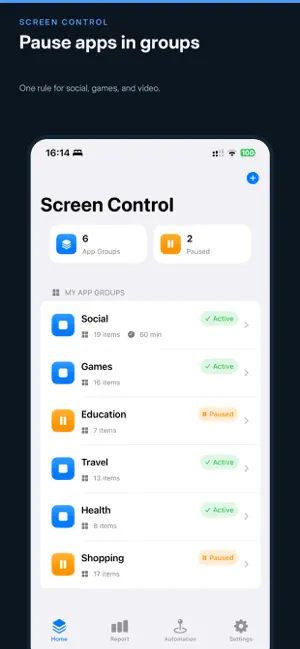
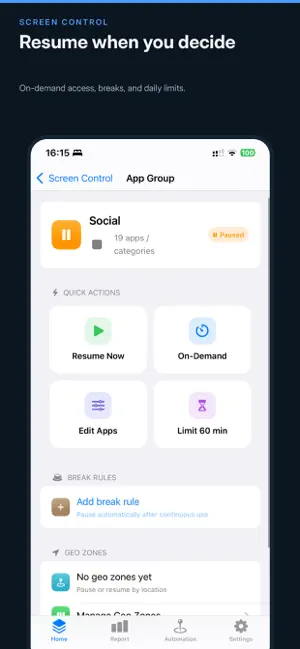
Screen Manager helps you pause the apps that steal your attention — short video, social, games — and resume them when you choose. It uses Apple Screen Time and Family Controls. It does not replace Settings → Screen Time. It adds groups, limits, schedules, breaks, and places on top of the apps you pick. When a rule trips, those apps are paused (hidden) by the system. When the rule lifts, or you resume them, they come back. WHO IT’S FOR • Anyone who opens apps on impulse and wants a pause first • Parents who need extra install, delete, and in-app purchase limits • People building a calmer phone without creating an account WHAT YOU CAN DO • App groups — put social, video, or games in one group and share one rule • Daily limits — pause a group when today’s minutes run out • Schedules — focus blocks by weekday and time • Breaks — rest after a stretch of use, then resume • Geo zones — restrict when you leave a safe place or enter a restrict zone • Reports — system Screen Time plus this app’s pause and resume log • Widgets and Shortcuts — pause or resume from Home Screen or Siri • App lock — Face ID / Touch ID or a 6-digit passcode every time you open Screen Manager ON YOUR DEVICE Rules, places, appearance, and the passcode hash stay on the iPhone. There is no sign-in and no developer server for your usage data. Screen Time charts are drawn on-device by Apple’s report extension. PLEASE KNOW • You must authorize Screen Time / Family Controls • Geo zones need Always location and may fire a little late • Screen Manager cannot hide its own battery or system Screen Time record • The app picker is provided by iOS; custom system app names are not available • On iOS 16, restored icons may not return to the original Home Screen slot (iOS 17.3+ is better) Screen Manager is a habit and focus aid. It is not a medical device and not ADHD treatment.
What’s new
Version 1.6 · Updated September 12, 2026
Bug fixes and improved stability
App privacy
The developer, Hong Kong Artark-NFT Culture Development Limited, reported these privacy practices to Apple.
Data Not Collected
The developer does not collect any data from this app.
Alternatives to ScreenManager
Looking for apps like ScreenManager? Here are 6 similar apps on the App Store.


| App | Rating | Price | Last updated | Compare |
|---|---|---|---|---|
| ScreenManager | – | Free | September 12, 2026 | |
| UniSpeed Calc | – | Free | Jul 31, 2026 | Compare |
| 暖柚收藏夹 | – | Free | Jan 27, 2026 | Compare |
| Random Decision | – | Free | May 22, 2026 | Compare |
| 三省吾身Reflect3 | – | Free | Feb 23, 2026 | Compare |
| 天天连测 | – | Free | May 21, 2025 | Compare |
| WiFi Analyzer・Speed Test | – | Free | Aug 20, 2026 | Compare |
Compare ScreenManager with the top alternatives: ratings, updates, ASO score and keyword gaps →