

FiveLeaf - Five Letter Diary
SUNHO CHOI Lifestyle iPhoneiPadiPod touch
FiveLeaf - Five Letter Diary is a free Lifestyle app for iPhone and iPad by SUNHO CHOI. Requires iOS 26.0. Updated October 22, 2026.
- Price
- Free
- on the App Store
- Size
- 52 MB
- Age 4+
- Updated
- Oct 22
- 2026 · v1.1.1
Screenshots

About FiveLeaf - Five Letter Diary
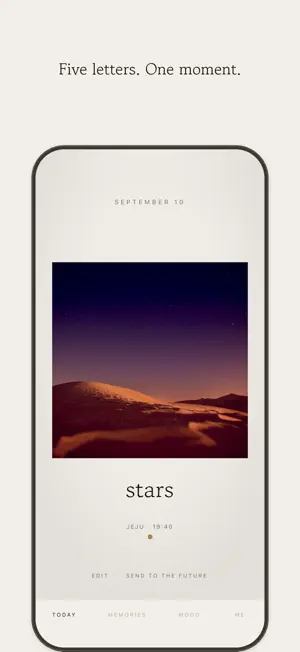
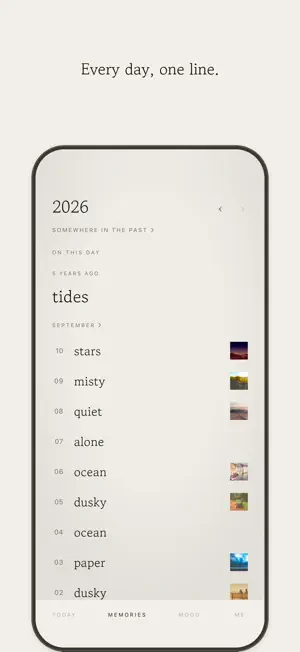
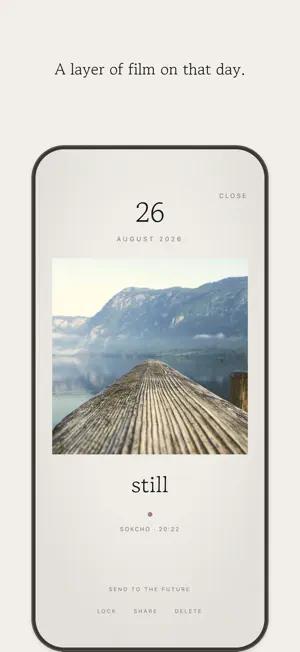
Keep your day in five letters. You do not have to write much. Five letters are enough to hold on to today. It takes five seconds, and those five seconds become the most precious thing five years from now. ■ Five letters · One entry a day, five letters only · Written late at night? You can still fix it until noon the next day · After that it stays as the words of that day ■ One frame of today · Add a single photo or a five-second video · The original stays untouched — film filters are laid on when you look · The color of the day, the place and the weather are quietly noted with it ■ It changes as it piles up · A month flows down the screen like a strip of film · Locked entries — cover a day you would rather not show with Face ID · Send a day to your future self and let it come back later ■ Quiet principles · No account. There is no sign-in screen · Entries stay on this device, and you export a backup whenever you want · No ads, no friends, no likes FiveLeaf Plus Unlocks every film filter, the widgets, icon and paper choices, the yearly Mood palette, Years — the same date across many years in one column, Monthly Film, and letters you write to your future self. Choose monthly, yearly, or a one-time lifetime purchase. The yearly plan starts with a 14-day free trial. Subscriptions are charged to your App Store account and renew automatically unless cancelled at least 24 hours before the period ends. You can cancel any time in Settings. Terms of Use (EULA): https://www.apple.com/legal/internet-services/itunes/dev/stdeula/ Privacy Policy: https://letsean.dev/fiveleaf/privacy/
What’s new
Version 1.1.1 · Updated October 22, 2026
Removing a place from a memory now removes its weather too. Before, the weather stayed behind. Wide photos now fill the screen when you view them up close. On iPad and iPhone Duo, screens like Settings now open at full width. Unfold iPhone Duo and the screen you opened while folded moves to the right side. New in 1.1.0 - iPad and iPhone Duo support - Auto Sync (Plus) keeps your memories in step across your devices through iCloud - Color mode in Settings: System, Light or Dark - Lock and unlock past memories at any time What you can do with FiveLeaf - Keep each day in five letters, once a day - Add one photo or a five-second video, with 17 film filters - The day's color, place and weather are noted alongside - Lock the days you'd rather keep hidden with Face ID - Revisit past days through Film Roll, Years and Monthly Film - Send today's memory to your future self - Home Screen and Lock Screen widgets - No account. Your memories stay on this device, and sync through your own iCloud if you choose
App privacy
The developer, SUNHO CHOI, reported these privacy practices to Apple.
Data Not Linked to You
The following data, which may be collected but is not linked to your identity, may be used for the following purposes:
- Purchases: Purchase History
- Identifiers: Device ID
- Usage Data: Product Interaction
- Diagnostics: Crash Data
Used for: Analytics, App Functionality
Alternatives to FiveLeaf - Five Letter Diary
Looking for apps like FiveLeaf - Five Letter Diary? Here are 6 similar apps on the App Store. The highest rated is Fliptik - StandBy Flip Clock (5.0/5), and 4 of the 6 are free to download.
-
 Fliptik - StandBy Flip Clock
5.0
Fliptik - StandBy Flip Clock
5.0
-
 광고없이 계속읽기
-
 Happy Haru
-
 Momento Log
-
 Gizmory: Device Timeline
-
 HOSONO - Sleep & Focus Timer
3.5
HOSONO - Sleep & Focus Timer
3.5
| App | Rating | Price | Last updated | Compare |
|---|---|---|---|---|
| FiveLeaf - Five Letter Diary | – | Free | October 22, 2026 | |
| Fliptik - StandBy Flip Clock | 5.0 / 5 (1) | Free | Oct 21, 2026 | Compare |
| 광고없이 계속읽기 | – | Free | Apr 27, 2026 | Compare |
| Happy Haru | – | 0.99 USD | Aug 24, 2026 | Compare |
| Momento Log | – | Free | Jul 15, 2026 | Compare |
| Gizmory: Device Timeline | – | Free | Oct 21, 2026 | Compare |
| HOSONO - Sleep & Focus Timer | 3.5 / 5 (2) | 0.99 USD | Aug 28, 2025 | Compare |