

Desktop Mini Clock
CHUN CHIEH TSAI Utilities iPhoneiPadiPod touchMac
Desktop Mini Clock is a free Utilities app for iPhone and iPad by CHUN CHIEH TSAI. Requires iOS 17.0. Updated September 16, 2026.
- Price
- Free
- on the App Store
- Size
- 1 MB
- Age 4+
- Updated
- Sep 16
- 2026 · v0.2.6
Screenshots


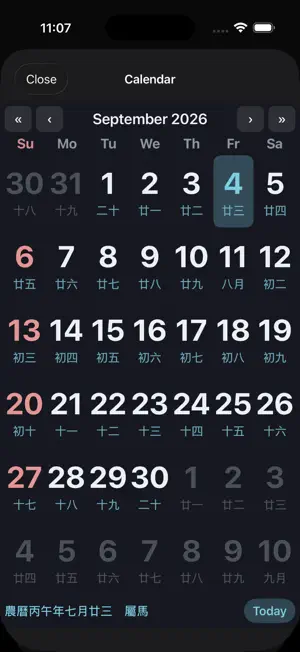

About Desktop Mini Clock
Desktop Mini Clock brings a precision LCD clock to every Apple platform — your Mac desktop, iPhone and iPad Home Screen, and Apple Vision Pro. MAC — ALWAYS-ON FLOATING PANEL A compact clock panel floats above your other windows, exactly where you need it. Lock position, stay always on top, or hide and reveal with a click. Drag anywhere, and the panel automatically stays on screen when your display setup changes. Start at login so the clock is always ready. iPHONE & iPAD — HOME SCREEN WIDGETS From a glanceable Small square to an Extra Large layout that pairs the clock with a full month calendar, pick the size that fits your life. Lock Screen accessories show the time at a glance. Set a personal photo as the widget background. APPLE VISION PRO — SPATIAL CLOCK Place the clock anywhere in your space. Scale from a subtle accent to a bold centerpiece. Hover over the date line to reveal the lunar annotation. Open the calendar or settings window while the clock stays in view. BILINGUAL — ENGLISH & TRADITIONAL CHINESE One tap switches the entire interface: date formats, weekday names, and lunar annotations all follow your language choice. Lunar calendar covers solar terms, traditional holidays, and leap months. CUSTOMIZE SETTINGS · LCD digit color and accent hue · 12 / 24-hour format · Seconds display with smooth progress bar · Date and lunar annotation on or off HONEST BY DESIGN No ads. No tracking. No network access needed.
What’s new
Version 0.2.6 · Updated September 16, 2026
Adjusted the display formats for the lunar calendar, 24 solar terms, and traditional festivals. Added a settings reset feature and support for saving multiple color presets. The perpetual calendar now supports date bookmarking and integration with the system calendar. Fixed an issue in the macOS version where the window could not be moved.
App privacy
The developer, CHUN CHIEH TSAI, reported these privacy practices to Apple.
Data Not Collected
The developer does not collect any data from this app.
Alternatives to Desktop Mini Clock
Looking for apps like Desktop Mini Clock? Here are 6 similar apps on the App Store. The highest rated is CKClock (5.0/5), and 5 of the 6 are free to download.
-
 Big Digital Clock - Desk Clock
-
 CKClock
5.0
CKClock
5.0
-
 Binary Clock: Standby
-
 Counter #
-
 ASG Clock - Autostereogram
-
 HH:MM:SS
| App | Rating | Price | Last updated | Compare |
|---|---|---|---|---|
| Desktop Mini Clock | – | Free | September 16, 2026 | |
| Big Digital Clock - Desk Clock | – | Free | Oct 14, 2026 | Compare |
| CKClock | 5.0 / 5 (1) | Free | Feb 28, 2026 | Compare |
| Binary Clock: Standby | – | Free | Jul 12, 2026 | Compare |
| Counter # | – | Free | Jun 15, 2026 | Compare |
| ASG Clock - Autostereogram | – | Free | Feb 25, 2026 | Compare |
| HH:MM:SS | – | 0.99 USD | Sep 27, 2026 | Compare |
Compare Desktop Mini Clock with the top alternatives: ratings, updates, ASO score and keyword gaps →