

Teleprompter: Read to Camera
Yurii Koshkin Photo & Video iPhoneiPadiPod touchMac
Teleprompter: Read to Camera is a free Photo & Video app for iPhone and iPad by Yurii Koshkin. Requires iOS 17.0. Updated October 23, 2026.
- Price
- Free
- on the App Store
- Size
- 8 MB
- Age 4+
- Updated
- Oct 23
- 2026 · v1.0.7
Screenshots



About Teleprompter: Read to Camera
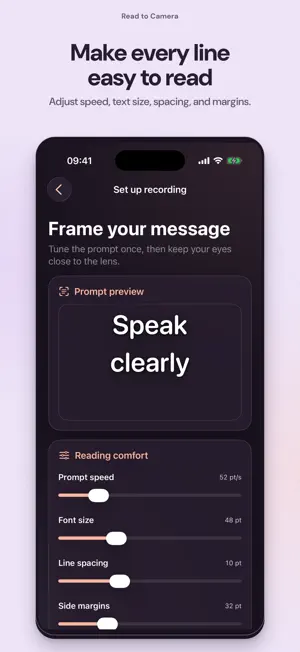
Read to Camera turns your iPhone into a focused teleprompter and front-camera recorder. Keep your script close to the lens, speak naturally, and create a clean video without memorizing every line. READ WITH CONFIDENCE • Write or paste scripts in a private on-device library • Adjust scrolling speed, text size, spacing, margins and text color • Mirror only the prompt for a beam-splitter setup while your saved video stays normal • Choose a 3, 5, or 10 second countdown RECORD A CLEAN VIDEO • Record with the front camera and microphone, or explicitly continue without sound • Choose portrait or landscape before recording and keep that orientation locked • Pause or resume the prompt and change its speed while recording • Preview, save to Photos, share, or record another take • Prompt controls never appear in the finished video TRY THE COMPLETE WORKFLOW Access varies: some can export one watermark-free video; others need Pro before recording. See yourself with the words over your camera. This preview is not recorded. PRIVATE BY DESIGN Your scripts and recording drafts stay on this iPhone. Read to Camera needs no account, cloud workspace, or product-owned server. Product analytics is enabled by default and can be turned off in Settings; analytics never includes scripts, recordings, camera video or microphone audio. PRO OPTIONS Pro recording features require an in-app purchase. Monthly and Annual subscriptions unlock the same features and renew automatically unless canceled. Lifetime unlocks the same features with one purchase and no renewal. Restore is available in Settings and the paywall. Built for creators, presenters, educators, auditions, courses, product videos, social content, and any moment when you want to speak clearly without looking away from the lens. Terms of Use (EULA): https://www.apple.com/legal/internet-services/itunes/dev/stdeula/
What’s new
Version 1.0.7 · Updated October 23, 2026
Start your first take in fewer steps: a camera greeting, your own script, a practice run, then recording setup. Clearer main actions, better support for larger text, and reliability and analytics fixes. Practice still shows text on a transparent background over the camera without recording.
App privacy
The developer, Yurii Koshkin, reported these privacy practices to Apple.
Data Not Linked to You
The following data, which may be collected but is not linked to your identity, may be used for the following purposes:
- Purchases: Purchase History
- Identifiers: Device ID
- Usage Data: Product Interaction
Used for: Analytics
Alternatives to Teleprompter: Read to Camera
Looking for apps like Teleprompter: Read to Camera? Here are 6 similar apps on the App Store. The highest rated is CuePrompt: Teleprompter (5.0/5), and 5 of the 6 are free to download.
-
 Glide: Teleprompter for Reels
-
 BogoCam - Flip & Dual Camera
-
 Teleprompter: CueRoll
-
 Lines: Teleprompter for Video
-
 CuePrompt: Teleprompter
5.0
-
 SpeakCam - Voice Teleprompter
| App | Rating | Price | Last updated | Compare |
|---|---|---|---|---|
| Teleprompter: Read to Camera | – | Free | October 23, 2026 | |
| Glide: Teleprompter for Reels | – | Free | Sep 24, 2026 | Compare |
| BogoCam - Flip & Dual Camera | – | 1.99 USD | Sep 8, 2026 | Compare |
| Teleprompter: CueRoll | – | Free | Sep 11, 2026 | Compare |
| Lines: Teleprompter for Video | – | Free | Apr 25, 2026 | Compare |
| CuePrompt: Teleprompter | 5.0 / 5 (1) | Free | Oct 11, 2026 | Compare |
| SpeakCam - Voice Teleprompter | – | Free | Oct 1, 2026 | Compare |