

RepSplit: Rep Counter on Video
ENDCODE SRL Health & Fitness iPhoneiPadiPod touch
RepSplit: Rep Counter on Video is a free Health & Fitness app for iPhone and iPad by ENDCODE SRL. Requires iOS 26.0. Updated October 11, 2026.
- Price
- Free
- on the App Store
- Size
- 7 MB
- Age 4+
- Updated
- Oct 11
- 2026 · v1.1
Screenshots

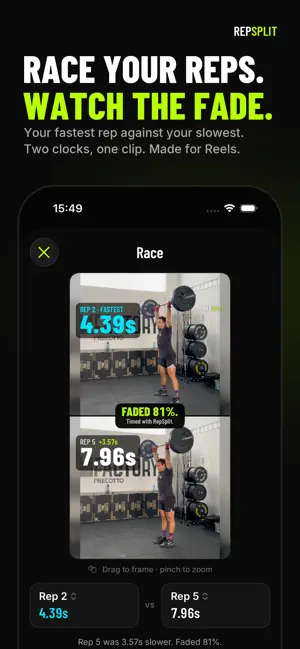


About RepSplit: Rep Counter on Video
You did the work. Now show it. Import any workout video — double unders, burpees, wall balls, pull-ups — and RepSplit overlays your rep count, splits and pace directly on the footage. Pick a style, export, post. Your PR, with receipts. NEW: RACE YOUR REPS Pick two reps from any set and RepSplit puts them in one vertical clip. Both clocks start together, the faster rep stops first, and the video ends on your fade. Your fastest against your slowest, made for Reels and TikTok. Your first race is free. HOW IT WORKS 1. Import a clip from Photos or Files. 2. Tap along. Scrub the filmstrip and tap + on every rep, or slow the clip to 0.25× and tap in rhythm while it plays. 3. Style it. Choose an overlay look and which stats ride along. 4. Export. RepSplit burns the live counter, the running clock, your last split and the pace trend into the video, sized for Reels, TikTok and Stories. WHAT YOU GET • Live rep counter overlay, in multiple styles • Rep-by-rep splits: fastest, slowest and average pace • Your fastest rep flagged on the video the moment it happens • A pace trend line that shows where you held on and where you faded • Race videos: two reps side by side, two clocks, one verdict • Every session saved automatically, with a chart and full rep list • Compare each set with your previous one and your best • Track pace over time, per movement • Custom movements for anything not in the list • Fast 1080p export, ready to post BUILT FOR FUNCTIONAL FITNESS Double unders, burpees, wall balls, thrusters, pull-ups, toes-to-bar, box jumps, snatches, clean & jerks, deadlifts, push-ups, muscle-ups, handstand push-ups, kettlebell swings, air squats, sled pushes and more. One movement per set, every split counted. FREE, WITH A PRO FINISH Import, marking, every movement, all stats, history, PRs, comparisons and a real 1080p export are free. So is your first race video. RepSplit Pro is a one-time purchase that unlocks unlimited race videos, the Bold and Neon overlay looks (and every look added in the future), the rep list on the video, no wordmark, and original-quality export. PRIVATE BY DESIGN Your videos never leave your phone. No account, no upload, no cloud. Everything is rendered on device. Every rep. Every split. On film.
What’s new
Version 1.1 · Updated October 11, 2026
Race your reps. Pick two reps from any set and RepSplit stacks them in one vertical clip. Both clocks start together, the faster rep stops first, and the video ends on your fade. Made for Reels, TikTok and Shorts. Your first race is free. A steadier timeline. Reps, the start flag and the playhead now move exactly as far as your finger, at any zoom. In a busy set you always pick up the rep closest to your finger. A live clock. The clock in the editor now runs while the clip plays, just like it does in the exported video.
App privacy
The developer, ENDCODE SRL, reported these privacy practices to Apple.
Data Not Linked to You
The following data, which may be collected but is not linked to your identity, may be used for the following purposes:
- Usage Data: Product Interaction
Used for: Analytics
Alternatives to RepSplit: Rep Counter on Video
Looking for apps like RepSplit: Rep Counter on Video? Here are 6 similar apps on the App Store. The highest rated is BRIK: Home Workout Generator (4.9/5), and all 6 are free to download.
-
 ActiCount - AI Rep Counter
-
 FinalRep Training App
-
 Hybrid Flow
-
 Desmotec Connect
-
 BRIK: Home Workout Generator
4.9
-
 cadenza | run better
2.5
| App | Rating | Price | Last updated | Compare |
|---|---|---|---|---|
| RepSplit: Rep Counter on Video | – | Free | October 11, 2026 | |
| ActiCount - AI Rep Counter | – | Free | Oct 8, 2026 | Compare |
| FinalRep Training App | – | Free | Oct 23, 2026 | Compare |
| Hybrid Flow | – | Free | Oct 22, 2026 | Compare |
| Desmotec Connect | – | Free | May 27, 2025 | Compare |
| BRIK: Home Workout Generator | 4.9 / 5 (13) | Free | Jun 13, 2026 | Compare |
| cadenza | run better | 2.5 / 5 (2) | Free | May 29, 2024 | Compare |