

Piano Keyfall
KEVIN CHRISTOPHER FLANAGAN Games iPhoneiPadiPod touch
Piano Keyfall is a free Games app for iPhone and iPad by KEVIN CHRISTOPHER FLANAGAN. Requires iOS 17.0. Updated October 5, 2026.
- Price
- Free
- on the App Store
- Size
- 3 MB
- Age 4+
- Updated
- Oct 5
- 2026 · v1.1.0
Screenshots



About Piano Keyfall
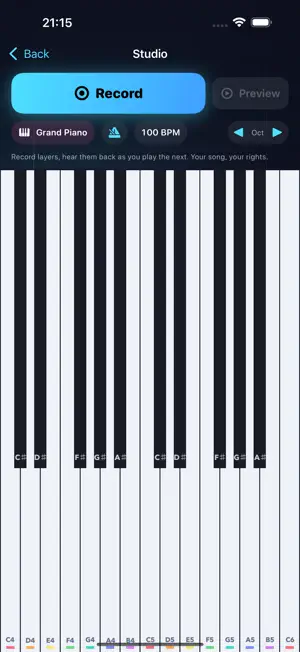
Turn your screen into a glowing piano. Notes fall toward the keys: tap on the beat, hold the long notes, and hear the music you play. FIND YOUR RHYTHM Start with a guided first lesson and forgiving white-key charts. Color-coded notes, key labels, and EARLY/LATE hints help you improve your timing. Explore seventeen charts, including original music, Ode to Joy, Für Elise, and The Entertainer. PLAY AT YOUR TEMPO Choose 0.75× practice, standard 1×, or a faster 1.25× challenge. Switch between portrait and landscape for more room at the keyboard; the song pauses while you adjust. Play chords and slide between keys with multitouch controls. Earn judgments, combos, stars, and grades, then use your results coaching to plan the next run. A crowd celebrates your performance, with bigger reactions as your accuracy, combos and completed holds improve. Return for a daily challenge and track your progress in Career. MAKE AND SHARE MUSIC Record your own songs in the Studio and share them as playable levels. Near-perfect performances can be saved as replays, ready for friends to watch and try themselves. Recording captures piano-note data; no microphone is needed. PLAY OFFLINE Gameplay, Studio recording, and local progress work offline. No account is required to play. No ads and no subscriptions. Enjoy five minutes of gameplay free each day. One optional Piano Keyfall Forever purchase removes the daily timer. Studio recording, sharing, and replay watching remain free. App Store purchases and optional online services require a connection. Pick a song, count in, and play.
What’s new
Version 1.1.0 · Updated October 5, 2026
Play with more room and more feedback in this update: • Switch between portrait and landscape for a wider piano keyboard. Your song pauses while you adjust. • Celebrate each performance with a crowd that cheers more as your accuracy, combos and completed holds improve. • Feel and see your progress through long notes, with clearer hold feedback and practice coaching. • Play two new original compositions: Neon Current and Afterglow Steps, with levels for different abilities. • Enjoy clearer chord feedback and more readable pause controls at larger text sizes. • Includes fixes for interrupted holds, shared performances, saved replays, daily challenges and audio reliability.
Play today's Inkspill puzzle
Spread your ink until the whole board is one color, within the move limit. A free daily puzzle from Fiplay, same board for everyone. It plays right here, no download.
App privacy
The developer, KEVIN CHRISTOPHER FLANAGAN, reported these privacy practices to Apple.
Data Not Collected
The developer does not collect any data from this app.
Alternatives to Piano Keyfall
Looking for apps like Piano Keyfall? Here are 6 similar apps on the App Store. The highest rated is i Classic Piano 3D (5.0/5), and 5 of the 6 are free to download.
-
 i Classic Piano 3D
5.0
-
 Nail Salon: Manicure for Girls
4.4
-
 Charades Party Game: Guess On!
1.5
-
 Cat Piano – Animal Sounds
5.0
-
 Supermarket Maths: Learn & Fun
-
 Go Fish | Card Game
4.5
| App | Rating | Price | Last updated | Compare |
|---|---|---|---|---|
| Piano Keyfall | – | Free | October 5, 2026 | |
| i Classic Piano 3D | 5.0 / 5 (2) | 2.99 USD | Dec 1, 2023 | Compare |
| Nail Salon: Manicure for Girls | 4.4 / 5 (12) | Free | Oct 29, 2026 | Compare |
| Charades Party Game: Guess On! | 1.5 / 5 (2) | Free | Oct 19, 2026 | Compare |
| Cat Piano – Animal Sounds | 5.0 / 5 (1) | Free | Sep 4, 2025 | Compare |
| Supermarket Maths: Learn & Fun | – | Free | Apr 18, 2025 | Compare |
| Go Fish | Card Game | 4.5 / 5 (171) | Free | Aug 12, 2024 | Compare |
Compare Piano Keyfall with the top alternatives: ratings, updates, ASO score and keyword gaps →