

Invoice Maker: Create & Track
Selitics Business iPhoneiPadiPod touch
Invoice Maker: Create & Track is a free Business app for iPhone and iPad by Selitics. Requires iOS 15.0. Updated October 22, 2026.
- Price
- Free
- on the App Store
- Size
- 38 MB
- Age 4+
- Updated
- Oct 22
- 2026 · v1.0.1
Screenshots



About Invoice Maker: Create & Track
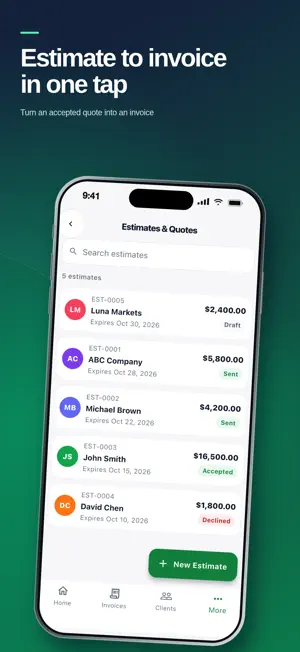
Create invoices and estimates on your iPhone, turn an estimate into an invoice in one tap, and share the PDF with your client from the share sheet — WhatsApp, Messages, Mail, AirDrop or any app you already use. Know where every invoice stands. Record payments in full or in parts, and invoices past their due date are marked overdue automatically. Your phone reminds you about due and overdue invoices. WHAT YOU CAN DO • Invoices and estimates with your logo and brand colour • Convert an accepted estimate into an invoice in one tap • Share invoices as PDF through the iOS share sheet • Record full and partial payments; see the balance left • Automatic overdue status, with overdue grouped by age • Email a payment reminder to an overdue client in one tap • Recurring invoice schedules with a reminder, then create the invoice in one tap • Saved clients and items, so repeat jobs take seconds • Reports: revenue collected, accounts receivable aging, top clients, sales tax collected on paid invoices • Several businesses in one app, each with its own details and currency • 36 currencies and 7 languages: English, Spanish, French, German, Portuguese, Turkish, Arabic • Works offline; syncs to your account when you're back online PLANS Every plan includes unlimited invoices, estimates and clients. Plans differ only in how many businesses you run: • Standard — 1 business — $5.99/month or $49.99/year • Pro — up to 3 businesses — $9.99/month or $79.99/year • Elite — unlimited businesses — $19.99/month Start with a 14-day free trial when you create your account; no payment details needed. When the trial ends, the app becomes view-only until you subscribe; nothing is deleted. Subscriptions are billed monthly or yearly to your Apple ID, renew automatically unless cancelled at least 24 hours before the end of the period, and can be managed or cancelled in your Apple ID account settings. Prices may vary by country. Invoice Maker creates PDF invoices for your business. It is not an e-invoicing or accounting system and does not give tax advice. Terms of Use (EULA): https://www.apple.com/legal/internet-services/itunes/dev/stdeula/ Privacy Policy: https://invoice.selitics.org/privacy Support: [email protected]
What’s new
Version 1.0.1 · Updated October 22, 2026
• Email a payment reminder to overdue clients in one tap • Rate the app right after you mark an invoice as paid • Clearer wording on the Overdue screen and paywall • The App Store now lists all 7 app languages • Small fixes and improvements
App privacy
The developer, Selitics, reported these privacy practices to Apple.
Data Linked to You
The following data, which may be collected and linked to your identity, may be used for the following purposes:
- Purchases: Purchase History
- Contact Info: Physical Address, Email Address, Name, Phone Number, Other User Contact Info
- User Content: Photos or Videos, Other User Content
- Identifiers: User ID, Device ID
Used for: App Functionality
Alternatives to Invoice Maker: Create & Track
Looking for apps like Invoice Maker: Create & Track? Here are 6 similar apps on the App Store. The highest rated is Invoice Maker - InvoiceFinch (5.0/5), and all 6 are free to download.
-
 Real by Amwaj
-
 Sajilni Lead Retrieval
-
 Invoice Maker - InvoiceFinch
5.0
-
 Rental Inspector
4.0
-
 Fabricar
-
 QuickWash: Mobile Car Wash
| App | Rating | Price | Last updated | Compare |
|---|---|---|---|---|
| Invoice Maker: Create & Track | – | Free | October 22, 2026 | |
| Real by Amwaj | – | Free | Oct 2, 2026 | Compare |
| Sajilni Lead Retrieval | – | Free | Jun 4, 2026 | Compare |
| Invoice Maker - InvoiceFinch | 5.0 / 5 (1) | Free | Nov 2, 2026 | Compare |
| Rental Inspector | 4.0 / 5 (4) | Free | Aug 17, 2026 | Compare |
| Fabricar | – | Free | Jul 31, 2026 | Compare |
| QuickWash: Mobile Car Wash | – | Free | Oct 14, 2026 | Compare |