

REK: Audio Recorder for Synths
Agli Panci Music iPhoneiPadiPod touch
REK: Audio Recorder for Synths is a free Music app for iPhone and iPad by Agli Panci. Rated 5.0/5 from 2 ratings. Requires iOS 18.0.
- Rating
- 5.0
- 2 ratings
- Price
- Free
- on the App Store
- Size
- 5 MB
- Age 4+
- Updated
- Oct 22
- 2026 · v1.4.1
Screenshots


About REK: Audio Recorder for Synths
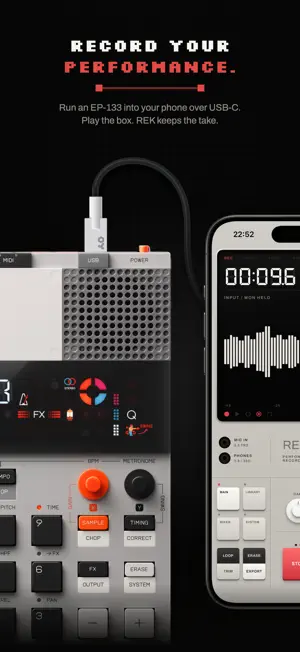
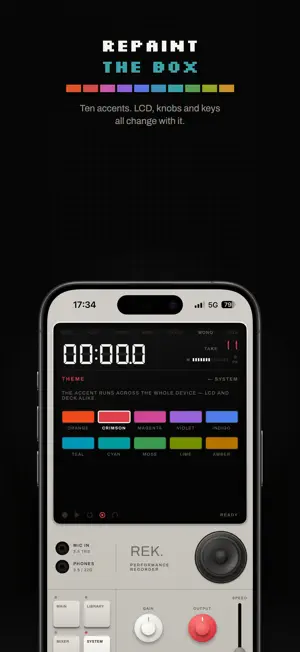
Record your synth, groovebox or drum machine straight into your iPhone, up to four tracks at once. Plug in over USB-C, press RECORD, and the take is saved: 32-bit float, up to 96 kHz, ready for your DAW as a mix or as stems. REK is a recorder built like a piece of hardware: one screen, one deck of keys and knobs, nothing to set up and nothing to name. It works with class-compliant USB audio devices and with the iPhone's own microphone. PLUG IN AND RECORD • Class-compliant USB audio: interfaces, mixers, grooveboxes and synths with USB audio out. • Up to four tracks in one take, each on the input you choose: a single input or a stereo pair. Every input lights up with its signal, so you can see which one you are playing into. • The tracks are cut from the same audio, so they line up to the sample. • 32-bit float by default, so a hot signal is stored instead of clipped. 24-bit and 16-bit too, at 44.1, 48 or 96 kHz. • Gain in 2 dB steps, and what you hear while monitoring is what's being written. • Left and right meters with a peak lamp, and a meter for every track. MIX IT • Every take opens on channel strips: level, pan, mute and solo per track. • You hear changes as you make them, and they are saved with the take. • An export contains exactly what you hear. NEVER MISS THE FIRST NOTE • Head start: REK is always listening, so the second before you press RECORD is on the take. • Hands free: press RECORD and the take starts when you start playing. • Count-in: one or two bars of click, and the take starts on the downbeat. • Pause and resume while recording, with a clean join. • Record from the Action Button, Control Center, the Lock Screen or Siri. LOOP IT, PITCH IT • Loop any take, and trim the start and end without touching the original file. • Record length: set 1 to 16 bars and the take ends exactly on the bar, then loops. • Varispeed from ×0.50 to ×1.50, pitch and all, like tape. • Metronome from 40 to 240 BPM, through the take or through playback too. • Keep listening with the phone locked, with play and stop on the Lock Screen. GET IT OUT • WAV, AIFF or AAC, to your DAW, AirDrop, Files or Messages. • Stems: one WAV per track, named for the performance and its track. • WAV keeps the take's own bit depth, so lossless means lossless. • Optional peak normalize, off by default, so an ordinary export is untouched. YOUR TAKES • Plain audio files in the Files app, named for the minute they were recorded. No account, no cloud, no database. • Rename them, tag them (VOCALS, DRUMS, IDEAS, LOOP or your own), and filter the library by tag. THE DEVICE • Light, dark or system finish, and ten accent colours. • Haptics on every key, knob, fader and mixer strip, at the strength you choose. • Double-tap any control to snap it home. • VoiceOver throughout, and Dynamic Type on the display. • Long-press the speaker to blow it. Playback only: your recordings are never touched. FREE TO TRY Everything works from the first launch, with takes up to one minute long. The mixer, looping, trimming, tags and export are never limited, so you'll never record something good and then find you can't get it out. One purchase removes the limit for good. No subscription, no account, no ads, no analytics. Requires iOS 18 or later.
What’s new
Version 1.4.1 · Updated October 22, 2026
The ten accent colors under SYSTEM › THEME have new names, taken from sound: REK for the crimson REK ships in, then VALVE, DISCO, VELVET, BLUES, SURF, WAVE, CIRCUIT, ACID and BRASS. The colors themselves are unchanged, and the one you chose stays selected.
App privacy
The developer, Agli Panci, reported these privacy practices to Apple.
Data Not Collected
The developer does not collect any data from this app.