

CROSSROOM: Cross Process Film
kazunari aoki Photo & Video iPhoneiPadiPod touch
CROSSROOM: Cross Process Film is a free Photo & Video app for iPhone and iPad by kazunari aoki. Requires iOS 17.0. Updated September 26, 2026.
- Price
- Free
- on the App Store
- Size
- 11 MB
- Age 4+
- Updated
- Sep 26
- 2026 · v1.1.2
Screenshots


About CROSSROOM: Cross Process Film
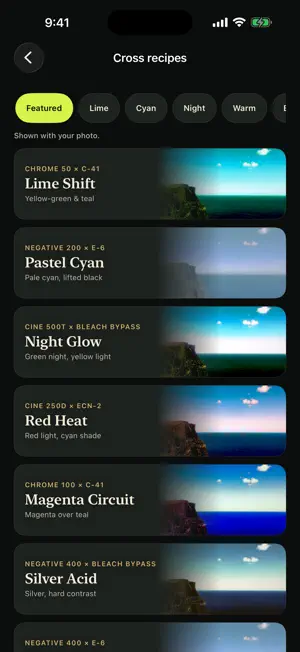
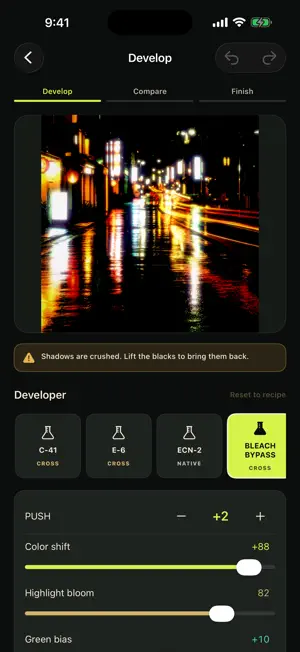
■ Put a film through the wrong developer Cross processing means developing film in chemistry it was never made for. The colour breaks, and the shadows and highlights drift in opposite directions. CROSSROOM is a darkroom that rebuilds that chemical accident as numbers. ■ Choose by the colour you want Pick a recipe by its finished look, not by a film name. ・Lime Shift yellow-green highlights, blue-green shadows ・Pastel Cyan lifted blacks, pale cyan ・Night Glow deep green shadows, light that saturates to yellow ・Red Heat red-orange highlights, cyan shadows ・Magenta Circuit magenta midtones over teal shadows ・Silver Acid low saturation, hard contrast, heavy grain ・Blue Ember deep blue shadows against warm light ・Cobalt Edge only the sky sinks into deep blue, the ground stays gold ・Amber Static amber light, olive shadows ■ The colour crosses over, it isn't laid on top Within one photograph the dark areas and the bright areas move in opposite directions. That is what separates this from a filter that tints everything. ■ Take the process apart Swap the developer. Push the film. Move colour shift, highlight bloom, green bias, contrast and temperature. Choose grain, halation and paper. Save a combination as your own recipe and reuse it on other photographs. ■ Compare before you commit A split screen puts the processed frame against the original. Touch and hold to see the original full frame. ■ Your photos never leave the device Everything runs on your iPhone. No account, no server, no ads, no analytics. Location data is always stripped from exported images. ■ One purchase No subscription. Free users can choose from two recipes, compare and export. Nothing is watermarked. ■ About the film names Every film, developer and paper name in this app is invented. They are not reproductions of real products. Terms of Use: https://akiaki1984-alt.github.io/app-legal/crossroom/terms/ Privacy Policy: https://akiaki1984-alt.github.io/app-legal/crossroom/privacy/
What’s new
Version 1.1.2 · Updated September 26, 2026
• You can now save free recipes from "Compare & save" in fewer steps • If the price can't be loaded, you can now load it again • If a purchase or saving to Photos doesn't go through, the app now tells you why right away
App privacy
The developer, kazunari aoki, reported these privacy practices to Apple.
Data Not Collected
The developer does not collect any data from this app.
Alternatives to CROSSROOM: Cross Process Film
Looking for apps like CROSSROOM: Cross Process Film? Here are 6 similar apps on the App Store.
-
 필터하나 바꿨을 뿐인데 인생샷이 나왔다.
-
 PaintLapse: Art Timelapse Lite
-
 AI Camera UULab
-
 Jeju Filter: Landscape Camera
-
 Patina Film: Photo Editor
-
 Trilog - Photo Diary,Journal
| App | Rating | Price | Last updated | Compare |
|---|---|---|---|---|
| CROSSROOM: Cross Process Film | – | Free | September 26, 2026 | |
| 필터하나 바꿨을 뿐인데 인생샷이 나왔다. | – | Free | Sep 13, 2026 | Compare |
| PaintLapse: Art Timelapse Lite | – | Free | Sep 22, 2026 | Compare |
| AI Camera UULab | – | Free | Jul 27, 2026 | Compare |
| Jeju Filter: Landscape Camera | – | Free | Sep 10, 2026 | Compare |
| Patina Film: Photo Editor | – | Free | Sep 29, 2026 | Compare |
| Trilog - Photo Diary,Journal | – | Free | Aug 25, 2026 | Compare |