

PicBroom: Swipe Photo Cleaner
Hyunwoo Lee Photo & Video iPhoneiPadiPod touch
PicBroom: Swipe Photo Cleaner is a free Photo & Video app for iPhone and iPad by Hyunwoo Lee. Requires iOS 17.0. Updated October 17, 2026.
- Price
- Free
- on the App Store
- Size
- 2 MB
- Age 4+
- Updated
- Oct 17
- 2026 · v1.0.2
Screenshots


About PicBroom: Swipe Photo Cleaner
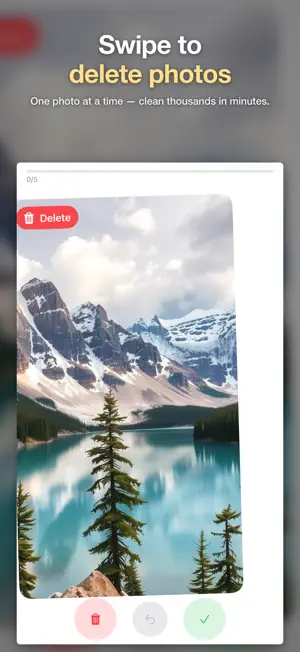
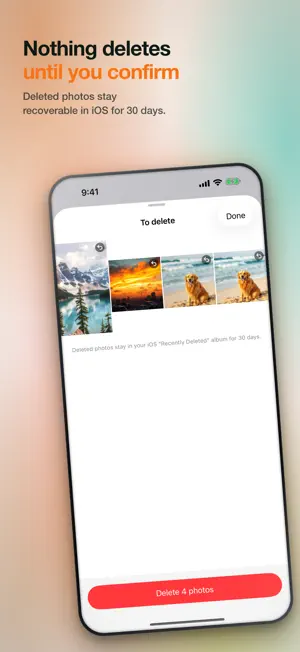
Your camera roll is full of photos you'll never look at again. PicBroom makes cleaning them fast — and even fun: swipe left to delete, swipe right to keep. That's the whole app. No account, no cloud, no ads. SWIPE TO CLEAN · One photo at a time, full screen — decide in a second · Review month by month, oldest clutter first · Undo anytime; nothing is deleted until you confirm · Deleted photos stay in iOS "Recently Deleted" for 30 days SIMILAR SHOTS — KEEP ONLY THE BEST Bursts, retakes, five almost-identical shots of the same moment: PicBroom groups them on your device and suggests the sharpest one to keep. Confirm, and the rest are queued for deletion in one tap. SEE WHAT YOU GET BACK Every session ends with the number that matters: how many photos you cleaned and how many gigabytes you freed. 100% ON-DEVICE, BY DESIGN Your photos are analyzed with Apple's on-device Vision framework. Nothing is uploaded, ever. No account, no server, no tracking. 7-DAY FREE TRIAL FOR ELIGIBLE NEW SUBSCRIBERS Eligible new subscribers get everything unlocked for 7 days, free. After the trial it converts to a monthly subscription unless you cancel. If you've already used a trial, the monthly plan starts right away at the price shown. Prefer to own your tools? There's a one-time lifetime license instead. Prices and renewal terms are shown plainly before you pay; cancelling is one tap in your Apple Account settings. Questions or ideas: [email protected] Payment is charged to your Apple Account at confirmation of purchase. If you're eligible for the free trial, it converts to a paid monthly subscription unless it is cancelled at least 24 hours before the trial ends. A subscription renews automatically unless it is turned off at least 24 hours before the end of the current period. You can manage or cancel a subscription in your Apple Account settings after purchase. The lifetime purchase is a one-time payment and does not renew. Terms of Use: https://www.apple.com/legal/internet-services/itunes/dev/stdeula/ Privacy Policy: https://appfactory-studio.vercel.app/privacy/photo-sweep.html
What’s new
Version 1.0.2 · Updated October 17, 2026
• New Settings tab: see your plan, restore purchases, manage your subscription and open the privacy policy and terms. • If plans can't load, you now get a clear message and a Retry button instead of an endless spinner. • The 7-day trial is shown only when your account is eligible for it. • More reliable storage-size calculation when you confirm deletions.
App privacy
The developer, Hyunwoo Lee, reported these privacy practices to Apple.
Data Not Collected
The developer does not collect any data from this app.
Alternatives to PicBroom: Swipe Photo Cleaner
Looking for apps like PicBroom: Swipe Photo Cleaner? Here are 6 similar apps on the App Store. The highest rated is Lumi: AI Photo Cleaner (5.0/5), and all 6 are free to download.
-
 Photo Cleaner Blanc: Storage
-
 Lumi: AI Photo Cleaner
5.0
Lumi: AI Photo Cleaner
5.0
-
 VideoAI: Animate Photos AI
4.8
VideoAI: Animate Photos AI
4.8
-
 Cool-Art: AI Photo Generator
1.8
Cool-Art: AI Photo Generator
1.8
-
 FaceStyle-AI Art Generator
4.5
FaceStyle-AI Art Generator
4.5
-
 HotAi Lab – AI Photo Editor
5.0
HotAi Lab – AI Photo Editor
5.0
| App | Rating | Price | Last updated | Compare |
|---|---|---|---|---|
| PicBroom: Swipe Photo Cleaner | – | Free | October 17, 2026 | |
| Photo Cleaner Blanc: Storage | – | Free | Oct 21, 2026 | Compare |
| Lumi: AI Photo Cleaner | 5.0 / 5 (2) | Free | Oct 18, 2026 | Compare |
| VideoAI: Animate Photos AI | 4.8 / 5 (6) | Free | Oct 20, 2026 | Compare |
| Cool-Art: AI Photo Generator | 1.8 / 5 (4) | Free | Aug 7, 2026 | Compare |
| FaceStyle-AI Art Generator | 4.5 / 5 (153) | Free | Oct 24, 2023 | Compare |
| HotAi Lab – AI Photo Editor | 5.0 / 5 (30) | Free | Aug 19, 2026 | Compare |