

Tactical Timetable: Duty Plan
SIA CrowFoundry Productivity iPhoneiPadiPod touchMacApple Watch
Tactical Timetable: Duty Plan is a free Productivity app for iPhone and iPad by SIA CrowFoundry. Requires iOS 16.0. Updated November 12, 2026.
- Price
- Free
- on the App Store
- Size
- 61 MB
- Age 4+
- Updated
- Nov 12
- 2026 · v1.2.0
Screenshots
Save to Pinterest


About Tactical Timetable: Duty Plan
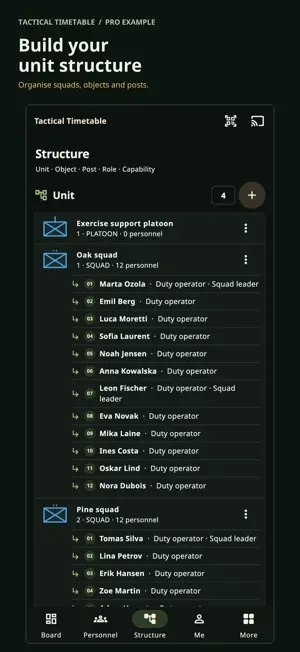
Know who is on duty, where they belong and when they can rest. Tactical Timetable brings your roster, posts, equipment and handovers into one offline workspace, from a personal duty card to a large-screen operations centre. • Build a qualified roster. Organise people, roles, capabilities and equipment, then assign them to posts and time blocks. • Plan fair rotations with Pro. Preserve manual assignments, fill remaining positions and review rest or qualification conflicts before applying the result. • Keep handovers traceable. Record comments, events, 5W and 9-Line reports in a tamper-evident journal; export PDF, JSON and encrypted files with Pro. • TOC (tactical operations centre) mode gives the timetable and selected duty more room on large screens. Pro: Present the mission board on a TV with Cast. • Find what needs attention. Search posts or people and filter unfilled posts, double bookings and qualification problems without losing your selected duty. • Keep nearby teams in step. Encrypted Hopweave mesh sync uses expiring QR invitations, signed roles and visibility limits. Routes, queues and packet receipts stay visible. Your operational data stays in encrypted storage on your device. There is no timetable account or CrowFoundry mission cloud. You choose when to share files, link nearby devices or sync personal calendar events. Technical fault reporting is disabled in this release. Start free with LITE: one operation, one object, one squad, six people, three posts and twelve time blocks. Join with a personal-duty QR to receive only your next three relevant duties and basic reminders. Pro Lifetime is one in-app purchase, with no subscription. It unlocks the full shared timetable, mesh relaying, automatic rotation, reports, exports and companions. The store shows your local price before purchase. LITE planning works on phones, tablets and Mac. On Apple devices, buy Pro or restore it with the same Apple Account. Apple Watch needs Pro on its paired iPhone. Activate Windows with a one-time code from your Pro phone; there is no separate Windows purchase. Purchases, restoration and initial activation need internet. A scheduling aid for responsible human use. Review staffing, rest and critical alarms independently. NATO-style symbols do not imply NATO endorsement or certification.
What’s new
Version 1.2.0 · Updated November 12, 2026
Find duties faster with search and live Unfilled and Issues filters. TOC (tactical operations centre) mode gives the timetable and selected duty more room on large screens. Offline team sync now uses the Hopweave engine for encrypted routing, durable queues and delivery receipts while retaining signed roles and visibility controls.
App privacy
The developer, SIA CrowFoundry, reported these privacy practices to Apple.
Data Linked to You
The following data, which may be collected and linked to your identity, may be used for the following purposes:
- Purchases: Purchase History
Used for: App Functionality
Data Not Linked to You
The following data, which may be collected but is not linked to your identity, may be used for the following purposes:
- Location: Coarse Location
- Identifiers: Device ID
- Diagnostics: Crash Data, Performance Data
Used for: App Functionality
Alternatives to Tactical Timetable: Duty Plan
Looking for apps like Tactical Timetable: Duty Plan? Here are 6 similar apps on the App Store. The highest rated is GitBot (5.0/5), and all 6 are free to download.
-
 MapBrief
-
 GeoMaps - Map Your Data
-
 CopoHub: GitHub Trending
-
 GitBot
5.0
-
 SafeX by Safe Security
4.8
-
 Mesh++
4.2
| App | Rating | Price | Last updated | Compare |
|---|---|---|---|---|
| Tactical Timetable: Duty Plan | – | Free | November 12, 2026 | |
| MapBrief | – | Free | Oct 19, 2026 | Compare |
| GeoMaps - Map Your Data | – | Free | Nov 1, 2026 | Compare |
| CopoHub: GitHub Trending | – | Free | Nov 11, 2026 | Compare |
| GitBot | 5.0 / 5 (1) | Free | Mar 20, 2026 | Compare |
| SafeX by Safe Security | 4.8 / 5 (22) | Free | Nov 1, 2026 | Compare |
| Mesh++ | 4.2 / 5 (13) | Free | Jun 28, 2026 | Compare |