

Audio Converter & Music Editor
Jackie Martinez Utilities iPhoneiPadiPod touch
Audio Converter & Music Editor is a free Utilities app for iPhone and iPad by Jackie Martinez. Requires iOS 15.0. Updated September 19, 2026.
- Price
- Free
- on the App Store
- Size
- 49 MB
- Age 4+
- Updated
- Sep 19
- 2026 · v1.0.0
Screenshots


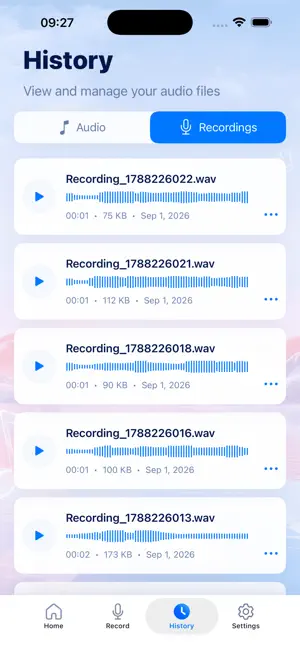
About Audio Converter & Music Editor
Edit, convert, merge, enhance, and manage your audio with ease. Whether you want to trim a recording, convert audio formats, merge multiple clips, adjust volume, reduce background noise, or create ringtones, podcast clips, and voice content, this audio tool helps you get it done quickly and effortlessly. No complicated workflows or professional audio knowledge required. With just a few simple steps, you can edit your audio anytime, anywhere, and make every clip sound just the way you want. 【Key Features】 - Audio Format Converter Import and process a wide range of audio and video formats. Customize sample rate, audio channels, bitrate, and bit depth based on your needs. - Audio Cutter & Trimmer Trim audio with precision and keep only the parts you need. Quickly remove unwanted sections and create clean, polished clips in just a few taps. - Video to Audio Converter Import a video and automatically extract its audio. Export the result in your preferred audio format for easy editing, sharing, or reuse. - Audio Enhancement & Noise Reduction Improve audio clarity and vocal detail with adjustable enhancement levels. Reduce persistent background noise with multiple noise reduction strengths, and compare the original and processed audio before saving. - Audio Merger Combine multiple audio files into one seamless track. Rearrange clips, remove unwanted sections, preview the result, and export everything as a single continuous audio file. - Audio Speed Control Speed up or slow down your audio with a simple swipe while keeping voices and music sounding natural. Perfect for quick listening, reviewing recordings, or creating new audio variations. - Volume Booster & Reducer Adjust volume from 0% to 200%. Lower audio that is too loud, boost quieter recordings, and preview the result before exporting. - Audio Compressor Reduce audio file size with multiple compression options. View the estimated output size and storage savings in real time, while keeping your original file unchanged. 【Simple Audio Editing for Everyone】 We believe audio editing should be simple. There is no need to learn complicated timelines, technical settings, or professional editing software. Even if you are using an audio editor for the first time, you can quickly trim, merge, convert, enhance, and export your files. From making a quick adjustment to a single recording to processing multiple audio files, everything is designed to be faster, easier, and more convenient. Privacy Policy: https://docs.qq.com/doc/p/1d495bcd4ee18d8d1f666bba54844c7cf0fb8c49 User Agreement: https://docs.qq.com/doc/p/effd28bb24e8467ecda588a4a9ffe5acac2015cd
App privacy
The developer, Jackie Martinez, reported these privacy practices to Apple.
Data Not Linked to You
The following data, which may be collected but is not linked to your identity, may be used for the following purposes:
- Diagnostics: Crash Data
Used for: App Functionality
Alternatives to Audio Converter & Music Editor
Looking for apps like Audio Converter & Music Editor? Here are 6 similar apps on the App Store.
-
 视频伴奏提取
-
 Music Editor - AudioEditormp3
-
 Noise Reducer & Voice Enhancer
-
 Ride Recoder-Recording cycling
-
 铃声制作-可以录制铃声&相册视频导出铃声&手机文件导入铃声
-
 UnionApp
| App | Rating | Price | Last updated | Compare |
|---|---|---|---|---|
| Audio Converter & Music Editor | – | Free | September 19, 2026 | |
| 视频伴奏提取 | – | Free | Oct 20, 2025 | Compare |
| Music Editor - AudioEditormp3 | – | Free | Jan 27, 2026 | Compare |
| Noise Reducer & Voice Enhancer | – | Free | Oct 22, 2026 | Compare |
| Ride Recoder-Recording cycling | – | Free | Sep 11, 2026 | Compare |
| 铃声制作-可以录制铃声&相册视频导出铃声&手机文件导入铃声 | – | Free | Apr 22, 2025 | Compare |
| UnionApp | – | 0.99 USD | Oct 16, 2026 | Compare |