

D-REC: Offline AI Recorder
Knight AI+AV LLC Productivity iPhoneiPadiPod touchApple Watch
D-REC: Offline AI Recorder is a free Productivity app for iPhone and iPad by Knight AI+AV LLC. Rated 5.0/5 from 3 ratings. Requires iOS 17.0.
- Rating
- 5.0
- 3 ratings
- Price
- Free
- on the App Store
- Size
- 45 MB
- Age 4+
- Updated
- Oct 10
- 2026 · v2.8.0
Screenshots


About D-REC: Offline AI Recorder
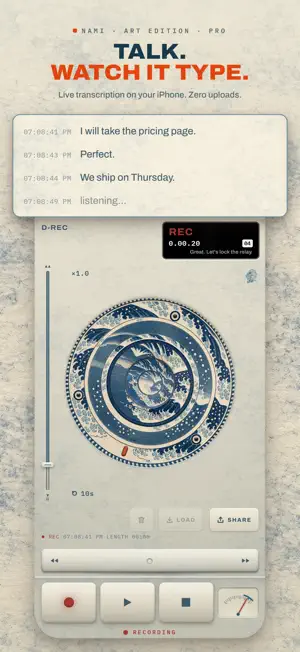
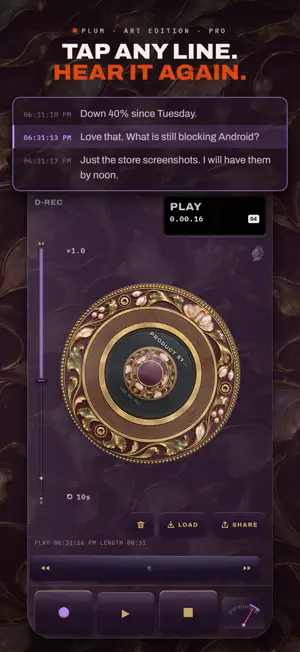
D-REC Digital Scribe is an offline AI recorder that types as you talk. Hit record and every word appears on screen; tap any sentence to hear it again. Recording, transcription and summaries run 100% on your iPhone. Zero uploads. Built for meetings, doctor visits, lectures, interviews and 2 a.m. ideas. RECORD • Press record and the text appears as people speak • Every line carries the time it was said • A new chapter every 5 minutes, each with its own title and recap REWIND • Tap any line to hear that moment again • Turn the wheel or press the rocker to move through the recording, like a tape deck • Search your saved recordings for any word PRIVATE • Transcription runs on your iPhone with Apple's speech recognition, and summaries use Apple's model on your iPhone where it has one • No server ever receives your audio or your text • Recordings and transcripts stay out of iCloud backups, so this iPhone is the only copy • No ads, no trackers, no analytics company EDIT-READY EXPORTS • Type your camera's timecode once and every line carries it, at 24, 25 or 30 fps • Export markers for DaVinci Resolve, colored by kind • Text, CSV and Markdown exports with the time on every line FREE AND PRO Free: record up to 10 minutes at a time, copy the text, and use 5 colorways. A free account also keeps 3 recordings on your iPhone, with summaries of your first 3. Pro: record as long as you want and keep every recording, with summaries, speaker labels and sound labels on all of them. Export files (text, CSV, Markdown, timeline markers), the audio, or just a part of a recording. Cut sentences from a transcript, play your own music in music mode, use all 27 colorways, and get the editor tools: camera timecode and timeline markers. Start a recording with one press of the Action Button. Copying the text is always free. Delete a recording and it is gone from the only place it was kept. Pro is $3.99 a month or $24.99 a year, each after a 7-day free trial for new subscribers, or $39.99 once for Pro Forever. A subscription renews automatically unless cancelled in Settings at least 24 hours before the end of the current period; cancel at least 24 hours before the trial ends and you are not charged. Your account holds only your email address, a sign-in identifier and your plan with its purchase record, never anything you record. ANONYMOUS COUNTS D-REC keeps two anonymous counts, and one switch in Settings turns both off: once a day it notes that a copy was opened, and the first time a copy records, exports, sees the plans, signs in, opens music mode, the checkout or a trial, uses the production tools or answers the rating ask, it notes which. Each carries only a random id and the platform (the daily one also the version), never anything you recorded. Terms of Use: https://drec.live/terms.html Privacy Policy: https://drec.live/privacy.html Made by Knight AI+AV.
What’s new
Version 2.8.0 · Updated October 10, 2026
RECORDING AND WAITING WORDS Record audio while transcription gets ready. The status shows when text is still waiting. That work stays with its own recording when you stop, open another recording or return after an interruption. READABLE CONTROLS Recording names, start times, search counts and engine status have more room on small screens. On small Transcribe screens, messages open below the header with separate actions and scrolling for long text. Crowded recording-limit and recovery views let you reach their text and controls. APP LANGUAGE Choose English, Japanese or Spanish in Settings for the controls and help. Your recordings and their transcript language stay as they are. PRO TOUR An optional Pro tour shows the features available on this device. Open it again from Settings. FINISH CONTROLS Film grain strength controls refresh as soon as grain is switched on or off.
App privacy
The developer, Knight AI+AV LLC, reported these privacy practices to Apple.
Data Linked to You
The following data, which may be collected and linked to your identity, may be used for the following purposes:
- User Content: Other User Content, Customer Support
- Purchases: Purchase History
- Contact Info: Email Address
- Identifiers: User ID
- Diagnostics: Other Diagnostic Data
Used for: Analytics, App Functionality
Data Not Linked to You
The following data, which may be collected but is not linked to your identity, may be used for the following purposes:
- Identifiers: Device ID
- Usage Data: Product Interaction
Used for: Analytics
Alternatives to D-REC: Offline AI Recorder
Looking for apps like D-REC: Offline AI Recorder? Here are 6 similar apps on the App Store. The highest rated is Ringaroo - Ringtone Maker (4.3/5), and all 6 are free to download.
-
 Overtchat
-
 chateAI
-
 Ringaroo - Ringtone Maker
4.3
Ringaroo - Ringtone Maker
4.3
-
 Chat-style to-do list ChatDo
-
 Native Voice Check: AI Speech
-
 LLM Shortcut Toolkit
4.3
LLM Shortcut Toolkit
4.3
| App | Rating | Price | Last updated | Compare |
|---|---|---|---|---|
| D-REC: Offline AI Recorder | 5.0 / 5 (3 ratings) | Free | October 10, 2026 | |
| Overtchat | – | Free | Oct 22, 2026 | Compare |
| chateAI | – | Free | Feb 25, 2026 | Compare |
| Ringaroo - Ringtone Maker | 4.3 / 5 (3) | Free | Jul 1, 2026 | Compare |
| Chat-style to-do list ChatDo | – | Free | Sep 7, 2026 | Compare |
| Native Voice Check: AI Speech | – | Free | Sep 22, 2025 | Compare |
| LLM Shortcut Toolkit | 4.3 / 5 (6) | Free | Oct 23, 2025 | Compare |