

Azukari: Screen Time Friends
Cohen Benjamin Coolidge Lifestyle iPhoneiPadiPod touch
Azukari: Screen Time Friends is a free Lifestyle app for iPhone and iPad by Cohen Benjamin Coolidge. Rated 5.0/5 from 3 ratings. Requires iOS 17.0.
- Rating
- 5.0
- 3 ratings
- Price
- Free
- on the App Store
- Size
- 31 MB
- Age 4+
- Updated
- Oct 14
- 2026 · v0.7.10
Screenshots


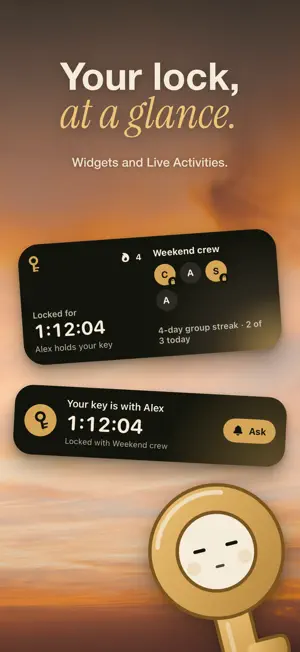
About Azukari: Screen Time Friends
Don’t rely on yourself to lock your apps. Let someone else hold your key. Azukari is an app blocker and screen time limit you share with friends. You lock the apps you choose, such as social media, games, or video. Someone else holds the key, so you cannot quietly undo it. FRIENDS AND ACCOUNTABILITY PARTNERS Create a group and pick the apps on your iPhone. Invite a friend or accountability partner, and they hold your key. When you want an app back, ask from your phone. Your friend can approve a timed break, unlock you, or share the key. Use it to study, focus at work, or cut down on scrolling. Lock until your key holder unlocks you, or for 30 minutes to 4 hours. Lock only the apps you picked, or every app. Key holders confirm with Face ID or their passcode before they unlock you. STREAKS Every day with a lock of 30 minutes or more counts toward your streak. Your group sees everyone's streak, so you keep each other going. SCHEDULES Set daily lock windows, such as school hours or bedtime. Scheduled windows end on their own. Emergency unlocks are limited. FAMILY SCREEN TIME Pick when and what apps your children have locked. A parent chooses the apps on the child’s iPhone and sets the lock times. Kids can ask a parent for the key. PRICING Setting up a group and inviting friends is free. The person who created the group subscribes (monthly or yearly) when they want to lock. Yearly starts with a 7-day free trial. Everyone they invite joins free. PRIVACY Azukari uses Apple’s Screen Time permission to block apps. Your app list stays on this iPhone. Terms of Use: https://azukari.app/terms
What’s new
Version 0.7.10 · Updated October 14, 2026
Creating a group is now free. Name it, pick your apps, and invite a friend before paying anything. When your first friend joins, you can start the 7-day free trial and they start holding your key. Kagi now comes along every day: when you lock, when you ask for your key, and when your friend lets you back in. Friends still join free.
App privacy
The developer, Cohen Benjamin Coolidge, reported these privacy practices to Apple.
Data Used to Track You
The following data may be used to track you across apps and websites owned by other companies:
- Identifiers: Device ID
- Usage Data: Product Interaction
Data Linked to You
The following data, which may be collected and linked to your identity, may be used for the following purposes:
- Identifiers: User ID, Device ID
- Usage Data: Product Interaction
- Diagnostics: Crash Data
- Purchases: Purchase History
- Contact Info: Name
- Other Data: Other Data Types
Used for: Analytics, App Functionality, Other Purposes
Data Not Linked to You
The following data, which may be collected but is not linked to your identity, may be used for the following purposes:
- Purchases: Purchase History
- Identifiers: Device ID
- Usage Data: Product Interaction
Used for: Third-Party Advertising
Alternatives to Azukari: Screen Time Friends
Looking for apps like Azukari: Screen Time Friends? Here are 6 similar apps on the App Store. The highest rated is KidWall (5.0/5), and all 6 are free to download.
-
 KidWall
5.0
-
 Cuscowilla on Lake Oconee
5.0
-
 Local Church App
5.0
-
 Core Apartment Homes
-
 Seeds by Orchard
5.0
-
 Browns Bridge Church
4.8
| App | Rating | Price | Last updated | Compare |
|---|---|---|---|---|
| Azukari: Screen Time Friends | 5.0 / 5 (3 ratings) | Free | October 14, 2026 | |
| KidWall | 5.0 / 5 (4) | Free | Oct 8, 2026 | Compare |
| Cuscowilla on Lake Oconee | 5.0 / 5 (1) | Free | Oct 20, 2026 | Compare |
| Local Church App | 5.0 / 5 (1) | Free | Sep 16, 2026 | Compare |
| Core Apartment Homes | – | Free | Oct 15, 2026 | Compare |
| Seeds by Orchard | 5.0 / 5 (13) | Free | Oct 7, 2026 | Compare |
| Browns Bridge Church | 4.8 / 5 (16) | Free | May 12, 2026 | Compare |