

FlashCardFlipper: Study Cards
DAVID WILLIAM SMITH Education iPhoneiPadiPod touch
FlashCardFlipper: Study Cards is a free Education app for iPhone and iPad by DAVID WILLIAM SMITH. Requires iOS 16.4. Updated September 14, 2026.
- Price
- Free
- on the App Store
- Size
- 33 MB
- Age 4+
- Updated
- Sep 14
- 2026 · v1.0.1
Screenshots


About FlashCardFlipper: Study Cards
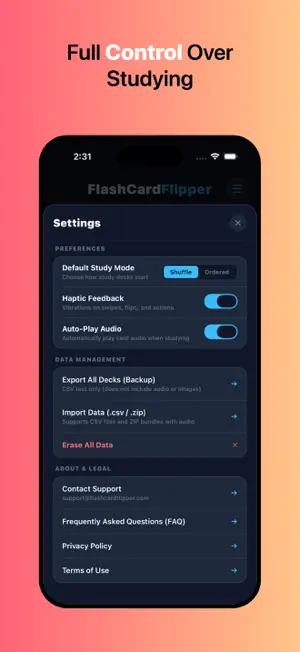
FlashCardFlipper is a powerful, customizable flashcard study app designed to help you master vocabulary, languages, exam prep, terminology, coursework, multimedia, and more! Users can create custom collections, record spoken pronunciation, attach audio and image files, and study seamlessly using an interactive card-flipping experience. KEY FEATURES & CAPABILITIES: AUDIO RECORDING & DIRECT AUDIO IMPORT • Built-In Voice Recorder: Record custom voice notes directly onto the front or back of any flashcard with live timing, preview playback, and re-recording controls. • Import Audio Files: Attach external audio tracks (.mp3, .m4a, and more) from your device to either the question or answer side. • Auto-Play Audio: Listen to front and back pronunciations automatically as you flip through cards during study sessions, or tap the audio button anytime to listen on demand. IMAGE & MEDIA ATTACHMENTS • Add visual aids, diagrams, and photos directly from your photo library to the front and back of any card. • Visual indicators in your deck overview highlight at a glance which cards contain audio recordings or image attachments. INTERACTIVE 3D STUDY MODE • Gesture-Driven Study: Swipe vertically to flip cards and swipe horizontally to advance through your deck. • Study Shuffle or Ordered: Practice in randomized shuffle order or structured sequence, with custom defaults saved in your settings. • Selective Card Study: Toggle individual cards on or off to focus exclusively on active material without deleting mastered content. • In-Study Editing: Edit text, change photos, re-record audio, or remove cards directly from the active study session without losing your place. DECK MANAGEMENT & ORGANIZATION • Favorites System: Star important decks to pin them to the top of your home screen for instant access. • Detailed Collection Summaries: View card counters and add rich descriptions to keep your study materials organized. • Reorder & Custom Positioning: Move cards up or down step-by-step, or jump a card directly to a specific position number. • Instant "Flip All": Reverse front and back sides across an entire deck with one tap, ideal for bidirectional language learning (e.g., Spanish-to-English and English-to-Spanish). • Single Card Side Swap: Quickly swap the front and back content (including media and audio) of individual cards with a single button. CSV DATA IMPORT & EXPORT • Single Deck CSV Export: Share or download individual collections as standard CSV spreadsheets. • Bulk CSV / ZIP Deck Import: Import existing lists and flashcards directly from spreadsheets with automatic header detection (Question/Front, Answer/Back) or raw 2-column formats. • Full Library Backup & Restore: Export all your text collections in a single CSV / ZIP backup file and restore multiple decks in seconds. CUSTOMIZABLE SETTINGS & PRIVACY • 100% Offline & Private: All flashcards, recordings, images, and collections remain strictly stored on your local device. Zero tracking, zero remote servers, and zero cloud profiling. Your study materials stay entirely yours. • Configure study mode defaults (Shuffle vs. Ordered). • Toggle haptic vibrations and audio auto-play preferences. • Full data control with one-tap library reset tools. • Direct support access, FAQ guide, and clear privacy links. Master any subject with text, sound, and imagery. FlashCardFlipper gives you a complete toolkit for effective learning!
What’s new
Version 1.0.1 · Updated September 14, 2026
Enhanced File Imports: Expanded the 'import data' feature to seamlessly support bulk audio and image data via ZIP files alongside traditional CSV uploads. Improved User Experience: Introduced a new loading popup for enhanced feedback and clarity during data processing, paired with optimized navigation and transition flows. Visual Refresh: Updated the app icon and added a video preview.
App privacy
The developer, DAVID WILLIAM SMITH, reported these privacy practices to Apple.
Data Not Collected
The developer does not collect any data from this app.
Alternatives to FlashCardFlipper: Study Cards
Looking for apps like FlashCardFlipper: Study Cards? Here are 6 similar apps on the App Store. The highest rated is Consistent Cursive (5.0/5), and all 6 are free to download.
-
 Flashcards Made Easy. Learn!
-
 Flashcards.ai Study Cards
-
 OnScene: EMT-Basic
-
 Consistent Cursive
5.0
-
 Flashcards - Swipe & Learn
-
 Flashcard Memory: Kids TTS
5.0
| App | Rating | Price | Last updated | Compare |
|---|---|---|---|---|
| FlashCardFlipper: Study Cards | – | Free | September 14, 2026 | |
| Flashcards Made Easy. Learn! | – | Free | Aug 24, 2026 | Compare |
| Flashcards.ai Study Cards | – | Free | Oct 19, 2026 | Compare |
| OnScene: EMT-Basic | – | Free | Oct 22, 2026 | Compare |
| Consistent Cursive | 5.0 / 5 (1) | Free | Oct 25, 2026 | Compare |
| Flashcards - Swipe & Learn | – | Free | Jul 26, 2026 | Compare |
| Flashcard Memory: Kids TTS | 5.0 / 5 (1) | Free | Jan 26, 2026 | Compare |