

Handpick: Photo Organizer
Benjamin Zhuang Photo & Video iPhoneiPadiPod touch
Handpick: Photo Organizer is a free Photo & Video app for iPhone and iPad by Benjamin Zhuang. Rated 5.0/5 from 2 ratings. Requires iOS 18.0.
- Rating
- 5.0
- 2 ratings
- Price
- Free
- on the App Store
- Size
- 9 MB
- Age 4+
- Updated
- Oct 25
- 2026 · v1.4.1
Screenshots



About Handpick: Photo Organizer
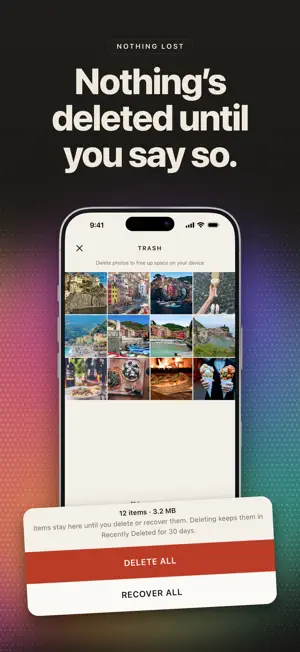
Your camera roll, handpicked. Handpick shows you one photo at a time. Swipe down to keep it, swipe up to send it to Trash. Sorting is free and unlimited, with no daily cap, no ads and no account, and nothing leaves your library until you confirm. Then let Handpick do the finding. It spots duplicates, near-identical shots, forgotten screenshots and screen recordings, blurry shots, your trips and the videos taking up your storage, all on your iPhone, so you decide faster and free up more space. ONE PHOTO, ONE CHOICE - Swipe down to keep, up to delete, left or right to browse. - Double-tap to favorite. Tap an album to file a photo without leaving it. - Start with This Week, Last Year, On This Day, Random, Videos, Screenshots or any month. - Stop any time and pick up where you left off. NOTHING IS GONE UNTIL YOU SAY SO - Photos you swipe up wait in Handpick's Trash. Recover any of them, or delete them all at once. - Nothing leaves your library until you tap Delete and confirm. - Deleted photos stay in Recently Deleted in Photos for 30 days. IT FINDS. YOU DECIDE. - Junk first: start each review with what's most likely junk. Screenshots and screen recordings, saved images and GIFs, QR codes, receipts and documents, photos of screens, accidental clips, and blank, dark or blurry shots, each tagged with why it's there. - Junk first leaves your favorites, edited photos, albums and photos of people and pets alone. Keep one it suggested and it's left alone for 30 days, or for good if you keep it again. - Ready from the start: Junk first leads with what it has found while Handpick keeps reading the rest of your library. - Duplicates: identical copies across your whole library, grouped with one suggested to keep. - Similar: several takes of the same moment, with the best one put forward. - Trips, Memorable Days and Yearly Occasions are found for you. Review each one together and save it as an album. FREE UP SPACE - Large Files puts your biggest videos and photos first, so a few swipes give back gigabytes. - Compress big videos to 1080p. Each keeps its date, place and albums. - Library stats count your duplicates, similar shots, blurry shots, screenshots and screen recordings, and how much space clearing them would free. KEEP THE ONES YOU LOVE - Browse your timeline and favorites, and pinch to see 4, 8 or 12 photos across. - Arrange your albums like your Home Screen, with Personal and Shared albums in their own tabs. - Give an album a cover photo with the background lifted away. - A calendar shows what you've reviewed, day by day. - On This Day and monthly reminders bring back photos worth a second look. - Put a month of your photos on your Home Screen with the widget. PRIVATE BY DESIGN - Works completely offline. Your photos and their analysis never leave your device. - No account, no ads, no analytics, no tracking. HANDPICK PLUS Sorting is free. Plus lets Handpick do the finding: - Duplicates and Similar, cleared in one pass - Junk first review order - Every trip, memorable day and yearly occasion - Large Files and video compression - Every preference unlocked Try one of each first, free: your newest trip, memorable day and yearly occasion, a duplicate group, a set of similar shots, and one video to compress. Theannual plan starts with a seven-day free trial. Plus is a weekly or annual auto-renewing subscription, or a one-time lifetime purchase. Payment is charged to your Apple Account when you confirm the purchase. Subscriptions renew automatically unless canceled at least 24 hours before the end of the current period. Manage or cancel in your Apple Accountsettings. Your photos. Your choices. Handpicked. Website: https://handpick-dco.pages.dev Support: https://handpick-dco.pages.dev/support/ Privacy Policy: https://handpick-dco.pages.dev/privacy/ Terms of Use: https://handpick-dco.pages.dev/terms/ Requires iOS 18.0 or later. Compatible with iPhone and iPad.
What’s new
Version 1.4.1 · Updated October 25, 2026
New in Handpick 1.4.1 - By size: start a review with your largest photos and videos. - Join two trips into one. - See the album picker as a grid. Improvement - Trips hold together across quiet days, and split where you take days out. - Undo now covers album shortcuts and Keep First. - Handpick opens and scrolls faster. Fix - Bug fixes.
App privacy
The developer, Benjamin Zhuang, reported these privacy practices to Apple.
Data Not Collected
The developer does not collect any data from this app.
Alternatives to Handpick: Photo Organizer
Looking for apps like Handpick: Photo Organizer? Here are 6 similar apps on the App Store. The highest rated is Backward - Daily Time Capsule (5.0/5), and 5 of the 6 are free to download.
-
 Cluster: Photo Search
1.0
-
 Photo Replace
-
 Backward - Daily Time Capsule
5.0
-
 Moments Vault – Frozen Memory
-
 Toned: Halation & Darkroom
-
 Photo Sifter
5.0
| App | Rating | Price | Last updated | Compare |
|---|---|---|---|---|
| Handpick: Photo Organizer | 5.0 / 5 (2 ratings) | Free | October 25, 2026 | |
| Cluster: Photo Search | 1.0 / 5 (1) | Free | Sep 16, 2026 | Compare |
| Photo Replace | – | 0.99 USD | Oct 26, 2026 | Compare |
| Backward - Daily Time Capsule | 5.0 / 5 (7) | Free | Oct 25, 2026 | Compare |
| Moments Vault – Frozen Memory | – | Free | Jan 14, 2026 | Compare |
| Toned: Halation & Darkroom | – | Free | Oct 22, 2026 | Compare |
| Photo Sifter | 5.0 / 5 (3) | Free | Feb 14, 2025 | Compare |