

Ease: AI Daily Planner
Quang Tran Productivity iPhoneiPadiPod touchApple Watch
Ease: AI Daily Planner is a free Productivity app for iPhone and iPad by Quang Tran. Requires iOS 18.0. Updated October 24, 2026.
- Price
- Free
- on the App Store
- Size
- 187 MB
- Age 4+
- Updated
- Oct 24
- 2026 · v1.0.4
Screenshots


About Ease: AI Daily Planner
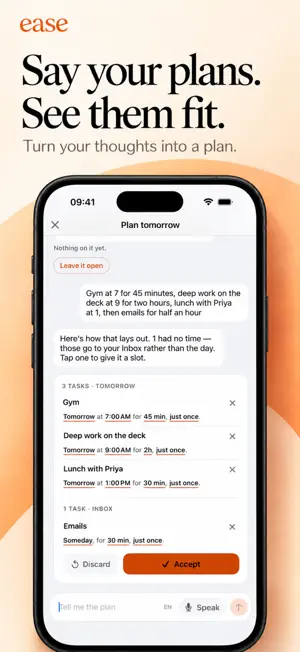
Most day planners hand you an empty timeline and wish you luck. Ease hands you a method — and asks one question at a time. It's a planner for anyone who has downloaded a planner before, used it for four days, and quietly stopped. ONE QUESTION AT A TIME Ease never opens on a dashboard. It works out where you are in your day and shows the smallest thing that matters right now. Tonight — plan tomorrow. Say tomorrow out loud and AI turns it into a timed plan, while today is still fresh. Mornings stop being a decision. Morning — start from how today feels. Rough, Okay or Good. Ease sizes the day to the energy you actually have, not the energy you planned for. Through the day — follow the line. A visual day you take one block at a time. Fall behind and it reflows gently instead of collapsing into a wall of red. When you come back — it asks, it doesn't assume. Disappeared for three hours? Ease never quietly ticks things off, and never decides for you that something is done, late or lost. It asks what happened, and "I don't know" is a real answer. End of day — check in. Twenty seconds on how it went, and tomorrow gets planned while you still remember today. BUILT TO BE KIND Minutes, not a to-do count. Ease weighs what you're planning against the hours you actually have. That's the burnout guard, and it's arithmetic rather than a lecture. Say it and it lands. Speak "gym 7am 45 min" and it arrives timed and placed. Too big to start? Tap Breakdown and a task becomes a few small steps. Tick each one off and the next shows up. Screenshot it and it's a task. Ease reads the words off the picture for a title, and one tap lifts the object itself — the card, the shoes, the lamp — onto your timeline. Nothing nags. Miss a task and it carries over kindly. Nothing goes red, nothing scolds, no streak to break. A focus timer that goes quiet with you. Sessions, breaks and a twenty-three-layer ambient mixer. Sound follows the clock — pause the timer, the sound pauses too. Turn your phone on its side and it's a desk clock. It learns when you're at your best. After a few weeks, Ease shows you which parts of your day actually hold — your most productive hours, worked out on your device from your own history. It shows you. It never rewrites your plan behind your back. ALSO IN THE BOX Apple Watch — what's on now, one tap to tick it off, and a task spoken straight onto your wrist Home Screen and Lock Screen widgets — today's plan, the step you're on, voice capture and a live focus timer Read-only calendar overlay, so your meetings show up in the day Full VoiceOver, Dynamic Type and Reduce Motion support from the first screen PRIVATE BY DEFAULT No account. No sign-up. No ads, no trackers, no analytics SDK. Your tasks, check-ins and pictures live on your devices and sync through your own iCloud account — never through a server of ours. One exception, said plainly: when you plan a day by speaking or typing it, that text goes to our own server, where an AI model sorts it into tasks. It is not stored, not logged, and not tied to you. Everything else happens on your device, speech recognition and screenshot reading included. Turn off your connection and Ease still plans your day. Ease never asks for your photo library. It reads only the one picture you hand it, on your device. EASE PLUS The daily method is free, forever — planning by hand or by voice, the focus timer, the widgets, every insight. Ease Plus adds the AI co-planner (try it free for about 30 messages; Plus plans about 120 a day), AI Breakdown, repeating tasks, and the rest of the sound palette: twenty of the twenty-three layers, including all eleven music tracks. Rain, a fireplace and a purring cat are free forever. That's the whole list. Subscriptions renew automatically unless cancelled at least 24 hours before the period ends. Manage or cancel in your Apple Account settings. Terms of Use: https://www.apple.com/legal/internet-services/itunes/dev/stdeula/
What’s new
Version 1.0.4 · Updated October 24, 2026
Reminders that reach you Ease now asks about notifications right after you plan a task with a time, so a nudge can arrive before it starts. If they're off, Settings shows you how to turn them back on. A few gentle tips Today offers, one at a time, to turn on notifications, show your calendar events and bring in your open Reminders. Close any of them and it won't come back.
App privacy
The developer, Quang Tran, reported these privacy practices to Apple.
Data Not Linked to You
The following data, which may be collected but is not linked to your identity, may be used for the following purposes:
- User Content: Other User Content
Used for: App Functionality
Alternatives to Ease: AI Daily Planner
Looking for apps like Ease: AI Daily Planner? Here are 6 similar apps on the App Store. The highest rated is TimeBoxer Daily Planner (5.0/5), and all 6 are free to download.
-
 REA: Chakra Energy Planner
-
 ethos: Life OS
-
 TimeBoxer Daily Planner
5.0
TimeBoxer Daily Planner
5.0
-
 WhoBe: Intelligent Contacts
5.0
WhoBe: Intelligent Contacts
5.0
-
 Clarity: Decision Coach
5.0
Clarity: Decision Coach
5.0
-
 Cadence: AI day planner
5.0
Cadence: AI day planner
5.0
| App | Rating | Price | Last updated | Compare |
|---|---|---|---|---|
| Ease: AI Daily Planner | – | Free | October 24, 2026 | |
| REA: Chakra Energy Planner | – | Free | Oct 6, 2026 | Compare |
| ethos: Life OS | – | Free | Oct 9, 2026 | Compare |
| TimeBoxer Daily Planner | 5.0 / 5 (5) | Free | Oct 12, 2026 | Compare |
| WhoBe: Intelligent Contacts | 5.0 / 5 (1) | Free | Oct 26, 2026 | Compare |
| Clarity: Decision Coach | 5.0 / 5 (1) | Free | Oct 21, 2026 | Compare |
| Cadence: AI day planner | 5.0 / 5 (2) | Free | May 28, 2026 | Compare |