

CameraAdapt: Copy Any Photo
Oskar Bruce Photo & Video iPhoneiPadiPod touch
CameraAdapt: Copy Any Photo is a free Photo & Video app for iPhone and iPad by Oskar Bruce. Rated 4.0/5 from 3 ratings. Requires iOS 17.0.
- Rating
- 4.0
- 3 ratings
- Price
- Free
- on the App Store
- Size
- 39 MB
- Age 4+
- Updated
- Oct 13
- 2026 · v1.5
Screenshots

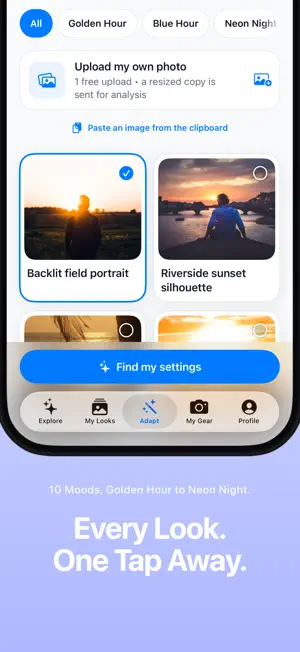
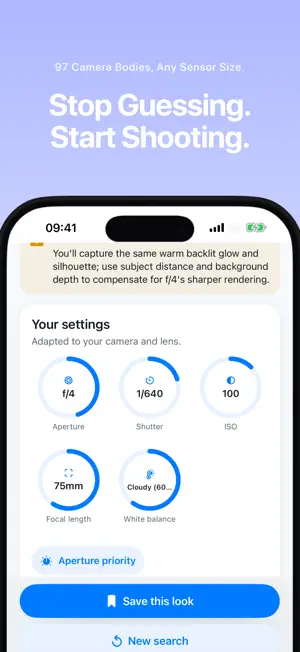

About CameraAdapt: Copy Any Photo
Pick any photo's look, enter your specific gear, and get the original camera settings used + a full recipe adapted to your exact camera and lens in seconds. You see a photo you love. The problem is never the look — it's that it was shot on a body and a lens you don't own, so copying its settings gives you a different photo entirely. CameraAdapt translates instead of copying. Pick a reference photo, tell it what's in your bag, and get the aperture, shutter, ISO, focal length and white balance that land the same look on your gear — plus an editing recipe written for the app you actually edit in. It is honest about the gap, too. When your lens can't reach the reference's f/1.4, it says so and tells you what to do instead: step closer, put more distance behind your subject, accept a little more grain. • 100 reference photos across 10 moods — golden hour, blue hour, neon night, high noon, soft overcast, window light, low key, high key, film and hazy • Every one carries its real camera metadata, so the numbers you start from are facts, not guesses • 313 cameras and 62 phones (iPhone, Pixel and Galaxy), 259 lenses from kit zooms to fast primes, and a similar-camera option when yours isn't listed • iPhone counts as a camera: which lens to use, how to bias exposure, when to use Portrait and Night mode, and which Photographic Style • Editing recipes in Lightroom, Capture One, Photoshop, Affinity Photo, VSCO, Snapseed, Darkroom or Apple Photos, each in that app's own controls • Export real preset files: .xmp for Lightroom and Camera Raw, .costyle for Capture One, and .cube LUTs for DaVinci Resolve, Premiere and Final Cut • Upload your own reference photo and have it read the same way Your first adapted look is free, in full. Anything new after that needs CameraAdapt Pro. CameraAdapt Pro is $14.99/month or $49.99/year, each with a 3-day free trial. Payment is charged to your Apple Account at confirmation of purchase. Subscription automatically renews unless cancelled 24hrs before your renewal date in the App Store. Privacy Policy: https://oskarbruce1.github.io/cameraadapt-pages/privacy.html Terms of Use (EULA): https://www.apple.com/legal/internet-services/itunes/dev/stdeula/
What’s new
Version 1.5 · Updated October 13, 2026
A simpler, clearer Pro screen. Everything is now on one page: what you get, both plans with their prices, and your 7-day free trial, so you can see exactly what you're signing up for before you start.
App privacy
The developer, Oskar Bruce, reported these privacy practices to Apple.
Data Not Linked to You
The following data, which may be collected but is not linked to your identity, may be used for the following purposes:
- Purchases: Purchase History
- Location: Coarse Location
- Identifiers: Device ID
- Usage Data: Product Interaction
- User Content: Photos or Videos, Customer Support
- Diagnostics: Other Diagnostic Data
Used for: Analytics, App Functionality
Alternatives to CameraAdapt: Copy Any Photo
Looking for apps like CameraAdapt: Copy Any Photo? Here are 6 similar apps on the App Store. The highest rated is POZER Posing App (5.0/5), and all 6 are free to download.
-
 POZER Posing App
5.0
-
 LogLab
3.3
-
 THE Tether
-
 Second View - viewfinder
4.0
-
 Honcho: From Camera to Cloud
2.0
-
 ToneLab: Video & Photo Editor
5.0
| App | Rating | Price | Last updated | Compare |
|---|---|---|---|---|
| CameraAdapt: Copy Any Photo | 4.0 / 5 (3 ratings) | Free | October 13, 2026 | |
| POZER Posing App | 5.0 / 5 (6) | Free | Oct 17, 2026 | Compare |
| LogLab | 3.3 / 5 (3) | Free | Oct 24, 2026 | Compare |
| THE Tether | – | Free | Oct 18, 2026 | Compare |
| Second View - viewfinder | 4.0 / 5 (5) | Free | Oct 9, 2026 | Compare |
| Honcho: From Camera to Cloud | 2.0 / 5 (2) | Free | Oct 26, 2026 | Compare |
| ToneLab: Video & Photo Editor | 5.0 / 5 (9) | Free | Oct 26, 2026 | Compare |