

Twnkle: Reminders & Alarms
杨 谌 Productivity iPhoneiPadiPod touch
Twnkle: Reminders & Alarms is a free Productivity app for iPhone and iPad by 杨 谌. Rated 5.0/5 from 1 ratings. Requires iOS 18.0. Updated October 19, 2026.
- Rating
- 5.0
- 1 ratings
- Price
- Free
- on the App Store
- Size
- 49 MB
- Age 4+
- Updated
- Oct 19
- 2026 · v1.1.3
Screenshots



About Twnkle: Reminders & Alarms
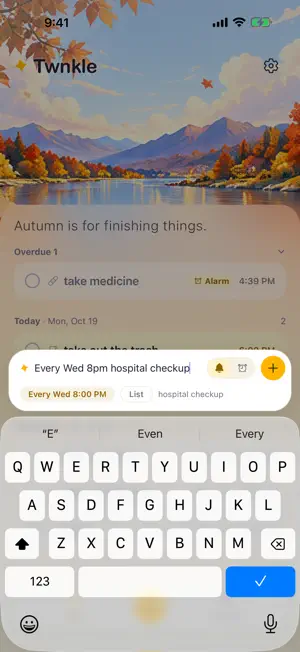
Twnkle is the reminder app that won't let you forget. Regular reminders buzz once and vanish. Twnkle keeps nudging until you tap Done, and its Alarm mode rings like a real alarm clock, right through Silent mode and Focus. Pills, meetings, rent, school pickup, the train you can't miss: if it has to happen today, hand it to Twnkle. TYPE IT THE WAY YOU'D SAY IT "tomorrow 3pm dentist", "in 30 min take the laundry out", "every day 8am take pills", "1st of every month pay rent". Twnkle picks out the date, time and repeat rule as you type and shows them as chips you can tap to adjust. No forms, no date wheels. TWO WAYS TO BE REMINDED • Notification: several nudges over the first 10 minutes, then follow-ups until you deal with it. Busy in a meeting? It will still be waiting afterwards. • Alarm (iOS 26+): a full-screen system alarm powered by AlarmKit. It breaks through Silent mode, Focus and Do Not Disturb, and rings again 5 minutes later if you don't respond. • Tap Done or Snooze right from the Lock Screen, the notification or your Apple Watch. Your list stays in sync. • Tapped Done by mistake? Undo within 5 minutes. WHY NOT JUST USE CLOCK OR REMINDERS? • An alarm knows "when" but not "what", and it can't do "Sept 12" or "the 1st of every month". Twnkle shows the task itself on your Lock Screen and files it away once it's handled. • Reminders is great for lists, but one banner is easy to miss with your phone on silent. A Twnkle Alarm is an alarm, not a notification. CAPTURE IN SECONDS • Quick entry from the app icon, Shortcuts or the Action button. • Voice capture (Pro): just say it. Twnkle creates the reminder when you stop talking. SEE WHAT'S NEXT • Overdue, Today, Tomorrow and Later, sorted for you, with the next task highlighted. • Calendar view to spot busy days, with repeating tasks shown ahead. • Repeats: daily, chosen days of the week, every few days, or monthly on a date. • Widgets for your Home Screen and Lock Screen (Pro). • Lists to keep work, home and errands apart (Pro). • Your own photo as the home wallpaper, dimmed automatically in Dark Mode (Pro). • A heads-up when rain or snow shows up in the forecast for a task's time. A LIST THAT TIDIES ITSELF Overdue tasks and undated notes move to Someday after 7 days, so the main list only shows what matters now. Restore them any time. YOUR DATA STAYS YOURS No account, no sign-up. Your tasks live on your device and in your own iCloud: automatic backups, a daily copy kept for 14 days, and one-tap restore on a new phone. Backups are always free. FREE AND TWNKLE PRO Free: natural-language input, unlimited Notification reminders, notes, calendar, iCloud backup, and 3 Alarms to try. Pro: unlimited Alarms (repeating ones too), voice capture, widgets, Lists and your own wallpaper photo. Choose Twnkle Pro Annual, which starts with a 7-day free trial, or Twnkle Pro Lifetime, a one-time purchase. Prices are shown in the app and may vary by region. Payment is charged to your Apple Account when you confirm the purchase. The subscription renews automatically unless you cancel at least 24 hours before the end of the current period; renewal is charged within the 24 hours before the period ends. Manage or cancel any time in Settings > your name > Subscriptions. Cancel during the free trial and you won't be charged. Requires iOS 18 or later. Alarms use AlarmKit, introduced in iOS 26; on iOS 18 to 25, Twnkle uses Notification reminders instead. Privacy Policy: https://peterchen1997.github.io/twnkle-site/privacy.en.html Terms of Use: https://www.apple.com/legal/internet-services/itunes/dev/stdeula/ Support: https://peterchen1997.github.io/twnkle-site/support.en.html
What’s new
Version 1.1.3 · Updated October 19, 2026
Twnkle now speaks English. Type reminders the way you'd say them, like “tomorrow 3pm dentist” or “every Monday 9am standup”, and get nudged until they're done. Also new: • Lists (Pro): file a task as you type with #work, then filter your home screen by list. • My Photo (Pro): use your own photo as the home wallpaper; bright photos are dimmed automatically in Dark Mode. • Time ranges: “tomorrow 9:30 to 10:30 meeting” reminds you at 9:30 and shows 9:30–10:30. • Tasks with a date but no time no longer ring at 9am; you get one morning summary instead. • If a Focus silenced your reminders, Twnkle shows how to allow it next time. • Try an Alarm: it really rings once a minute later, and doesn't count toward your 3 free Alarms. • Redeem offer codes in Settings, and your Mac shares your iPhone's Pro membership. • Sync and notification fixes.
App privacy
The developer, 杨 谌, reported these privacy practices to Apple.
Data Not Linked to You
The following data, which may be collected but is not linked to your identity, may be used for the following purposes:
- Identifiers: User ID
- Usage Data: Product Interaction
Used for: Analytics, App Functionality
Alternatives to Twnkle: Reminders & Alarms
Looking for apps like Twnkle: Reminders & Alarms? Here are 6 similar apps on the App Store.
-
 Strong Reminder
-
 Memo Keeper: Notes & Reminders
-
 ReadSlow: Bilingual Reading
-
 Retrace - Rewind for Notes
-
 Sticky Notea
-
 wijot - Minimal Widget Notes
| App | Rating | Price | Last updated | Compare |
|---|---|---|---|---|
| Twnkle: Reminders & Alarms | 5.0 / 5 (1 rating) | Free | October 19, 2026 | |
| Strong Reminder | – | Free | Jul 24, 2026 | Compare |
| Memo Keeper: Notes & Reminders | – | Free | Oct 5, 2026 | Compare |
| ReadSlow: Bilingual Reading | – | Free | Oct 5, 2026 | Compare |
| Retrace - Rewind for Notes | – | Free | May 13, 2026 | Compare |
| Sticky Notea | – | Free | Oct 22, 2026 | Compare |
| wijot - Minimal Widget Notes | – | Free | May 26, 2026 | Compare |