

TorideKey: Password manager
Passium Utilities iPhoneiPadiPod touch
TorideKey: Password manager is a free Utilities app for iPhone and iPad by Passium. Requires iOS 15.0. Updated September 24, 2026.
- Price
- Free
- on the App Store
- Size
- 27 MB
- Age 4+
- Updated
- Sep 24
- 2026 · v1.2
Screenshots



About TorideKey: Password manager
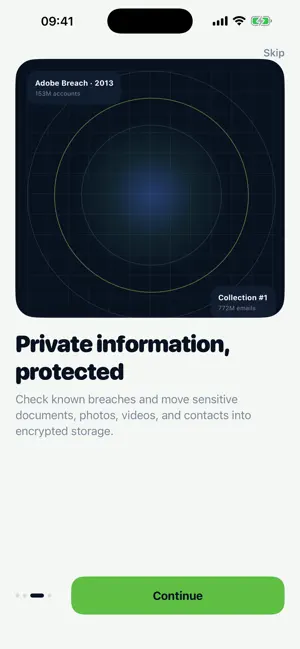
One vault for the logins you keep reusing, the files you would rather hide, and the check that tells you what has already leaked. TorideKey has no account — what you save is encrypted on this iPhone. STOP REUSING THE SAME PASSWORD • Generate a password of the length you choose, with or without symbols, and regenerate until it looks right. • Generate a throwaway username, or a plus-address alias built from your own email. The alias routes to your existing inbox; it does not create a new mailbox. • Save any of it to a vault that opens with Face ID, Touch ID, your device passcode, or a passcode you set inside the app. • Read password health as three counts you can work through: weak, reused, healthy. CHECK WHAT HAS ALREADY LEAKED — FREE, WHENEVER YOU ASK • Check an email address or username against known breach sources. It runs when you tap it, not as a permanent alert banner. • Check a password through a private lookup. The password is hashed on this device and only the first five characters of that hash ever leave the phone — the password itself is never transmitted. • See which sources reported the exposure and which categories of data were involved, then generate the replacement on the same screen. • Breach checks and the vault are free and unlimited. No trial required. LOCK MORE THAN LOGINS • Move photos, videos, contacts, and documents into Safe Storage as encrypted copies. • Open a section, preview an item, then share or remove it when you decide to. • Originals stay where they are. Nothing is removed behind your back. FREE UP SPACE, WITH THE FINAL SAY • Review likely duplicate photos, screenshots, and possibly blurry shots before a single one goes. • Review duplicate contacts, and merge only after a local rollback file has been written. • See the space a selection would return before you confirm it. • Photo deletion runs through the iOS photo library, so iOS asks for confirmation and items stay recoverable in Recently Deleted. MAKE VIDEOS SMALLER ON THIS DEVICE • Pick High, Balanced, Compact, or Smallest, compare the source with the estimated result, and preview it. • Save or share the smaller copy. The original is never uploaded, and an export can be cancelled while it runs. PRIVACY, PLAINLY No account, no sign-up. Vault entries, Safe Storage, cleaner analysis, and compression stay on this iPhone. An email address or username is sent to a breach-lookup provider only when you start that specific check. Breach results are informational: they describe what a source reported, not whether an account is safe or compromised. TorideKey is not antivirus, not a VPN, and not a monitoring service. It is a place to make a strong login, keep it locked, and look up what is already out there. TORIDEKEY PREMIUM Free: the password generator, the local vault, and unlimited breach checks. Premium: Safe Storage, Smart Cleaner, and the video compressor. Premium is an auto-renewable subscription. The price, the period, and any introductory offer are shown on the purchase screen before you confirm. Payment is charged to your Apple Account. It renews unless auto-renew is turned off at least 24 hours before the current period ends, and you can manage or cancel it any time in Settings. Purchases can be restored from the paywall. Terms of Use: https://toridekey.tech/terms.pdf Privacy Policy: https://toridekey.tech/privacy.pdf EULA: https://www.apple.com/legal/internet-services/itunes/dev/stdeula/
What’s new
Version 1.2 · Updated September 24, 2026
Passium is now TorideKey: same app, same vault, new name. • Added privacy-first photo and contact cleanup with review-before-change controls. • Added encrypted local storage for selected files and media. • Added video compression with quality, preview, save, share, and cancel controls. • Refined breach checks, credential tools, and the local vault. • Updated the interface and app icon.
App privacy
The developer, Passium, reported these privacy practices to Apple.
Data Used to Track You
The following data may be used to track you across apps and websites owned by other companies:
- Identifiers: Device ID
Data Not Linked to You
The following data, which may be collected but is not linked to your identity, may be used for the following purposes:
- Identifiers: Device ID
- Usage Data: Product Interaction
- Diagnostics: Crash Data
Used for: Analytics, App Functionality
Alternatives to TorideKey: Password manager
Looking for apps like TorideKey: Password manager? Here are 6 similar apps on the App Store. The highest rated is WiseBooster: Clean Storage (5.0/5), and all 6 are free to download.
-
 MrClean: Storage Cleaner
2.0
MrClean: Storage Cleaner
2.0
-
 WiseBooster: Clean Storage
5.0
WiseBooster: Clean Storage
5.0
-
 Onclear: Cleaner Assistant
5.0
Onclear: Cleaner Assistant
5.0
-
 Cura: Optimize Storage
4.5
Cura: Optimize Storage
4.5
-
 FlashClean: Boost & Clear Junk
4.6
FlashClean: Boost & Clear Junk
4.6
-
 AI Cleaner: Swipe & Clean Up
4.8
AI Cleaner: Swipe & Clean Up
4.8
| App | Rating | Price | Last updated | Compare |
|---|---|---|---|---|
| TorideKey: Password manager | – | Free | September 24, 2026 | |
| MrClean: Storage Cleaner | 2.0 / 5 (1) | Free | Oct 1, 2026 | Compare |
| WiseBooster: Clean Storage | 5.0 / 5 (1) | Free | Aug 7, 2026 | Compare |
| Onclear: Cleaner Assistant | 5.0 / 5 (1) | Free | Sep 8, 2026 | Compare |
| Cura: Optimize Storage | 4.5 / 5 (19) | Free | Oct 27, 2026 | Compare |
| FlashClean: Boost & Clear Junk | 4.6 / 5 (16) | Free | Oct 13, 2026 | Compare |
| AI Cleaner: Swipe & Clean Up | 4.8 / 5 (15) | Free | Aug 19, 2026 | Compare |