

Spasio: Floor Plan & Design
Caglar Celik Graphics & Design iPhoneiPadiPod touch
Spasio: Floor Plan & Design is a free Graphics & Design app for iPhone and iPad by Caglar Celik. Requires iOS 17.0. Updated September 30, 2026.
- Price
- Free
- on the App Store
- Size
- 85 MB
- Age 4+
- Updated
- Sep 30
- 2026 · v1.4
Screenshots


About Spasio: Floor Plan & Design
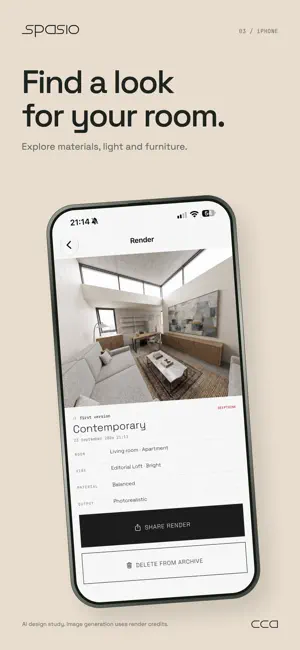
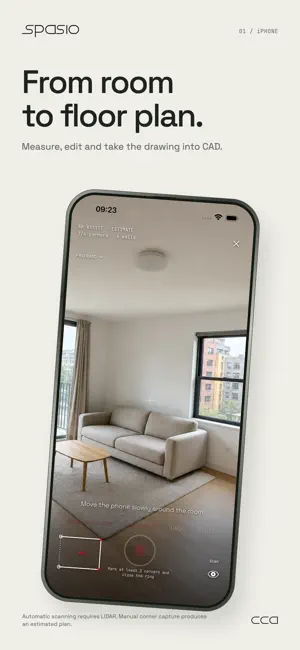
Measure your place. Design what comes next. Spasio brings room scanning, editable floor plans, furniture layouts and interior ideas into one project on your iPhone. START WITH YOUR SPACE Capture walls, doors and windows with a LIDAR-equipped iPhone, then review and adjust the result. Without LIDAR, mark floor or ceiling corners and calibrate the estimated plan with real measurements. MAKE THE PLAN YOURS Edit walls and openings, add dimensions and notes, and arrange furniture from an expanded library. Adjust furniture sizes and materials. Inspect the 3D model, calculate areas and quantities, then export PDF, PNG, layered DXF or supported 3D formats. EXPLORE A NEW INTERIOR Take a photo directly or use a view of your 3D model. Choose a style, mark a wall or an item, and explore colors, furniture removal and new layouts. Generated images are design concepts, not measured drawings. TOOLS FOR THE WAY YOU WORK Choose Standard, Architect, Real Estate or Studio. Prepare a property listing draft, use room-volume and TV-sizing tools, or organize people, tasks and notes locally in Studio. YOUR FIRST TWO PROJECTS Create two real projects free with full project tools. A Pro subscription unlocks unlimited new projects. Deleting a project does not reset the free allowance. Previously earned project access is preserved. Monthly and yearly subscriptions are available; eligible accounts may receive a one-week introductory trial where offered. The exact price and renewal terms appear before purchase. AI services use a separate credit balance and are not unlimited with Pro. Each paid AI action shows its credit cost before you continue. Additional credits are available as in-app purchases. YOUR PROJECTS AND PRIVACY Saved scans stay on your device. Selected photos, instructions and relevant plan details are processed online only after your consent. Sharing a completed render with CCA for quality review is optional, can be withdrawn, and is retained privately for up to 30 days. You can render without this extra sharing permission. Made by CCA, creative computational architecture. Manage or cancel subscriptions in your App Store account settings. Terms of Use: https://www.apple.com/legal/internet-services/itunes/dev/stdeula/ Privacy Policy: https://spasio.io/privacy
What’s new
Version 1.4 · Updated September 30, 2026
New in Spasio 1.4: • A graphite home screen with Standard, Architect, Real Estate and Studio modes. • Take a photo directly in room design and wall-color tools. Faster style presets and more forgiving region marking. • Better use of floor-plan and camera context when creating a concept from your 3D model. • An expanded furniture library with adjustable sizes and materials. • Ceiling-corner marking for calibrated LIDAR-free plans, plus improved shop-window handling. • Longer surface captures with resource warnings and a safety ceiling; preview density does not limit saved point data. • French, German, Italian and Spanish added alongside English, Turkish, Russian and Arabic. • Two free real projects, with previously earned access preserved. The monthly plan is shown first, with a one-week trial for eligible customers. Pro unlocks unlimited new projects; AI credits remain separate. • Fixes to free-project reuse and AI correction credit handling.
App privacy
The developer, Caglar Celik, reported these privacy practices to Apple.
Data Linked to You
The following data, which may be collected and linked to your identity, may be used for the following purposes:
- User Content: Photos or Videos, Other User Content
- Surroundings: Environment Scanning
- Purchases: Purchase History
- Identifiers: User ID
Used for: Analytics, App Functionality
Alternatives to Spasio: Floor Plan & Design
Looking for apps like Spasio: Floor Plan & Design? Here are 6 similar apps on the App Store. The highest rated is Home Makeover AI: House Design (5.0/5), and all 6 are free to download.
-
 VFX Team
-
 Nookivra - AI Room Design
-
 Home Makeover AI: House Design
5.0
Home Makeover AI: House Design
5.0
-
 AI Room Design: Decor & Paint
-
 Voxelio 3D LiDAR Scanner
4.0
Voxelio 3D LiDAR Scanner
4.0
-
 Syntina: AI Render & Interior
| App | Rating | Price | Last updated | Compare |
|---|---|---|---|---|
| Spasio: Floor Plan & Design | – | Free | September 30, 2026 | |
| VFX Team | – | Free | Aug 22, 2026 | Compare |
| Nookivra - AI Room Design | – | Free | Sep 29, 2026 | Compare |
| Home Makeover AI: House Design | 5.0 / 5 (4) | Free | Oct 13, 2026 | Compare |
| AI Room Design: Decor & Paint | – | Free | Oct 29, 2026 | Compare |
| Voxelio 3D LiDAR Scanner | 4.0 / 5 (3) | Free | Oct 27, 2026 | Compare |
| Syntina: AI Render & Interior | – | Free | Oct 12, 2026 | Compare |