

Skurda - Expense Tracker
ROCCO BARLETTA Finance iPhoneiPadiPod touch
Skurda - Expense Tracker is a free Finance app for iPhone and iPad by ROCCO BARLETTA. Requires iOS 17.0. Updated October 10, 2026.
- Price
- Free
- on the App Store
- Size
- 19 MB
- Age 4+
- Updated
- Oct 10
- 2026 · v3.6
Screenshots

About Skurda - Expense Tracker
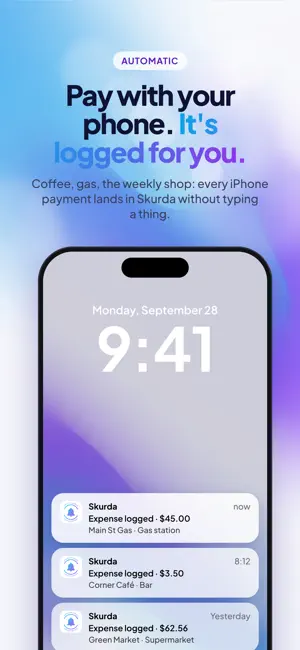
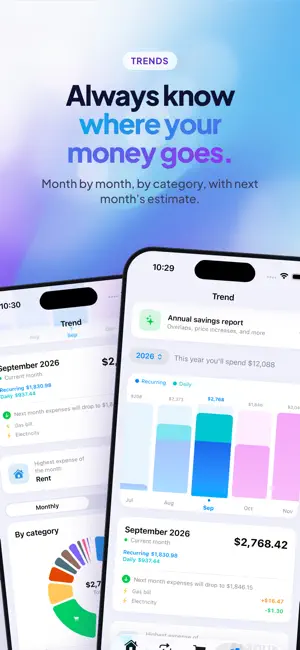
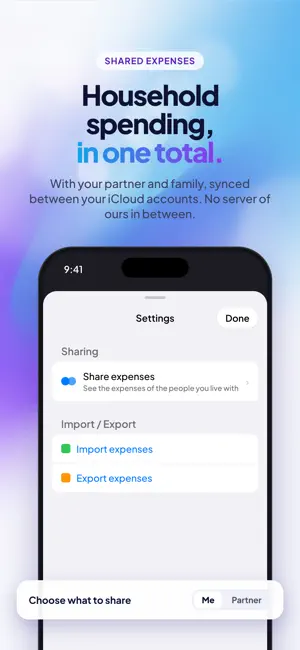
Subscriptions, utility bills, rent, insurance, taxes, loan payments — and now everything you spend day to day, too. The expenses that come back every month are the ones that weigh most on your budget; the daily ones are the easiest to lose track of. Skurda keeps them all in one place. Add a recurring expense once and say how often it repeats. From then on the app does the rest: it works out every future due date, tells you what it costs per month and per year, and warns you before each payment. DAILY EXPENSES, FOUR WAYS TO LOG THEM • Automatically, every time you pay with your phone, through an automation you set up once • By snapping a photo of the receipt: store, amount and date fill themselves in, and the photo is never saved anywhere • From a screenshot: take it, share it with Skurda, and the expense is already filled in • By hand, in a few seconds Your monthly total is now the real one: recurring and daily expenses together, always kept separate so an estimate never gets mistaken for a fact. WHAT YOU GET • Flexible recurrences: daily, weekly, monthly or yearly, with custom intervals (every 2 months, every 3 weeks, every 6 months) • Monthly and yearly totals always in view • A calendar of upcoming due dates, month by month • Charts by category and trends over time, so you can see where your money goes • Built-in categories, or your own with custom colors and icons — learned automatically from the merchant name when you pay by phone • Pause an expense without deleting it, and keep a history of amounts for variable bills like electricity and gas • A catalog of the most common expenses: pick yours with a tap on first launch, no typing needed REMINDERS YOU WON'T MISS Choose how many days ahead you want to be reminded, globally or expense by expense, and at what time of day. Straight from the notification you can snooze by three hours, by a day, or until next week. Reminders are free for everyone. WHERE YOU CAN SAVE Skurda looks at your expenses and points out real opportunities: overlapping streaming services, duplicate subscriptions, price increases compared with previous months, monthly subscriptions that would cost less paid yearly, and expenses you paused in the app but are probably still being charged for, because pausing here doesn't cancel anything with the provider. ALWAYS WITHIN REACH Home Screen widgets show your next expense due and what you've spent today. With Siri you can add a recurring or daily expense just by speaking, without opening the app. YOUR DATA STAYS YOURS No account required, no bank connection, no ads. Your data lives on your iPhone and syncs only to your own private iCloud. Receipts are read on your phone and never saved anywhere. SKURDA PRO The free version includes everything essential for recurring expenses, up to 10, plus up to 20 everyday expenses a month, by hand or from a receipt. Skurda Pro unlocks unlimited recurring expenses, unlimited everyday expenses, automatically when you pay with your phone or from a screenshot, the annual savings report, and import and export in Excel and CSV. Privacy Policy: https://dontknowif.github.io/spese-ricorrenti/privacy.html Terms of Use: https://dontknowif.github.io/spese-ricorrenti/terms.html
What’s new
Version 3.6 · Updated October 10, 2026
Pay with your phone. It logs itself. With Skurda's automation, every Apple Pay payment lands in your expenses on its own: merchant, amount and date, without opening the app. Set it up once and forget about it. (Premium — if you're eligible, your first month is free) NEW IN 3.6 • Ready for iPhone Duo: open, Skurda uses the whole big screen, with sections in a sidebar and easy-to-read lists. Closed, it works just like before • Latest daily expenses in order: on Home, your latest daily expenses now follow the expense date, including those of the person you share with • Try it with sample data: at the end of the intro you can see Skurda in action with demo data, without touching yours • Smoother intro: the pages swipe forward and back • A gentle reminder: if you haven't added any expense yet, we remind you the next day (only with notifications on) • If you cancel Premium, we ask in a few taps what didn't work. Answering is optional • Small fixes and polish Still no account, no bank connection, no ads.
App privacy
The developer, ROCCO BARLETTA, reported these privacy practices to Apple.
Data Not Linked to You
The following data, which may be collected but is not linked to your identity, may be used for the following purposes:
- Usage Data: Product Interaction, Advertising Data, Other Usage Data
- Diagnostics: Crash Data, Performance Data, Other Diagnostic Data
Used for: Analytics, App Functionality
Alternatives to Skurda - Expense Tracker
Looking for apps like Skurda - Expense Tracker? Here are 6 similar apps on the App Store.
-
 Spiccioli: spese e abbonamenti
-
 SubTracker: Subs & Instalments
-
 Kalendo: Budget Calendar
-
 4Budget
-
 Mis Suscripciones y Gastos
-
 Expense Aware
| App | Rating | Price | Last updated | Compare |
|---|---|---|---|---|
| Skurda - Expense Tracker | – | Free | October 10, 2026 | |
| Spiccioli: spese e abbonamenti | – | Free | Oct 15, 2026 | Compare |
| SubTracker: Subs & Instalments | – | Free | Sep 7, 2026 | Compare |
| Kalendo: Budget Calendar | – | Free | Sep 29, 2026 | Compare |
| 4Budget | – | 1.99 USD | Oct 2, 2026 | Compare |
| Mis Suscripciones y Gastos | – | Free | Sep 10, 2026 | Compare |
| Expense Aware | – | Free | Oct 9, 2026 | Compare |