

Travel Passport: Travel Diary
hyeonu lee Photo & Video iPhoneiPadiPod touch
Travel Passport: Travel Diary is a free Photo & Video app for iPhone and iPad by hyeonu lee. Requires iOS 17.0. Updated November 19, 2026.
- Price
- Free
- on the App Store
- Size
- 15 MB
- Age 4+
- Updated
- Nov 19
- 2026 · v1.1.1
Screenshots
Save to Pinterest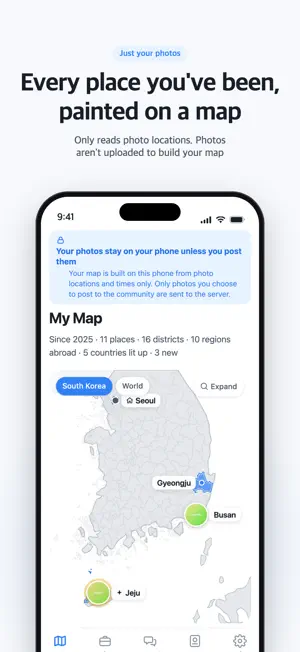


About Travel Passport: Travel Diary
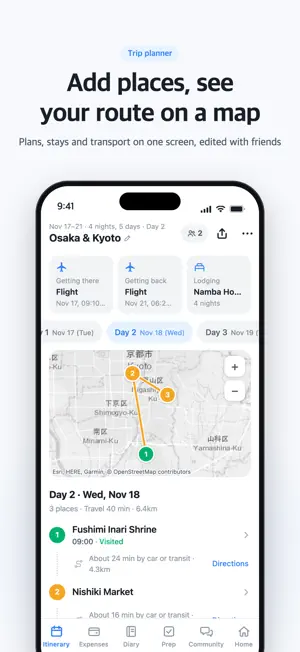
Plan before you go, log expenses and a diary on the road, and turn your photos into maps and videos when you are back — all in Travel Passport. ■ Trip planning (new) • Add the places you want to visit and see each day's route on a map, with stays, flights and transport on one screen • Upload a booking confirmation (PDF or photo) to fill in the stay name, dates and booking number, and keep the Korean, English and local-language versions separately • AI trip planner: pick a destination and dates to get a day-by-day plan with estimated costs (first use free, then one ad or a pass) • Expenses: enter amounts in local currency with automatic exchange rates, then settle up with your companions • Invite friends to view and edit the same trip, and get notified when someone adds an expense or a place • Trip reminders: getting ready, flight and stay times, each travel day and wrap-up • Plans and place photos work offline ■ Community (new) • Share travel stories and the plans you used, and find travel buddies • Get alerts for comments, replies, mentions and likes Your camera roll already knows where you've been, and when. Travel Passport reads only the location and capture time stored in your photos, works out the places you visited, and turns them into a video of your route moving across a map. ■ How it works • Your photos aren't uploaded to make the map. The map is built from location and time metadata; photos are loaded on-device only when you view them on the map. • Photos taken near each other are grouped, so the app can tell where you stayed and for how long. Places near home are left out. • Show your whole journey at once, or pick one trip for a short video. ■ Making a video • Portrait (Reels, Shorts), square, or landscape (YouTube) • 1080p, with automatic length (from relaxed to very fast) • Add a title, a tagline, and a closing line • Rendering happens in the background, and the finished video is saved straight to your photos • Save your whole journey as a single map image, too ■ My Map • When you open the app, a personal map that lights up every district and country you've visited becomes your home screen • Tap a place to see the photos you took there; places you keep returning to become your second and third hometowns ■ Premium (one-time purchase, not a subscription) • Save without ads • Dark theme, globe view, satellite and OpenStreetMap maps • Close-up and fixed cameras, 720p and 1440p, display options ■ Privacy • Shared trips, the community and the AI planner are sign-in features; only the plans and posts you enter there are sent to our server. • Photo access is used only to read location and time metadata, and to show your own photos on your own map. • Your photo library, location history and routes are never uploaded. Only photos you add to a community post are sent to our server. • With online maps on, only the tile coordinates of the visible map area are sent to the map server (Esri / OpenStreetMap). Map data: Natural Earth · Esri · © OpenStreetMap contributors / Place names: Apple Maps · GeoNames ■ Recommendations · Map Battle · Records • Recommendations: this month's festivals and events plus places you haven't visited yet, with a star to save favorites • Map Battle: send a friend a link, compare who has been to more places and check the rankings • Records: collect a passport stamp for every region you've visited and share it as an image
What’s new
Version 1.1.1 · Updated November 19, 2026
• Expenses: attach receipt photos and share them with travel companions • Shared and personal expenses are now separate — personal ones are visible only to you; budget and totals are per person • Export expenses as CSV • Pull down to refresh trips • AI help: remaining passes are shown before each use • Signing out removes that account's trips from the phone until you sign in again • Fixes and improvements
App privacy
The developer, hyeonu lee, reported these privacy practices to Apple.
Data Used to Track You
The following data may be used to track you across apps and websites owned by other companies:
- Identifiers: Device ID
- Usage Data: Product Interaction, Advertising Data
Data Linked to You
The following data, which may be collected and linked to your identity, may be used for the following purposes:
- Location: Coarse Location
- Identifiers: Device ID, User ID
- Usage Data: Advertising Data
- Purchases: Purchase History
- Contact Info: Name
- User Content: Photos or Videos, Other User Content
Used for: Third-Party Advertising, Analytics, App Functionality
Data Not Linked to You
The following data, which may be collected but is not linked to your identity, may be used for the following purposes:
- Usage Data: Product Interaction
- Diagnostics: Crash Data, Performance Data, Other Diagnostic Data
Used for: Third-Party Advertising, Analytics, App Functionality
Alternatives to Travel Passport: Travel Diary
Looking for apps like Travel Passport: Travel Diary? Here are 6 similar apps on the App Store. The highest rated is MellowSnap: Composition Camera (5.0/5), and all 6 are free to download.
-
 MellowCut - Video Editor
-
 MellowDay Daily Vlog Diary
-
 Pomu - Photo Cleanup
-
 ZALLA - Video Editor
-
 MellowSnap: Composition Camera
5.0
-
 Film Camera Filter MellowFilm
5.0
| App | Rating | Price | Last updated | Compare |
|---|---|---|---|---|
| Travel Passport: Travel Diary | – | Free | November 19, 2026 | |
| MellowCut - Video Editor | – | Free | Nov 18, 2026 | Compare |
| MellowDay Daily Vlog Diary | – | Free | Nov 8, 2026 | Compare |
| Pomu - Photo Cleanup | – | Free | Oct 4, 2026 | Compare |
| ZALLA - Video Editor | – | Free | Nov 11, 2026 | Compare |
| MellowSnap: Composition Camera | 5.0 / 5 (1) | Free | Nov 3, 2026 | Compare |
| Film Camera Filter MellowFilm | 5.0 / 5 (1) | Free | Nov 1, 2026 | Compare |