

Morse ICR Trainer
William Cody Education iPhoneiPadiPod touch
Morse ICR Trainer is a free Education app for iPhone and iPad by William Cody. Requires iOS 15.0. Updated September 24, 2026.
- Price
- Free
- on the App Store
- Size
- 20 MB
- Age 4+
- Updated
- Sep 24
- 2026 · v1.0.2
Screenshots


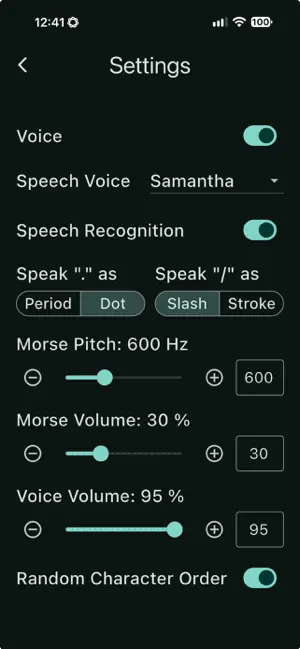
About Morse ICR Trainer
Morse ICR Trainer Morse ICR Trainer is an interactive training tool for ham radio operators who want to develop true Instant Character Recognition — the ability to copy Morse code in their head, instinctively and effortlessly, without writing anything down. And it's free! • How It Works The app plays Morse code characters one at a time. Your goal is to say each character aloud before the computer announces the answer. When you respond correctly within the recognition window, you beat the round. When time runs out, the computer's voice speaks the answer — so you always know what you heard, even when you couldn't place it. This tight feedback loop — hear it, say it, confirm it — is the fastest known path from conscious decoding to automatic, reflexive character recognition. • Training Controls * Speed (WPM) — Set character playback speed from comfortable beginner rates to contest-grade copying speeds and higher. * Recognition Time — Control how long you have to respond before the computer speaks. Shorten the window as your recognition improves. * Extra Gap — Add silence between characters to give yourself breathing room at higher speeds. * Character Set — Focus on specific letters, numbers, or punctuation marks you need to practice most. Mix and match as you choose. • Session Tracking The app captures every session's results, and with speech recognition enabled (experimental), automatically tracks which characters you recognized and which you missed. The Focus page shows your problem characters using a heat map, so you can target your practice where it matters most. Use the "Focusizer" slider to automatically select characters starting with your most challenging. Adjust it to include progressively easier ones. "Percentage correct" is automatically calculated to keep you in the learning zone. Automatically created session logs can be annotated and exported in standard CSV file format for your own records or to share progress with an Elmer. Each session is saved to a Training Log screen that automatically captures date/time, duration, focus characters, WPM, recognition time, and extra gap. A freeform notes box is available for the session. Your total training time is calculated on the Training Log page. Logs can be exported using the standard share-sheet, in CSV format for easy spreadsheet import. • Speech Recognition and Voice Morse ICR Trainer listens for your spoken responses using on-device speech recognition — no network connection required. Because the microphone stays open continuously during a session, wired or Bluetooth headphones are required when Speech Recognition is enabled for best performance. The computer voice can be switched off completely for "missing fast" training. The app automatically selects the highest-quality voice available on your device — Enhanced or Premium if you have downloaded one in iOS Settings → Accessibility → Spoken Content → Voices. Spoken announcements are pre-rendered at session start for consistent, low-latency playback throughout your training. • Countdown Timers Set a session length and train against the clock. The countdown keeps sessions focused and makes it easy to build a daily practice habit. Three programmable timers are available. • Background Audio Train with your screen off. Morse ICR Trainer continues playing in the background with lock-screen controls (play/pause), so you can practice hands-free, no matter where you are. Pop in your earbuds, launch the app, and let 'er rip! --... ...-- K3CDY
What’s new
Version 1.0.2 · Updated September 24, 2026
• Training Log now shows a per-session SR Score on iOS, calculated from Speech Recognition hits and misses, and flags sessions where Voice was off • New "Missing Fast" training technique, documented in a new Help section alongside an explanation of SR Score • Help page now has a search field that filters both the Contents list and the body sections
App privacy
The developer, William Cody, reported these privacy practices to Apple.
Data Not Collected
The developer does not collect any data from this app.
Alternatives to Morse ICR Trainer
Looking for apps like Morse ICR Trainer? Here are 6 similar apps on the App Store. The highest rated is Cadenza: Morse Code Trainer (5.0/5), and 3 of the 6 are free to download.
-
 Ham Companion Pro
-
 Morse Trainer QT
-
 MorseTest
4.0
MorseTest
4.0
-
 MTP Callsign Trainer
-
 Cadenza: Morse Code Trainer
5.0
Cadenza: Morse Code Trainer
5.0
-
 RST 599 Pro
4.0
RST 599 Pro
4.0
| App | Rating | Price | Last updated | Compare |
|---|---|---|---|---|
| Morse ICR Trainer | – | Free | September 24, 2026 | |
| Ham Companion Pro | – | 9.99 USD | Sep 24, 2026 | Compare |
| Morse Trainer QT | – | Free | Sep 16, 2026 | Compare |
| MorseTest | 4.0 / 5 (1) | 1.99 USD | Nov 29, 2023 | Compare |
| MTP Callsign Trainer | – | Free | Sep 24, 2026 | Compare |
| Cadenza: Morse Code Trainer | 5.0 / 5 (1) | Free | Oct 23, 2026 | Compare |
| RST 599 Pro | 4.0 / 5 (3) | 4.99 USD | Mar 21, 2026 | Compare |
Compare Morse ICR Trainer with the top alternatives: ratings, updates, ASO score and keyword gaps →