

Actually Do It: To-Do List
Devin Harmse Lifestyle iPhoneiPadiPod touchMac
Actually Do It: To-Do List is a free Lifestyle app for iPhone and iPad by Devin Harmse. Requires iOS 26.5. Updated November 24, 2026.
- Price
- Free
- on the App Store
- Size
- 82 MB
- Age 4+
- Updated
- Nov 24
- 2026 · v2.2.0
Screenshots
Save to Pinterest


About Actually Do It: To-Do List
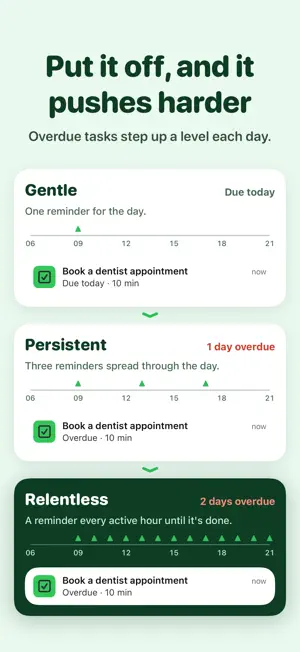
Some days the hardest part isn't doing the thing, it's deciding what to do, remembering it exists, and not drowning in everything else. Actually Do It is a to-do app for exactly those days. Instead of a bottomless list, it shows you ONE thing to do right now and can persistently remind you to get stuff done. ONE THING AT A TIME • A single "Doing now" card keeps you on one task with a big Done button and a guilt-free "Can't do this now" escape. • A "Today" view that only shows what needs doing today. No more overwhelming list of everything. • "Suggested next" shows a short, curated preview of what's coming, never the whole backlog. • A day-progress ring shows what you've already knocked out today. • Pin your goals and lists to Now, below Doing now, so what you're working towards stays in view. NUDGES THAT ACTUALLY WORK • Choose how hard each task nudges you: Gentle (one morning reminder), Persistent (a few through the day), or Relentless (every hour, 9am–9pm, until it's done). • Reminders stop the moment you finish. No nagging about things you've already handled. • A friendly morning digest tells you what's on your plate for the day. CAN'T DECIDE? LET THE APP CHOOSE • Tap "Pick for me" and Actually Do It suggests one task to start that fits in the time you have, beating the decision paralysis when everything feels equally impossible. CHORES & ROUTINES • Set recurring chores (daily, weekly, monthly, or every few days) that quietly come back when they're due. • Going away? Pause a chore so it stops nagging until you're back. ADD IT ONCE • Every task lives in one place. Lists and goals don't hold their own copies. They gather tasks you already have. • The same task can sit in a list and a goal at the same time. Tick it off anywhere and it's done everywhere. • Gather tasks into a goal with one deadline and watch its progress fill up (Plus), or share a list with your household (Plus). SHOPPING LISTS • One list for each shop. Things to buy aren't tasks, so they never crowd your day. • New items sort themselves into the right aisle. • What you buy moves to Bought, one tap from going back on the list. ORGANIZED, LIGHTLY • Tag tasks (Home, Work, Admin…) and filter down to just what matters. • Add a time estimate, so you can pick something that fits the time you actually have. • A Lock Screen Live Activity and Home Screen widget keep your current task in view. • Location based tasks for when you need a reminder at a place. • Checklists for when your tasks have tasks. • A journal with a page for each day: get things out of your head, and turn any line into a task. PRIVATE BY DESIGN • No account, no sign-up, no ads, no tracking. • Your tasks sync across your devices through your own iCloud. • Lock the app with Face ID or Touch ID, and keep your tasks out of widgets and notifications. ACTUALLY DO IT PLUS • Most of Actually Do It is free. Plus adds quick add in plain language, task suggestions, voice memos and #tag collections in your journal, goals, shared lists, Siri & Shortcuts, and app icons in every accent colour. • Subscribe monthly or yearly, both with a 1-month free trial, or pay once for lifetime access. • Subscriptions renew automatically until you cancel. Family Sharing is supported. Built for anyone whose brain gets overwhelmed easily, but genuinely useful for anyone who wants to stop managing a list and start finishing things. Download the app now, and Actually Do It. Terms of Use: https://www.apple.com/legal/internet-services/itunes/dev/stdeula/
What’s new
Version 2.2.0 · Updated November 24, 2026
Actually Do It 2.2 turns Days and the Brain dump into the Journal, lets you undo a task you swiped away, and locks the app with Face ID. NEW FOR EVERYONE • The Journal replaces Days and the Brain dump: a page for each day to get things out of your head, free for everyone. Swipe through the week at the top and tap any day, past or ahead, to write on it. Put [] in front of a line to make it a task • Choose the day your week starts on in Settings › Tasks: the Journal, the This Week widget and Upcoming follow it • Swipe a task away and it's gone at once, with Undo to bring it back • Every undo shows in the same place and stays up for 6 seconds • Undo a delete, tick, move or Done shopping in a shopping list • Type an amount and a note as you add to a shopping list: “milk 2L (semi-skimmed)” • Lock the app with Face ID, Touch ID or your passcode in Settings › Privacy, and choose whether widgets, Live Activities, notifications and Shortcuts show your tasks meanwhile • Three or more nudges at the same time now arrive as one notification, led by the most important task. You can turn this off in Settings • A task's nudges stack as one on the Lock Screen instead of piling up • The add bar closes once you've added a task. Adding several in a row? Turn on Keep open after adding in Settings › Tasks • Goals show their progress as a ring • A lighter look: lists lose their boxes, with space between sections, and the Tasks overview is grouped like Settings • A new green app icon • Leave a review from Settings • Tapping a nudge opens its task, whichever tab you were on • Fixes and polish NEW WITH ACTUALLY DO IT PLUS • Task suggestions: the Journal suggests the tasks and things to buy you write about • Voice memos: record a thought from the Journal, even right under the line you're writing, and get a transcript made on your device • Collections: tag anything in your journal with #idea or #books, then see everything with that tag in one place • Siri spots things to buy too: “buy milk and eggs” goes straight onto the right shopping list
App privacy
The developer, Devin Harmse, reported these privacy practices to Apple.
Data Not Collected
The developer does not collect any data from this app.
Alternatives to Actually Do It: To-Do List
Looking for apps like Actually Do It: To-Do List? Here are 6 similar apps on the App Store. The highest rated is Daily Planner - OneTask (5.0/5), and 5 of the 6 are free to download.
-
 MemoTempo
-
 Sequence - Timer & Routines
-
 Daily Planner - OneTask
5.0
-
 Daily Checklist & To-Do Task
-
 Garage Studio: Ringtone Maker
4.0
-
 Dulo TV tool
3.6
| App | Rating | Price | Last updated | Compare |
|---|---|---|---|---|
| Actually Do It: To-Do List | – | Free | November 24, 2026 | |
| MemoTempo | – | Free | Nov 24, 2026 | Compare |
| Sequence - Timer & Routines | – | 0.99 USD | Jan 30, 2026 | Compare |
| Daily Planner - OneTask | 5.0 / 5 (1) | Free | Oct 20, 2026 | Compare |
| Daily Checklist & To-Do Task | – | Free | Sep 20, 2026 | Compare |
| Garage Studio: Ringtone Maker | 4.0 / 5 (31) | Free | Nov 11, 2026 | Compare |
| Dulo TV tool | 3.6 / 5 (7) | Free | Sep 10, 2026 | Compare |