

Cadence - Task Planner
AAYAN MAHMOOD Productivity iPhoneiPadiPod touch
Cadence - Task Planner is a free Productivity app for iPhone and iPad by AAYAN MAHMOOD. Requires iOS 26.0. Updated November 16, 2026.
- Price
- Free
- on the App Store
- Size
- 3 MB
- Age 4+
- Updated
- Nov 16
- 2026 · v1.2.3
Screenshots



About Cadence - Task Planner
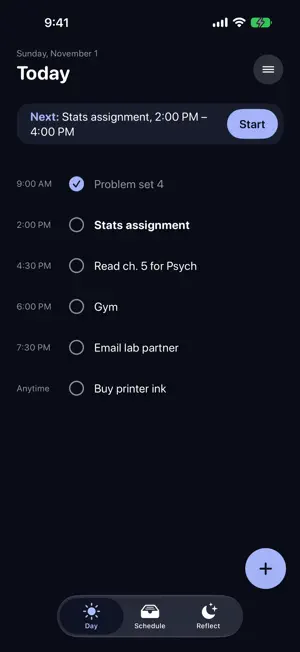
Cadence turns "stats assignment tomorrow, 2 hours" into a real plan. Type a task the way you'd say it, and Cadence finds a free slot around your calendar and working hours. You approve it before anything is added. PLAN IN ONE SENTENCE • Write tasks naturally: dates, times and durations are picked up for you • See a suggested time before anything is saved, or pick your own • Work around your calendar, or switch calendar events off entirely SEE WHAT'S NEXT • The Day screen shows your next task with a Start button and a clean list • Tap the circle to finish a task; tap anywhere else to open it • Unfinished work carries over to the next day, quietly, with no red badges PLAN YOUR WEEK • Schedule shows each day as a 24-hour dial of done, booked and free time • Swipe between weeks and tap a day to see its plan FOCUS • Break work into focus blocks and breaks, from 25/5 to one long session • The timer runs on your Lock Screen and in the Dynamic Island, with Pause and Finish right there • Time you focus is saved, so you learn how long things really take REFLECT • A short morning and evening check-in, with a daily quote • A gentle read of your day that never scolds you • History keeps your past entries and trends MAKE IT YOURS • Eight themes that color the whole app, including Black & White • Light and dark mode • Home Screen and Lock Screen widgets for your next task and today's progress PRIVATE BY DESIGN • No account, no sign-up, no ads • AI runs on your device using Apple Intelligence where available; nothing you type is sent to a server • Works fully offline; syncs between your devices through your own iCloud, which you can turn off
What’s new
Version 1.2.3 · Updated November 16, 2026
Focus Recording Turn on “Record this session” before you start a focus session, and Cadence makes a timelapse from the front camera. A 25-minute block plays back in about 25 seconds, with the time in the corner. Afterwards, watch it, save it to Photos, share it, or delete it. Stay with it While a session records, the screen dims and ignores taps, so nothing pulls you out. Hold the button for two seconds when you’re done. Want it stricter? Turn on Strict mode in Settings and any other touch ends the session. Private by design Clips are made on your device and are never uploaded. Anything you don’t save is deleted after 24 hours. Recording is always off until you turn it on for that session. Also in this update • The focus timer’s Lock Screen card now disappears as soon as a session ends • The “Mark task complete” button is readable in every theme
App privacy
The developer, AAYAN MAHMOOD, reported these privacy practices to Apple.
Data Not Collected
The developer does not collect any data from this app.
Alternatives to Cadence - Task Planner
Looking for apps like Cadence - Task Planner? Here are 6 similar apps on the App Store. The highest rated is FocusHabit Pro (5.0/5), and 4 of the 6 are free to download.
-
 DayFlow Planner
-
 FocusHabit Pro
5.0
-
 Burn List: To-Do & Reminders
-
 HabitSet: Habit Tracker
-
 Any Counter: Endless Counter
1.0
-
 Shut Up?!: Talk Balance
5.0
| App | Rating | Price | Last updated | Compare |
|---|---|---|---|---|
| Cadence - Task Planner | – | Free | November 16, 2026 | |
| DayFlow Planner | – | Free | Aug 29, 2026 | Compare |
| FocusHabit Pro | 5.0 / 5 (1) | Free | Aug 19, 2026 | Compare |
| Burn List: To-Do & Reminders | – | Free | Nov 9, 2026 | Compare |
| HabitSet: Habit Tracker | – | Free | Sep 17, 2026 | Compare |
| Any Counter: Endless Counter | 1.0 / 5 (1) | 2.99 USD | Nov 17, 2026 | Compare |
| Shut Up?!: Talk Balance | 5.0 / 5 (2) | 2.99 USD | Nov 17, 2026 | Compare |