

Color Analysis: My Colors
Tianjin Illuso Information Technology Co., Ltd. Lifestyle iPhoneiPadiPod touch
Color Analysis: My Colors is a free Lifestyle app for iPhone and iPad by Tianjin Illuso Information Technology Co., Ltd. Requires iOS 15.5.
- Price
- Free
- on the App Store
- Size
- 111 MB
- Age 4+
- Updated
- Sep 7
- 2026 · v1.0.1
Screenshots
About Color Analysis: My Colors
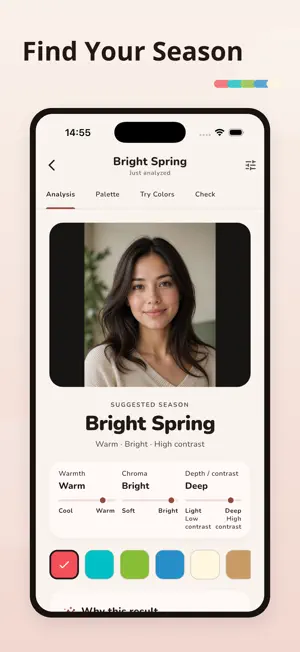
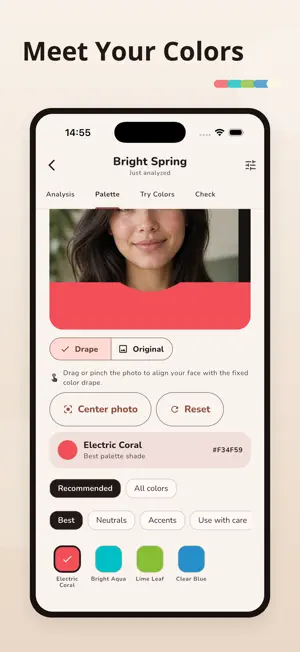
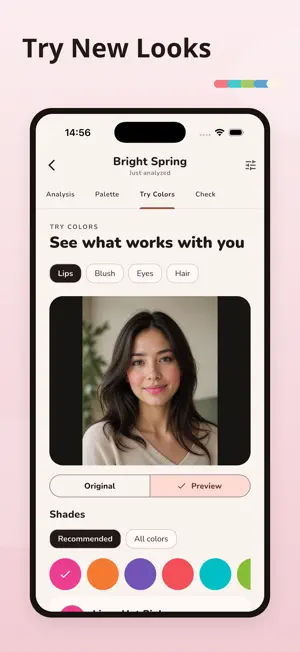
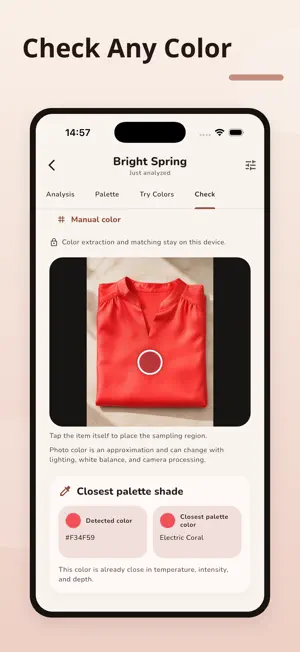
Find the colors that feel most at home on you. Color Analysis turns one clear selfie into a suggested 12-season color direction, a personal palette, and practical tools for clothing, makeup, hair, and everyday shopping. GUIDED PHOTO Take a selfie or choose a photo. Check face position, lighting, exposure, and sharpness before analysis. SUGGESTED COLOR SEASON See a suggested Spring, Summer, Autumn, or Winter subtype. Explore Warmth, Chroma, and Depth & Contrast, why the result was suggested, and the closest alternative when available. PERSONAL COLOR PALETTE Browse Best, Neutrals, Accents, and Use with Care shades. Switch between your photo and a color drape, then move or zoom the photo around your face. MAKEUP AND HAIR COLOR TRY-ON Layer shades for Lips, Blush, Eyes, and Hair. Adjust intensity, switch colors, or remove one layer without losing the others. CHECK A COLOR Take or import an item photo, tap an area to sample, or enter a Hex color. Compare it with your palette and see the closest shade plus a warmer, cooler, lighter, or deeper direction. SAVE AND REVISIT Analyses and photos are stored locally so you can reopen a result and continue exploring. FULL COLOR REPORT AND PRO Start with a free preview. Unlock one Full Color Report, or choose Color Analysis Pro for complete reports, palettes, try-on shades, color checks, history, and an ad-free experience. Full reports add color swaps, makeup guidance, hair directions, metals, gemstones, and outfit formulas. PRIVACY BY DEFAULT Seasonal analysis runs on your device. Your selfie is not uploaded to a remote analysis service. Color analysis is personal style guidance, not a medical assessment or professional consultation. Lighting, camera processing, makeup, glasses, and image quality can affect results. Retake your photo when a result feels inconsistent. Some features require an in-app purchase or subscription. Subscription availability and prices are shown in the app and may vary by country or region. Privacy Policy: https://rkvpxdr.com/privacy Terms of Use: https://www.apple.com/legal/internet-services/itunes/dev/stdeula/
What’s new
Version 1.0.1 · Updated September 7, 2026
This update makes Color Analysis more reliable: • Improved plan loading and purchasing. • Added clearer in-app feedback. • Improved performance and stability.
App privacy
The developer, Tianjin Illuso Information Technology Co., Ltd., reported these privacy practices to Apple.
Data Used to Track You
The following data may be used to track you across apps and websites owned by other companies:
- Identifiers: Device ID
Data Linked to You
The following data, which may be collected and linked to your identity, may be used for the following purposes:
- Identifiers: Device ID
Used for: Third-Party Advertising
Alternatives to Color Analysis: My Colors
Looking for apps like Color Analysis: My Colors? Here are 6 similar apps on the App Store. The highest rated is Color Analysis: Glow Up AI (5.0/5), and all 6 are free to download.
-
 Tinted: Color Analysis
-
 Bellavie: Color Analysis
-
 Undertone: Season & Palette
-
 True Palette:AI Color Analysis
-
 Color Analysis: Glow Up AI
5.0
Color Analysis: Glow Up AI
5.0
-
 SkinTone AI — Personal Color
| App | Rating | Price | Last updated | Compare |
|---|---|---|---|---|
| Color Analysis: My Colors | – | Free | September 7, 2026 | |
| Tinted: Color Analysis | – | Free | Jul 1, 2026 | Compare |
| Bellavie: Color Analysis | – | Free | Aug 26, 2026 | Compare |
| Undertone: Season & Palette | – | Free | Sep 29, 2026 | Compare |
| True Palette:AI Color Analysis | – | Free | Jul 6, 2026 | Compare |
| Color Analysis: Glow Up AI | 5.0 / 5 (1) | Free | Sep 2, 2026 | Compare |
| SkinTone AI — Personal Color | – | Free | Oct 8, 2026 | Compare |