

SCORE: Inventory & POS
Rural Technologies, Inc. Business iPhoneiPad
SCORE: Inventory & POS is a free Business app for iPhone and iPad by Rural Technologies, Inc. Rated 5.0/5 from 2 ratings. Requires iOS 16.7.
- Rating
- 5.0
- 2 ratings
- Price
- Free
- on the App Store
- Size
- 98 MB
- Age 4+
- Updated
- Oct 15
- 2026 · v1.2.0
Screenshots



About SCORE: Inventory & POS
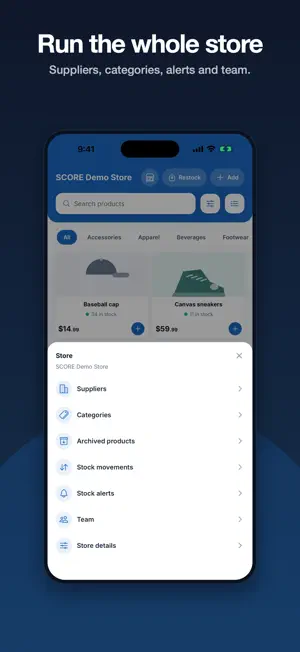
SCORE turns your phone into the counter of your shop. Check what's in stock, build a cart, take the payment, and see at a glance how the day is going. Everything your team records on the phone shows up in the SCORE web app, where the reporting and store setup live Built for small retailers, in English and Spanish. INVENTORY YOU CAN ACTUALLY READ • Search your catalog, or filter by category and availability • List or grid — whichever suits your products • Low stock and out of stock are visible at a glance, not buried in a report • Correct a count in seconds when the shelf and the system disagree • Add and edit products from the phone SELL IN A FEW TAPS • Tap a product to add it; the cart follows you across the app • Cash, card or on credit • Every sale updates stock immediately CREDIT SALES, TRACKED Selling on credit is normal in a neighborhood shop, and it usually lives in a notebook. SCORE keeps it with the sale: who owes, how much, and what's still outstanding — so you know what the day really brought in, not just what came into the drawer. THE DAY, SUMMARIZED • What you sold today, and how it was paid • Collected now versus still owed • What needs attention: what's low, what's out RESTOCKING Record goods as they arrive, keep the receiving history, and see what a supplier delivered and when. WORKS WITH YOUR TEAM Invite the people who work with you and decide what each of them can do — sell, edit inventory, see the numbers. Roles and permissions are set from the web app. WHAT YOU SHOULD KNOW • SCORE needs an account and an internet connection. Inventory, sales and permissions belong to a specific shop, so the register has to know whose stock it is changing. • This release does not accept card payments through the phone. Card sales are recorded as a payment method; the phone does not read the card. • A free plan is available. Paid plans are billed through the SCORE web app, not through the App Store. • Optional Face ID lock, so a shared phone left on the counter isn't an open till.
What’s new
Version 1.2.0 · Updated October 15, 2026
Tap to Pay on iPhone This version adds Tap to Pay on iPhone.Payments are processed by Stripe (Stripe Terminal SDK), into each store's own Stripe account. How to see it 1. Sign in with the demo account below. Its store is on the Pro plan, is in the United States and has its Stripe account connected — the three conditions for Tap to Pay to appear. 2. Settings → Card payments → "Set up Tap to Pay". The Tap to Pay on iPhone Terms and Conditions appear for the account owner; after accepting, Apple's own merchant education (ProximityReaderDiscovery) is shown, followed by a "Try it out" screen. The education can be reopened any time from Settings → Card payments → "How Tap to Pay works". 3. Add an item, open checkout and choose "Tap to Pay on iPhone" to see the tap screen. A real contactless card is charged for real; a declined or cancelled tap records no sale, and a receipt can be emailed either way. Location is requested only when setting up Tap to Pay, because the payment network requires it to authorize a card payment. Also in this version • Weighed items now show exactly the price that is charged. • Ecuador: stores can set their prices to include IVA, and electronic invoices go straight to the customer's email. • Bug fixes and performance improvements.
App privacy
The developer, Rural Technologies, Inc., reported these privacy practices to Apple.
Data Linked to You
The following data, which may be collected and linked to your identity, may be used for the following purposes:
- Purchases: Purchase History
- Contact Info: Email Address, Name, Phone Number
- User Content: Other User Content
- Identifiers: User ID
- Other Data: Other Data Types
Used for: App Functionality
Alternatives to SCORE: Inventory & POS
Looking for apps like SCORE: Inventory & POS? Here are 6 similar apps on the App Store. The highest rated is Solair AI (4.4/5), and all 6 are free to download.
-
 Kalla: Billing & Khata POS
-
 SellDroid
-
 Stockery: Inventory & Billing
-
 MiStock: Complete POS
-
 F&C Bank
3.6
F&C Bank
3.6
-
 Solair AI
4.4
Solair AI
4.4
| App | Rating | Price | Last updated | Compare |
|---|---|---|---|---|
| SCORE: Inventory & POS | 5.0 / 5 (2 ratings) | Free | October 15, 2026 | |
| Kalla: Billing & Khata POS | – | Free | Oct 3, 2026 | Compare |
| SellDroid | – | Free | Aug 28, 2026 | Compare |
| Stockery: Inventory & Billing | – | Free | Sep 30, 2026 | Compare |
| MiStock: Complete POS | – | Free | Oct 2, 2026 | Compare |
| F&C Bank | 3.6 / 5 (16) | Free | Oct 1, 2025 | Compare |
| Solair AI | 4.4 / 5 (38) | Free | Sep 28, 2026 | Compare |