

Hangboard Buzzer
jnaO AB Health & Fitness iPhoneiPadiPod touch
Hangboard Buzzer is a free Health & Fitness app for iPhone and iPad by jnaO AB. Requires iOS 26.0. Updated October 17, 2026.
- Price
- Free
- on the App Store
- Size
- 28 MB
- Age 4+
- Updated
- Oct 17
- 2026 · v1.4
Screenshots


About Hangboard Buzzer
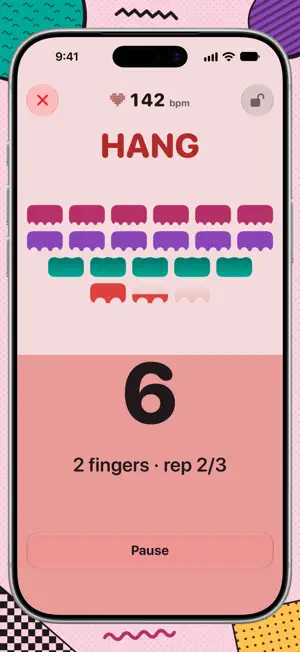
Hangboard Buzzer is the interval timer that lets you stop staring at your phone and start hanging. Set up in seconds. Pick a proven protocol, or build your own from scratch: choose the grip, how many fingers and how many reps. That's the whole setup. Press Start, put the phone down and your headphones on, and Buzzer counts you through the workout. If yo udon't want to look at the app you don't have to. Sound cues match every buzz, Each moment has its own buzz: two sharp taps to go, a long soft rumble to let go, and heavy thuds that tell you how many fingers the next set uses. But if you are visually inclined, it is clearly observable from afar. So when you do look, the time left is big and clear, and the whole screen will help you hold on just a little bit longer. Buzzer also works with VoiceOver and VoiceControl. And when you think you're done, you're not. After every workout an arcade game starts: invaders march down and you defend the board. Get shot and you take a penalty hang, right there and then. Three strikes and you're still in it; a fourth ends the game. It's the extra set you didn't plan on, and somehow you'll want to do it. Compare scores with friends on a Game Center leaderboard (optional). • Research-backed protocols: add Abrahangs, Repeaters, Max hangs and more in one tap, with instructions and links to the sources • Custom programs: save as many as you like, each with its own hang and rest times • Haptic and audio cues: you never have to check the screen mid-hang • Large, clear visuals and VoiceOver support • Share programs: send one as a link, and a friend can preview and save it without installing the app first • Live heart rate (optional): see your bpm during the workout with AirPods Pro 3 • Effort rating: rate each session afterwards, with a suggestion based on your heart rate • Apple Health (optional): save sessions as Climbing workouts with heart rate and effort. Your weight is read from Health to estimate the energy each session burns. • Six colour themes and alternate app icons • No account, no ads, no tracking Hangboard Buzzer is free. If it earns a spot in your training, an optional tip in Settings helps keep it on the App Store. Tips unlock nothing, but they do make the developer very happy.
What’s new
Version 1.4 · Updated October 17, 2026
What's new in this build Workout instructions & new programs • New Instructions page in Settings, also shown once during onboarding (and once for existing users). It explains the hangboard protocols behind the programs, with links to the sources. • Add any of the protocols as a program with one tap. They become normal programs you can edit or delete. Updated start screen • "Buzzer" title with the theme logo at the top, settings gear moved to the top right. • Clearer selected program: an accent bar on the selected row, other rows slightly dimmed. • A labelled Start Workout button showing the total workout time. • Share app now sends a proper preview card with the app icon. Heart rate (AirPods Pro 3, Apple Health on) • Live heart rate on the workout screen. While the AirPods connect, a small heartbeat trace shows where the number will appear. • All Health permissions are asked for in one sheet, and heart rate is on by default when Health saving is on. • After a workout you can rate your effort, with a suggestion based on your heart rate. If you end a workout early (before 85% of the hangs), you won't be asked to rate it, but it's still saved to Health. Please try • A full workout with AirPods in: how long until your heart rate shows, and does the trace feel right? • Ending a workout early versus finishing it: the effort card should only appear when you've done most of it. • Adding a program from the Instructions page, then editing or deleting it. Improved accessibility • VoiceOver: Buzzer now works well with VoiceOver. Programs, levels, leaderboard rows and tips read as single, clear items; the workout countdown and rep count are read out as they change; and the game can be played with direct touch. • Haptics switch: turn vibrations off in Settings › Sound & haptics, which now also explains what each setting does. • Apple Health, simpler: we only ask for your weight and resting heart rate when you set up Apple Health, never after a workout. Both are optional and can be edited directly in Settings › Apple Health. • Clear connection status: the Apple Health and leaderboard switches show when they're connecting, and a warning when access is blocked, with steps to fix it. • Programs: swipe right on a program to edit it, and you can now delete all your programs.
App privacy
The developer, jnaO AB, reported these privacy practices to Apple.
Data Not Collected
The developer does not collect any data from this app.
Alternatives to Hangboard Buzzer
Looking for apps like Hangboard Buzzer? Here are 5 similar apps on the App Store. The highest rated is Fantasy Hike (4.8/5), and all 5 are free to download.
-
 Sprint Intervals
-
 Interval Timer - Bit Timer
4.7
Interval Timer - Bit Timer
4.7
-
 Tonome: Blood Pressure Monitor
4.3
Tonome: Blood Pressure Monitor
4.3
-
 Seconds Interval Timer
4.7
Seconds Interval Timer
4.7
-
 Fantasy Hike
4.8
Fantasy Hike
4.8
| App | Rating | Price | Last updated | Compare |
|---|---|---|---|---|
| Hangboard Buzzer | – | Free | October 17, 2026 | |
| Sprint Intervals | – | Free | Jul 12, 2026 | Compare |
| Interval Timer - Bit Timer | 4.7 / 5 (560) | Free | Apr 15, 2026 | Compare |
| Tonome: Blood Pressure Monitor | 4.3 / 5 (174) | Free | Jan 29, 2026 | Compare |
| Seconds Interval Timer | 4.7 / 5 (23,766) | Free | Oct 22, 2026 | Compare |
| Fantasy Hike | 4.8 / 5 (15,026) | Free | Sep 30, 2026 | Compare |
Compare Hangboard Buzzer with the top alternatives: ratings, updates, ASO score and keyword gaps →