

WiFi Calling - No Internet
Susan Chikanbanjar Utilities iPhoneiPadiPod touch
WiFi Calling - No Internet is a free Utilities app for iPhone and iPad by Susan Chikanbanjar. Rated 1.0/5 from 1 ratings. Requires iOS 15.0.
- Rating
- 1.0
- 1 ratings
- Price
- Free
- on the App Store
- Size
- 70 MB
- Age 4+
- Updated
- Oct 18
- 2026 · v1.1.16
Screenshots


About WiFi Calling - No Internet
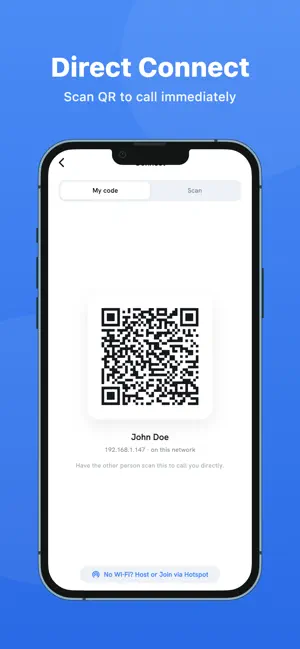
Turn any Wi-Fi network into your own private phone line. WiFi Calling - No Internet lets two phones on the same Wi-Fi talk directly to each other. No SIM card. No mobile signal. No data plan. No internet connection. Your voice never leaves the local network. HOW IT WORKS 1. Install the app on both phones. 2. Connect both to the same Wi-Fi network or hotspot. 3. Open the app. Each phone appears on the other's radar. Tap a name and call. No account. No phone number. No sign-up. Nothing to configure. WHAT YOU CAN DO - Clear voice calls over your local network - Video calls when you want to be seen - Send text messages during a call, or on their own - See everyone nearby on a live radar screen - Connect instantly by scanning a QR code - Set a display name and photo that others see - Review your call history and past conversations - Light and dark themes NO ROUTER? NO PROBLEM Turn on Personal Hotspot on one phone and let the other join it. You get the same direct calling with no router, no broadband, and no SIM in either phone. PERFECT FOR - Buildings with no mobile signal: basements, warehouses, hospitals, workshops - Farms, building sites and large properties that need a simple intercom - Homes where children or older relatives have a phone but no plan - Hotels and hostels abroad, instead of paying roaming charges - Camping and remote trips, using one phone as the hotspot - Spare phones and tablets with no SIM, turned into handsets BUILT FOR PRIVACY Calls, video and messages travel straight between the two devices across your own network. Nothing is routed through our servers, because there are no servers. Your contacts never leave your phone. There is no account to create and nothing to leak. WHAT YOU NEED - Both people need the app installed - Both devices must be on the same Wi-Fi network or hotspot - Some public and workplace networks block device-to-device traffic. If yours does, open Connect and pair the two phones by QR code instead This app connects devices to each other over Wi-Fi. It does not dial ordinary phone numbers and is not a replacement for your mobile carrier. From SCB Tech Solution.
What’s new
Version 1.1.16 · Updated October 18, 2026
Send files over Wi-Fi Share photos, videos and documents with people nearby, on the same Wi-Fi or hotspot. No internet needed, and your files never pass through a server. Every transfer is encrypted, and you always choose whether to accept it. Received files appear in the Files app under On My iPhone. A colour for each mode Local and Global now each have their own colour, so you always know which one you are in. Pick your own colours in Settings, under Appearance. Support that keeps you posted Chat with Support now shows when we have read your message. Plus fixes and improvements.
App privacy
The developer, Susan Chikanbanjar, reported these privacy practices to Apple.
Data Used to Track You
The following data may be used to track you across apps and websites owned by other companies:
- Location: Coarse Location
- Identifiers: Device ID
- Usage Data: Advertising Data
Data Linked to You
The following data, which may be collected and linked to your identity, may be used for the following purposes:
- Location: Coarse Location
- Identifiers: Device ID, User ID
- Usage Data: Advertising Data
- Contact Info: Email Address, Name
Used for: Third-Party Advertising, Analytics, App Functionality
Data Not Linked to You
The following data, which may be collected but is not linked to your identity, may be used for the following purposes:
- Usage Data: Product Interaction
- User Content: Customer Support
- Diagnostics: Crash Data, Performance Data
Used for: Analytics, App Functionality
Alternatives to WiFi Calling - No Internet
Looking for apps like WiFi Calling - No Internet? Here are 6 similar apps on the App Store. The highest rated is NetRadar: Who's On My WiFi (5.0/5), and all 6 are free to download.
-
 ReelPort: Video Player
-
 ScanPro+ QR & Barcode Scanner
-
 NetRadar: Who's On My WiFi
5.0
NetRadar: Who's On My WiFi
5.0
-
 Photo Compressor - Shrink Size
-
 Secret Codes: IMEI & Carrier
-
 WiFi Device Finder
| App | Rating | Price | Last updated | Compare |
|---|---|---|---|---|
| WiFi Calling - No Internet | 1.0 / 5 (1 rating) | Free | October 18, 2026 | |
| ReelPort: Video Player | – | Free | Aug 31, 2026 | Compare |
| ScanPro+ QR & Barcode Scanner | – | Free | Jun 24, 2026 | Compare |
| NetRadar: Who's On My WiFi | 5.0 / 5 (5) | Free | Oct 21, 2026 | Compare |
| Photo Compressor - Shrink Size | – | Free | Oct 18, 2026 | Compare |
| Secret Codes: IMEI & Carrier | – | Free | Oct 4, 2026 | Compare |
| WiFi Device Finder | – | Free | Sep 11, 2026 | Compare |