

Photo Wallpaper: Collage Maker
Elmahdi Soukafi Photo & Video iPhoneiPadiPod touch
Photo Wallpaper: Collage Maker is a free Photo & Video app for iPhone and iPad by Elmahdi Soukafi. Rated 4.0/5 from 1 ratings. Requires iOS 15.0.
- Rating
- 4.0
- 1 ratings
- Price
- Free
- on the App Store
- Size
- 60 MB
- Age 4+
- Updated
- Oct 25
- 2026 · vphoto wallpaper Collage Maker V1.2
Screenshots


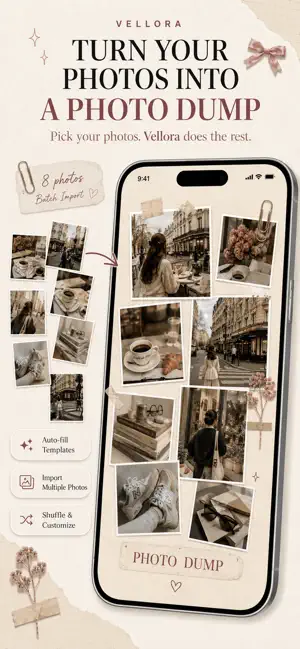
About Photo Wallpaper: Collage Maker
Create wallpapers from the photos and memories you love. Vellora is a photo wallpaper and collage maker designed for creating aesthetic lock screens, photo grids, Polaroid layouts, scrapbook collages and personalized wallpapers directly on your iPhone. Start with a professionally designed template or create your own layout from scratch. Add your photos, customize every layer and preview your finished design before saving it to your photo library. CREATE YOUR OWN PHOTO WALLPAPER Turn your favorite pictures into a wallpaper made for you. Create designs for: • Couple memories • Best friends • Family photos • Pets • Travel memories • Photo dumps • Polaroid collages • Vintage layouts • Minimal aesthetics • Scrapbook wallpapers Add multiple photos at once and arrange them freely on your canvas. AESTHETIC COLLAGE TEMPLATES Get started quickly with curated wallpaper templates including: • Pink Memories • Our Story • Photo Dump • Soft Pink • Summer Trip • Coffee Days • Clean Girl • Dark Academia • Family Moments • Pet Memories Choose a template, select your photos and let Vellora populate the layout while preserving the original design. PHOTO COLLAGE & GRID MAKER Build custom layouts using flexible photo slots and frames. Choose from: • Polaroid frames • Rounded photo cards • Circles • Hearts • Clean rectangles • Borders • Shadows Move, resize, rotate, crop and zoom photos directly on the canvas. Use Photo Shuffle to quickly rotate images through your layout while keeping the design intact. SCRAPBOOK STICKERS Decorate your wallpaper with a curated aesthetic sticker library. Discover: • Satin bows and ribbons • Pressed flowers • Washi tape • Paper clips • Vintage tickets • Wax seals • Film strips • Hearts and kisses • Sparkles • Celestial details • Scrapbook paper elements Resize, rotate and position every sticker exactly where you want it. PREMIUM BACKGROUNDS & PAPER TEXTURES Create different moods with aesthetic backgrounds including: • Blush paper • Warm linen • Kraft paper • Marble textures • Floral patterns • Vintage paper • Dark academia textures • Soft neutral backgrounds Use Style Remix to quickly change the visual mood of a wallpaper while keeping your photos and composition. ADD TEXT & TYPOGRAPHY Tell the story behind your photos. Add: • Titles • Captions • Dates • Quotes • Personal messages Choose from carefully selected serif, handwritten and modern fonts. Customize font size, color, alignment, letter spacing, line height, shadows, outlines and highlight backgrounds. VINTAGE PHOTO EFFECTS Give your collage an analog-camera feel. Use: • Film grain • Soft vignette • Vintage styling • 90s-style date stamp Perfect for photo dumps, Polaroid layouts and nostalgic scrapbook designs. DESIGNED FOR YOUR LOCK SCREEN Vellora helps you design around the iPhone Lock Screen. Use the live clock guide to see where the clock will appear while editing and keep important photos away from covered areas. Preview your composition before exporting so your wallpaper looks right when you use it. SMART ALIGNMENT Magnetic snapping helps you align elements to: • Canvas center • Key positions • Common rotation angles Subtle haptic feedback makes arranging photos, stickers and text feel precise and responsive. SAVE YOUR PROJECTS Come back to your designs anytime. Vellora includes: • Automatic project saving • Undo and Redo • Project thumbnails • Editable saved projects Experiment freely without losing your work. HIGH-RESOLUTION EXPORT When your wallpaper is finished, export it in high resolution and save it directly to your photo library. What you create in the editor is designed to match the final exported wallpaper. Make your lock screen personal with Vellora. Your photos. Your memories. Your style. Questions? Contact us: [email protected] Terms of Use (EULA): https://www.apple.com/legal/internet-services/itunes/dev/stdeula/
What’s new
Version photo wallpaper Collage Maker V1.2 · Updated October 25, 2026
• New aesthetic wallpaper templates • Improved collage editor for smoother photo placement • More scrapbook stickers, Polaroid styles and fonts • Enhanced lock screen preview • Better high-resolution exports • Performance improvements and bug fixes
App privacy
The developer, Elmahdi Soukafi, reported these privacy practices to Apple.
Data Used to Track You
The following data may be used to track you across apps and websites owned by other companies:
- Location: Coarse Location
- Identifiers: Device ID
- Usage Data: Product Interaction, Advertising Data
Data Not Linked to You
The following data, which may be collected but is not linked to your identity, may be used for the following purposes:
- Location: Coarse Location
- Identifiers: Device ID
- Usage Data: Product Interaction, Advertising Data
- Purchases: Purchase History
- Diagnostics: Crash Data, Performance Data
Used for: Third-Party Advertising, Analytics, App Functionality
Alternatives to Photo Wallpaper: Collage Maker
Looking for apps like Photo Wallpaper: Collage Maker? Here are 6 similar apps on the App Store. The highest rated is CollageVibe Easy Photo Collage (5.0/5), and all 6 are free to download.
-
 PicStudio: Collage Editor
1.0
-
 Wallpaper Collage Maker
4.6
-
 CollageThing: Collage Maker
-
 CollageVibe Easy Photo Collage
5.0
-
 Photo Layout - DIY Wallpaper
5.0
-
 Cute Wallpapers App
| App | Rating | Price | Last updated | Compare |
|---|---|---|---|---|
| Photo Wallpaper: Collage Maker | 4.0 / 5 (1 rating) | Free | October 25, 2026 | |
| PicStudio: Collage Editor | 1.0 / 5 (1) | Free | Nov 11, 2026 | Compare |
| Wallpaper Collage Maker | 4.6 / 5 (656) | Free | May 19, 2026 | Compare |
| CollageThing: Collage Maker | – | Free | Nov 10, 2026 | Compare |
| CollageVibe Easy Photo Collage | 5.0 / 5 (3) | Free | Nov 6, 2026 | Compare |
| Photo Layout - DIY Wallpaper | 5.0 / 5 (1) | Free | Apr 2, 2026 | Compare |
| Cute Wallpapers App | – | Free | Mar 5, 2026 | Compare |