

Idea Rewind: Notes & Recall
逸飞 闫 Productivity iPhoneiPadiPod touch
Idea Rewind: Notes & Recall is a free Productivity app for iPhone and iPad by 逸飞 闫. Requires iOS 16.4. Updated November 22, 2026.
- Price
- Free
- on the App Store
- Size
- 101 MB
- Age 4+
- Updated
- Nov 22
- 2026 · v0.2.2
Screenshots
Save to Pinterest
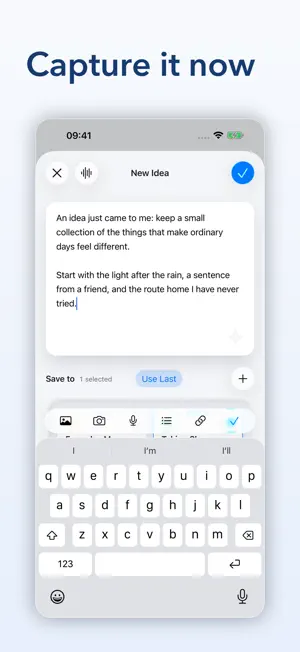


About Idea Rewind: Notes & Recall
Idea Rewind is a private place to capture and revisit your ideas. CAPTURE WHAT COMES TO MIND Write a few words, add photos or videos, record audio, or attach a file. Use voice input to write directly into your idea, then keep editing. Enjoy native iOS text controls and inline media playback. GIVE IDEAS A HOME Organize ideas in cabinets with a name, color and icon. Search, bookmark or archive them whenever you like. RETURN TO YOUR THOUGHTS Review past ideas one card at a time. Swipe to move on, bookmark or archive. Your progress is saved. Add a personal motto to your home screen. TURN IDEAS INTO KEEPSAKES Export as a letter, receipt, computer screen, newspaper or archive card. Adjust colors, layout and texture independently, and save your favorite settings. Long notes flow across pages with images in their original positions. Save all pages as images or export a PDF. Notes with audio or video can also become videos with their original sound, in Letter or Computer styles. Exports are created on your device. YOUR CONTENT STAYS YOURS Unlimited local capture, search, bookmarks, archiving, basic review, four custom cabinets, quick capture widgets, backup, restore and export are free. No Idea Rewind account or phone number is required. OPTIONAL PRO Pro adds unlimited custom cabinets, a custom review scope, optional private iCloud sync on iOS, and the recall Home Screen widget. Monthly, yearly and lifetime plans include the same Pro features. Local prices are shown before purchase. Monthly and yearly subscriptions renew automatically until cancelled. Manage or cancel renewal in your Apple account settings. Lifetime is a one-time purchase and does not automatically cancel an existing subscription. Restore purchases using the same Apple purchase account. If Pro expires, existing content remains available to view, edit and export. Uploads pause while pending changes are kept; previously synced content can still download. iCloud requires an iCloud account and explicit opt-in. Terms of Use: https://www.apple.com/legal/internet-services/itunes/dev/stdeula/
What’s new
Version 0.2.2 · Updated November 22, 2026
Rediscover the ideas that stayed with you. Tap the star in a note to see its resonance history, sort your ideas by resonance or shuffle them, and explore two new smart cabinets. Play recordings and videos directly on review cards. Playback stops when you move on. Pro members can start a review of an entire cabinet from its clock button. We also improved loading for large libraries and opening a new idea from the home-screen widget.
App privacy
The developer, 逸飞 闫, reported these privacy practices to Apple.
Data Linked to You
The following data, which may be collected and linked to your identity, may be used for the following purposes:
- Contact Info: Email Address, Other User Contact Info
- User Content: Photos or Videos, Customer Support
- Identifiers: Device ID
- Diagnostics: Other Diagnostic Data
Used for: App Functionality
Alternatives to Idea Rewind: Notes & Recall
Looking for apps like Idea Rewind: Notes & Recall? Here are 6 similar apps on the App Store. The highest rated is WHENDIL: When Did I Last (5.0/5), and 5 of the 6 are free to download.
-
 WHENDIL: When Did I Last
5.0
-
 日记簿-备忘记录笔记、日记便签和清单待办
-
 ArkNote: ADHD-Friendly Notes
5.0
-
 Sticky Notea
1.0
-
 InspirationDraft
5.0
-
 CardFlow Minimal Writing
3.0
| App | Rating | Price | Last updated | Compare |
|---|---|---|---|---|
| Idea Rewind: Notes & Recall | – | Free | November 22, 2026 | |
| WHENDIL: When Did I Last | 5.0 / 5 (1) | Free | Nov 15, 2026 | Compare |
| 日记簿-备忘记录笔记、日记便签和清单待办 | – | Free | Jul 22, 2024 | Compare |
| ArkNote: ADHD-Friendly Notes | 5.0 / 5 (3) | Free | Oct 28, 2026 | Compare |
| Sticky Notea | 1.0 / 5 (1) | Free | Nov 20, 2026 | Compare |
| InspirationDraft | 5.0 / 5 (3) | 9.99 USD | Nov 10, 2026 | Compare |
| CardFlow Minimal Writing | 3.0 / 5 (2) | Free | Aug 30, 2026 | Compare |