

Scano — Fit Any File Size
Qyron Logics Productivity iPhoneiPadiPod touch
Scano — Fit Any File Size is a free Productivity app for iPhone and iPad by Qyron Logics. Requires iOS 16.4. Updated September 8, 2026.
- Price
- Free
- on the App Store
- Size
- 60 MB
- Age 4+
- Updated
- Sep 8
- 2026 · v1.1.0
Screenshots
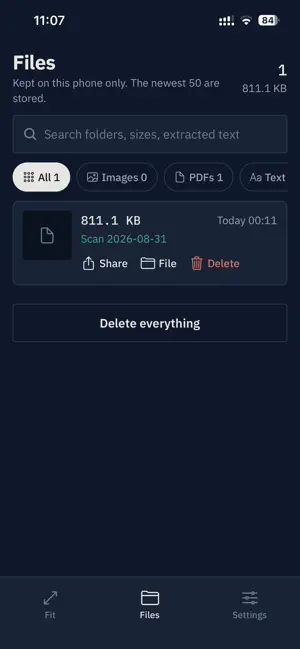

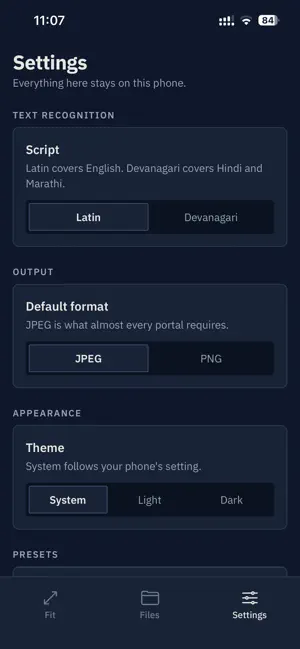

About Scano — Fit Any File Size
Scano fits your documents to the exact size an online form demands — and does it entirely on your phone. Every application portal asks for something different. A photo between 20 and 50 KB. A signature under 20 KB. A PDF below 100 KB. Get it wrong and the upload is rejected, usually minutes before the deadline. Most compressors only shrink files. Scano handles the case they all miss: when your file is too SMALL. If a portal needs at least 20 KB and your image is 12 KB, Scano enlarges it properly instead of leaving you stuck with a rejected upload. EXACT SIZES, NOT APPROXIMATE ONES • Set a minimum and a maximum in KB, and Scano lands inside that window • Ready-made sizes for SSC, IBPS, UPSC, NTA, RRB, JKSSB and JKPSC • Or type the numbers straight from your own notification • Exact dimensions in pixels or centimetres at any DPI • Images are cropped to fill, never stretched or letterboxed WHOLE DOCUMENTS, NOT ONE PAGE • Photograph every page of a form, then put them in order • Rotate, crop, flip or delete any single page • Clean every page in one pass — a scanned black-and-white look, grey, or a brightness lift that keeps colour for ID cards and seals • Combine the lot into one PDF • Join existing PDFs end to end, keeping their text selectable READ A NOTICE WITHOUT RETYPING IT • Pull the text out of any photo or PDF • Dates, phone numbers, email addresses and links are picked out for you • English and Hindi KEEP AN APPLICATION TOGETHER • File your photo, signature and thumb impression into one folder • Search everything you have saved by folder, size or the text inside it • Re-share any file later without redoing the work CLEAN UP A SIGNATURE • Force the paper white and darken the ink • Crop to the signature itself • A slider for when the automatic setting guesses wrong EVERYTHING STAYS ON YOUR PHONE Scano has no account and no server. Every scan, resize and text extraction runs on your device, and nothing you process is uploaded anywhere. It works in flight mode. There is nothing to sign in to and nothing to sign up for. Scano asks for no permission it does not need. There is no storage permission, because it only ever touches the exact file you choose. A NOTE ON REQUIREMENTS Exam requirements change between notification cycles. Scano's presets are a starting point, not a promise — always check the official notification for the current specification before you upload. Free, with ads. Designed and developed by Farhan Farooq Raina.
App privacy
The developer, Qyron Logics, reported these privacy practices to Apple.
Data Not Linked to You
The following data, which may be collected but is not linked to your identity, may be used for the following purposes:
- Identifiers: Device ID
Used for: Third-Party Advertising, Analytics
Alternatives to Scano — Fit Any File Size
Looking for apps like Scano — Fit Any File Size? Here are 6 similar apps on the App Store. The highest rated is Easy Creative Rangoli Designs (5.0/5), and all 6 are free to download.
-
 Easy Creative Rangoli Designs
5.0
Easy Creative Rangoli Designs
5.0
-
 COLOP e-mark go
1.0
COLOP e-mark go
1.0
-
 JK Samadhan
-
 Klubraum: Club & Team
3.8
Klubraum: Club & Team
3.8
-
 Darker - Dark Mode for Safari
4.2
Darker - Dark Mode for Safari
4.2
-
 PDFMaker: JPG to PDF converter
4.8
PDFMaker: JPG to PDF converter
4.8
| App | Rating | Price | Last updated | Compare |
|---|---|---|---|---|
| Scano — Fit Any File Size | – | Free | September 8, 2026 | |
| Easy Creative Rangoli Designs | 5.0 / 5 (2) | Free | Nov 11, 2023 | Compare |
| COLOP e-mark go | 1.0 / 5 (1) | Free | Sep 22, 2025 | Compare |
| JK Samadhan | – | Free | Aug 31, 2026 | Compare |
| Klubraum: Club & Team | 3.8 / 5 (5) | Free | Sep 8, 2026 | Compare |
| Darker - Dark Mode for Safari | 4.2 / 5 (1,287) | Free | Jun 2, 2026 | Compare |
| PDFMaker: JPG to PDF converter | 4.8 / 5 (1,394) | Free | Sep 28, 2026 | Compare |