

Libratory
Petar Sabev Book iPhoneiPadiPod touch
Libratory is a free Book app for iPhone and iPad by Petar Sabev. Requires iOS 15.6. Updated October 11, 2026.
- Price
- Free
- on the App Store
- Size
- 9 MB
- Age 4+
- Updated
- Oct 11
- 2026 · v1.5
Screenshots


About Libratory
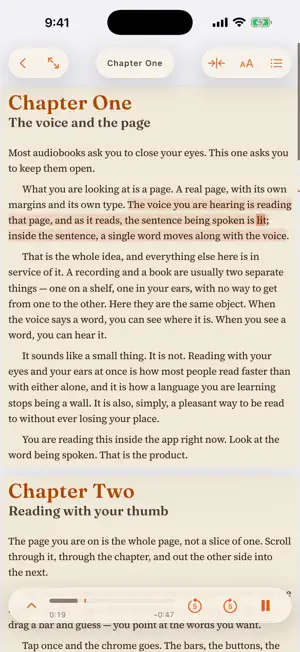
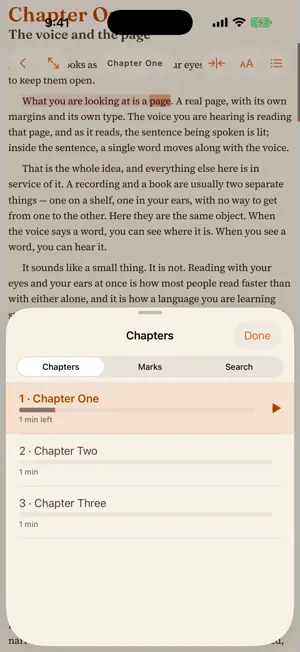
Libratory plays an audiobook over the real pages of the book, lighting up the sentence and the word being spoken as it reads. Double-tap a sentence to hear it again. Books are made on your Mac with the free Libratory desktop tool, which pairs a book with its narration and saves both as one synced EPUB. Send that file to your iPhone or iPad with AirDrop or the Files app, tap + on the shelf, and press play. Nothing is streamed, no account is needed, and everything works offline. The app comes with a short three-chapter guide already on the shelf. It is itself a synced book, so reading it is the fastest way to see what the app does. READ AND LISTEN • The voice plays over the printed page, with the sentence and the word highlighted as they are spoken • Double-tap a sentence to hear it from there • Three views of a synced book: Page shows the whole sheet with its pictures and tables, Column crops to the printed words, Text reflows the words at a size you choose • Playback continues with the screen locked, with the chapter, cover and controls on the lock screen • Change the speed and the highlight keeps up READ IN TWO LANGUAGES • A book exported with a translation opens with the original and the translation together, each with its own voice • Tap a word to hear the book from there, or to see what it means in the other language • Sentence pairs reads each sentence and then its translation; each language keeps its own speed, plays each sentence up to five times, and can pause to let you say it back • The original can stay on its printed page beside the translation JUST READ, OR JUST LISTEN • Open an EPUB ebook you already own and read it in Text view • Open an M4B audiobook, pick a chapter, and listen with the screen off PICK UP WHERE YOU LEFT OFF • The app remembers your place in every book and shows which parts you have heard • Hold a word to save it, put it in a group, and add a note; find it again in Marks • Search the book and your saved words, then jump back to read or listen KEEP YOUR LIBRARY IN ORDER • Folders and tags for your books, and a search across the whole library • Each book says which chapters light up word by word and which sentence by sentence SHELVES • Pair your phone with the desktop app by scanning the code on its Phone page, and every book it has made is a tap away over your own Wi‑Fi or Tailscale • A public shelf of free, narrated classics is built in, with a two-language Frankenstein among them • Each book says what it offers — read + listen, two languages, words or sentences lit — with its voice, length and a description PRIVATE BY DESIGN • No account, no sign-in, no tracking. The app talks only to the shelves you add and the public shelf, to list and download books; what you read stays on your device. Works on iPhone and iPad with iOS 15.6 or later. On iOS 15 and 16, a simpler reader includes Pages and Text, playback, highlighting, chapters, saved progress, and two-language books in two panes. Bookmarks, search, folders and tags require iOS 17 or later. Synced books are made with the Libratory desktop app for Mac, free at libratory.dev. Plain EPUB ebooks and M4B audiobooks open as they are.
What’s new
Version 1.5 · Updated October 11, 2026
Shelves: the books your desktop app has made, and a public shelf of free ones. • Shelves, in your library. Scan the code on the Libratory desktop app's Phone page and every book it has made is a tap away, over your own Wi‑Fi or Tailscale. Each book shows what it offers — read + listen, two languages, words or sentences lit, voice, length and a description — and lands in your library like an import. • A public shelf of free, narrated classics is built in, with a two-language Frankenstein among them. Nothing to set up. • In a two-language book, tap a word's tip while paused to hear just that word. • Speaking practice and making books on the phone are on the way. Both can be asked for from the app.
App privacy
The developer, Petar Sabev, reported these privacy practices to Apple.
Data Not Collected
The developer does not collect any data from this app.
Alternatives to Libratory
Looking for apps like Libratory? Here are 6 similar apps on the App Store. The highest rated is Compendium Audiobooks (5.0/5), and all 6 are free to download.
-
 L&N Reader
-
 Compendium Audiobooks
5.0
-
 Readers Port
-
 Folio: Audiobooks & Novels
-
 Moonread: TXT Reader
5.0
-
 Audiobookify
5.0
| App | Rating | Price | Last updated | Compare |
|---|---|---|---|---|
| Libratory | – | Free | October 11, 2026 | |
| L&N Reader | – | Free | Oct 24, 2026 | Compare |
| Compendium Audiobooks | 5.0 / 5 (6) | Free | Oct 27, 2026 | Compare |
| Readers Port | – | Free | Oct 20, 2026 | Compare |
| Folio: Audiobooks & Novels | – | Free | Oct 23, 2026 | Compare |
| Moonread: TXT Reader | 5.0 / 5 (1) | Free | Oct 30, 2026 | Compare |
| Audiobookify | 5.0 / 5 (4) | Free | Oct 11, 2026 | Compare |
Compare Libratory with the top alternatives: ratings, updates, ASO score and keyword gaps →